Deathskip
- By
Shows on your world map where to die to respawn at each graveyard in WoW Forever, made more accurate by real deaths shared between players.
shot_options.jpg
URL_SHOT_HOVER.jpg
URL_SHOT_MAP.jpg
Description

Know exactly where you respawn before you die. The death skip map built for how graveyards really work on WoW Forever.


The on-screen box tells you where you'd respawn if you died right now, and follows you as you walk.
On Forever, the subzone you die in decides your graveyard, not the distance.
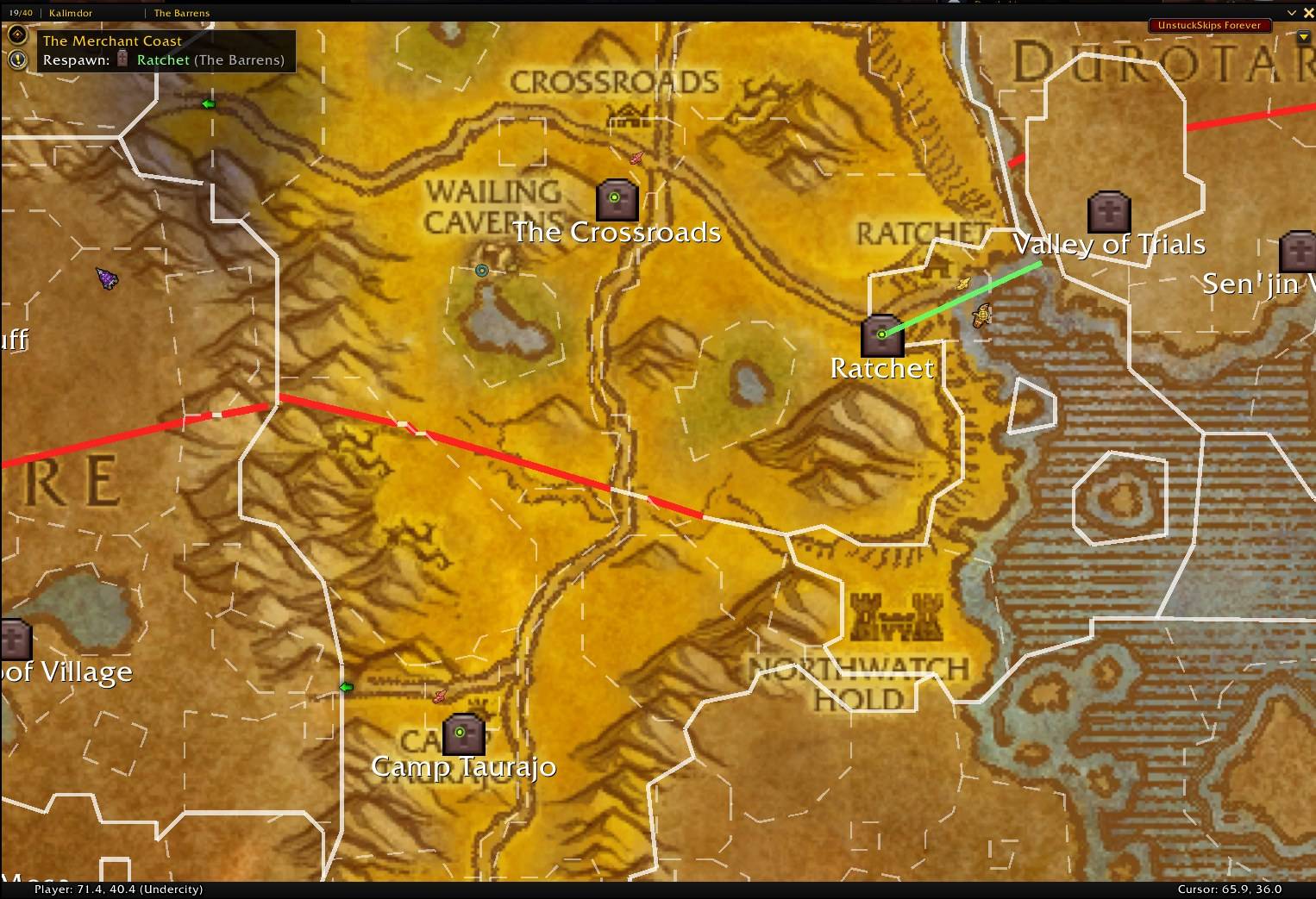
The Classic UnstuckSkips assumes you respawn at the nearest graveyard. On Forever that's wrong: die on The Merchant Coast and you wake up in Ratchet, die 100 yards away in The Barrens and you wake up at The Crossroads.
Deathskip reads the game's own subzone borders and real deaths shared by players, and shows you the answer for any spot on the map: 99% correct on 23,877 real deaths (cross-validation), against 78% for the old Classic rule.

The Merchant Coast sends you to Ratchet. A few yards west, in The Barrens, you would wake up at The Crossroads. The red line splits The Barrens between The Crossroads and Camp Taurajo.
 Hover, read, die
Open the world map and hover any spot. The tooltip in the top left gives the subzone and the spirit healer you'd respawn at, and a green line points to it. The tooltip scales with the map, so it stays readable on the small map. No command, nothing to set up.
 The real subzone borders
The borders are the game's own subzones, read from the client's terrain files, on land and at sea. By default they follow the game's exact 33-yard squares, like ClassicZoneMap (smoothed lines are an option):
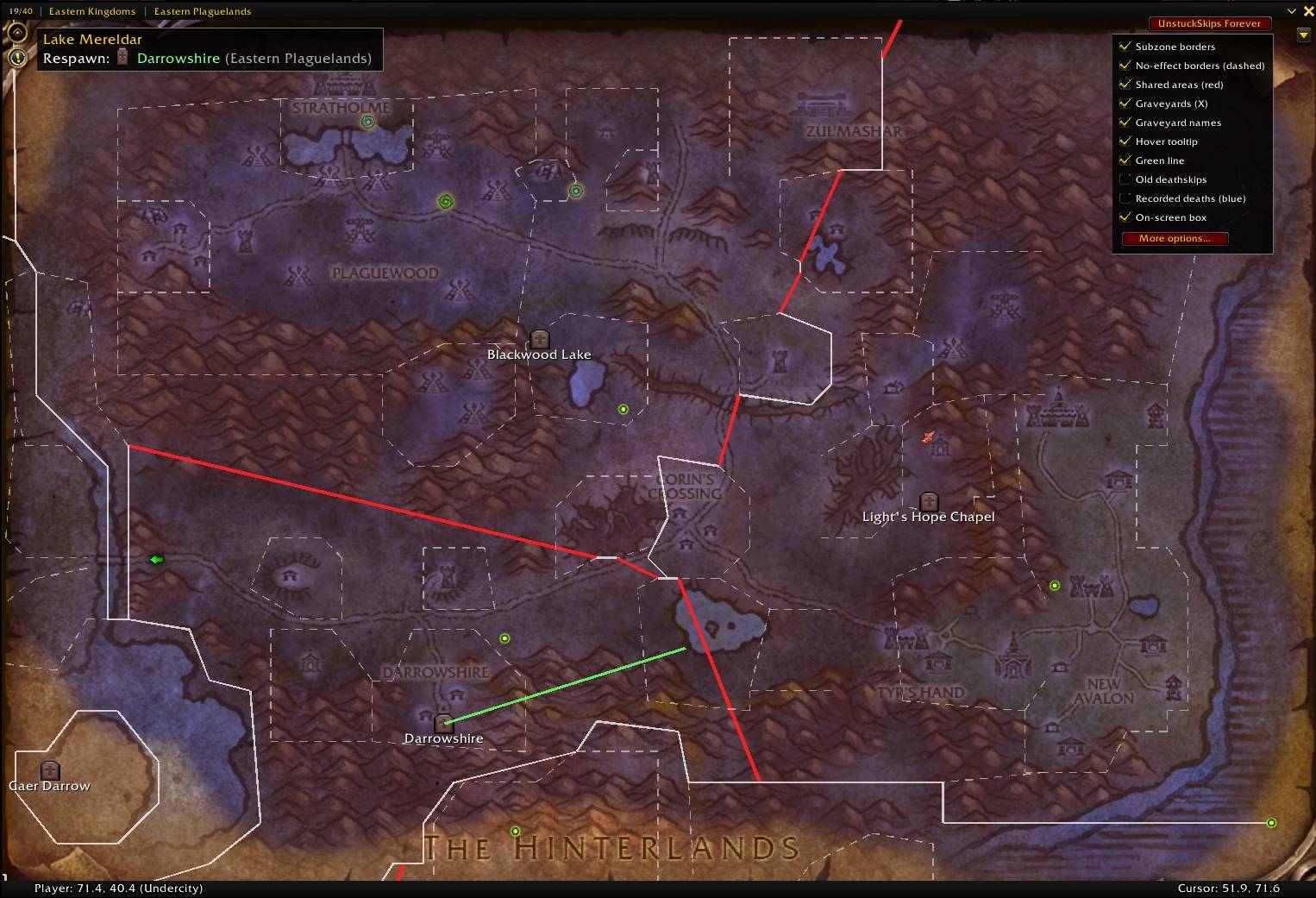
- solid white: crossing this border changes your graveyard
- dashed white: same graveyard on both sides, the border makes no difference (hidden by default, one click to show)
- red: one area shared between two graveyards, you go to the nearer one. The line is the exact straight line halfway between the two graveyards
So no border is invisible, and the ones that matter stand out. Graveyards your faction can reach are shown with a spirit-healer icon and their name.

Eastern Plaguelands: dying at Lake Mereldar sends you to Darrowshire. Solid borders change your graveyard, dashed ones don't, red lines split an area between two graveyards. The map menu is open on the right.
 Alliance, Horde or both
You see your own faction by default, and it follows you when you switch between Alliance and Horde characters. Use the HORDE / ALLIANCE buttons in the map menu to switch to the other faction or to both: the tooltip then gives one respawn line per faction, and the map shows Deathskip view: Alliance + Horde. Neutral graveyards like Ratchet serve both.
 Options right on the map
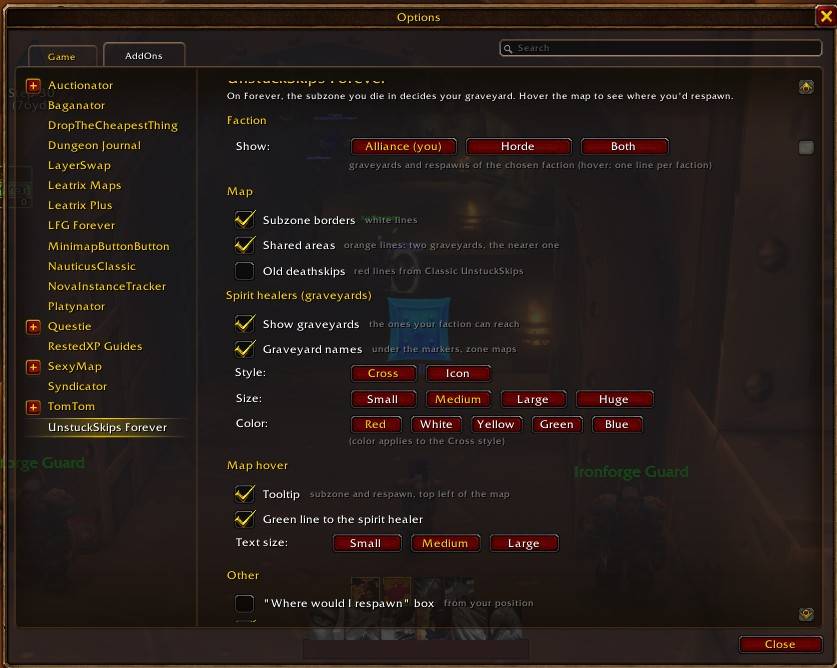
The Deathskip button on the world map opens a menu of clickable options (drag it anywhere along the map border, right-click to put it back). Everything else is in Options > AddOns > Deathskip (or type /ds):
- HORDE / ALLIANCE buttons to pick the faction you see, and an ON/OFF button to hide everything at once
- caves and tunnels outlined in orange where the respawn differs from the surface (Timbermaw Hold)
- subzone borders (also on the continent map), non impacted sub zones (dashed), red splits, graveyard markers, and the old Classic unstucks and deathskips (set apart)
- graveyards as a spirit-healer icon or a cross, 4 sizes, 5 colors, with or without names
- tooltip on/off, text size, green line
- a minimap button: left-click for the on-screen box, right-click for the options
- the on-screen box (on by default, close it with its X, bring it back from the map menu): where you are, and the graveyard you'd respawn at if you died there, updated as you walk

 Light on your PC
All the data ships with the addon: nothing is computed while you play. The map drawing is cached per zone and redrawn at most once per frame, so opening, closing and zooming the map stay smooth.
 How graveyards work on Forever
- A subzone can have its own graveyard, which overrides the zone's. The Merchant Coast: Ratchet. The rest of The Barrens: The Crossroads.
- Starting areas are subzones too. Shadowglen: Aldrassil, the rest of Teldrassil: Dolanaar. Coldridge Valley: Anvilmar, the rest of Dun Morogh: Kharanos.
- Some subzones send you to another zone: The Zoram Strand (Ashenvale) to Twilight Vale (Darkshore), North Coast (Tirisfal) to Faol's Rest, Freewind Post to The Great Lift.
- City graveyards only serve the city. The other faction's graveyards don't count.
 Death sharing and privacy
When you die and release your spirit, the addon notes where you died and where you respawned. When your character is moved while you're logged out (character unstuck service, logout skips), it notes where you logged out and where you logged back in. A few minutes later (out of combat, outside instances) it shares this on a hidden channel with other players using the addon. This is how each update gets more accurate, and how we're mapping unstuck skips on Forever next.
- Shared: death and respawn positions, logout and login positions when your character was moved, continent, zone, subzone, faction, date.
- Never shared: character names, guild, or anything else about you.
- Off anytime in the options or with
/ds share. Recorded deaths can be shown as blue dots for the factions you view (off by default).
 Commands
/ds, /dskip or /deathskip, whichever you prefer (the old /usf still works):
/ds options | /ds share sharing on/off | /ds data deaths known | /ds deaths your last deaths (predicted vs actual) | /ds unstucks your recorded unstucks | /ds notifier on-screen box | /ds minimap minimap button | /ds mapbutton world map button
 Wrong prediction?
Nothing to do: your death is shared automatically and fixes the next update. To help more, post the zone and spot in the comments.
 Credits
- UnstuckSkips by SeargentFish and cloudbells.
- LogoutSkips by yazpad and Zarant (MIT).
- Logout skip locations: Zarant.
- Skip discoveries and research: Tactics, TommySalami, Vitochie.
- Map line drawing: Semlar.
- Client file reader and cave maps adapted from OpenMap by jiforever (MIT). Works side by side with OpenMap. Icons: Lorc, game-icons.net (CC BY 3.0).
Deathskip Team