Deathnote Forever - Get Your Revenge
- By
deathnote2.png
Description
Deathnote Forever
Write down the players who killed you, share your lists with your guild, party and realm, get notified the moment somebody finds your target and get the revenge you deserve.
That rogue who ganked you at the flight master. The warrior who camped your corpse for ten minutes. The hunter who pulled you into a mob of elites. You will meet them again, and Deathnote Forever makes sure you know the moment you do.
How it works
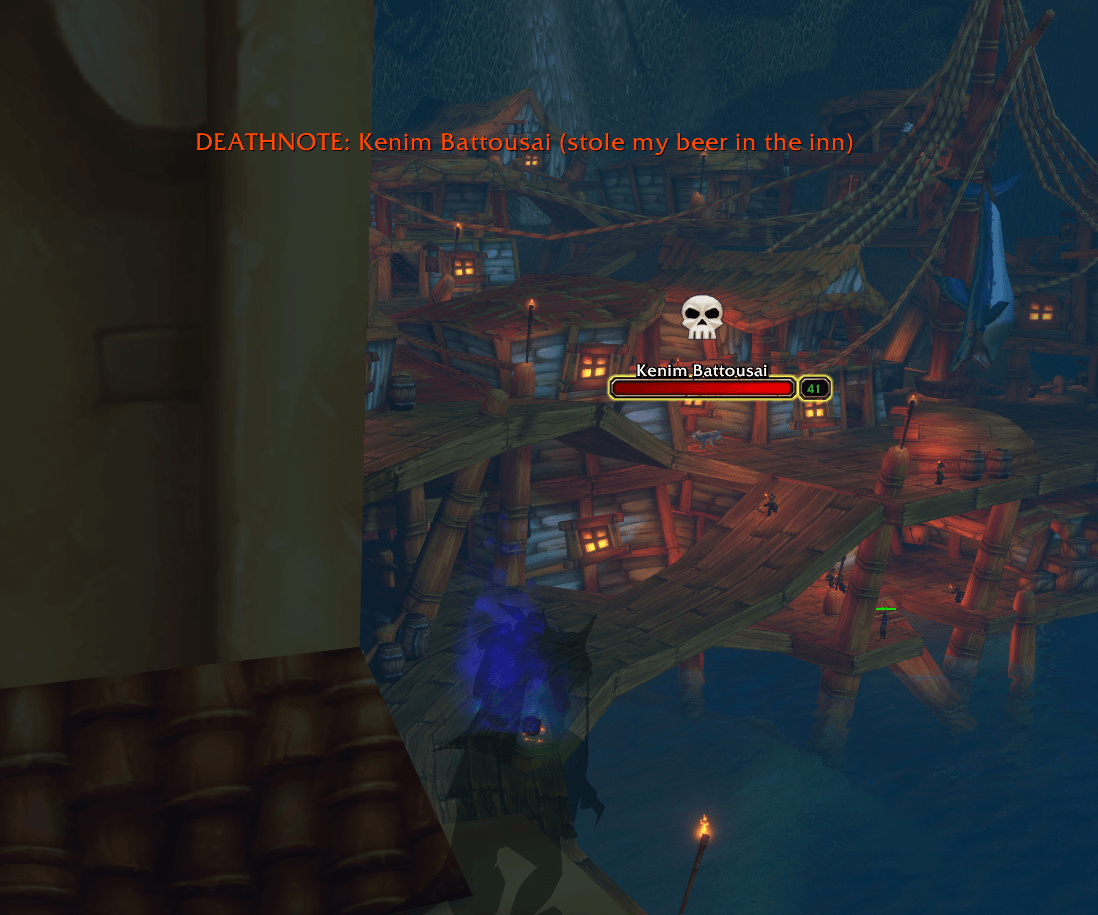
Add a player to your Deathnote with a short reason. From then on, whenever that player shows up near you, Deathnote Forever warns you:
- On-screen warning in raid warning style, with the name and your reason
- Warning sound, so you notice even mid-fight
- Skull marker above their nameplate
- Tooltip line "Deathnote: reason" when you mouse over them Write down the players who killed you, share your lists with your guild, party and realm, get notified the moment somebody finds your target and get the revenge you deserve.
That rogue who ganked you at the flight master. The warrior who camped your corpse for ten minutes. The hunter who pulled you into a mob of elites. You will meet them again, and Deathnote Forever makes sure you know the moment you do.
How it works
Add a player to your Deathnote with a short reason. From then on, whenever that player shows up near you, Deathnote Forever warns you:
- On-screen warning in raid warning style, with the name and your reason
- Warning sound, so you notice even mid-fight
- Skull marker above their nameplate
- Tooltip line "Deathnote: reason" when you mouse over them
Detection uses nameplates, your target and mouseover. Deathnote Forever also raises the enemy nameplate distance, so you spot your enemies as early as the game allows.
Who killed you?
Died and didn't catch the name? Open the Recent tab. Deathnote Forever remembers the enemy players who took part in your death or attacked you, with their class, the zone and the time. Click + to add one to your list with the reason already filled in, or X to dismiss it. Battlegrounds and arenas are skipped.
Share with your guild, party and realm
Deathnote Forever users in your guild and party automatically exchange their lists. One playeenemy.
- When somebody else finds a player from a list, you get a chat message with the zone and coordinates and an [open] link that takes you straight to that player's profile. The entry stays marked unread until you read it.
- Somebody else's find plays a softer sound than your own, so you can tell the two apart without looking. The on-screen notice for other players' finds can be switched off in Settings.
- Catch up at login: come back after a day away and the realm tells you where your targetne. Old news lands quietly in the list and in the report history, without a single alarm.
- When you spot someone from your list while in a party or raid, Deathnote Forever posts "Name spotted nearby" in group chat, so members without the addon know too. When several of you spot the same player, only one reports it. Turn it off in the Settings tab.
- Type /deathnote way to set a map waypoint to the latest report and go settle the score.
- Only guild and party members can add entries to your lists. Strangers can't.
- Realm network: every Deathnote Forever user on your realm and faction trades reports, so you hear about your target even when the spotter is somebody you have never met. The report carries their name, so you can whisper them, group up and get pulled onto the right layer. Strangers can only report players you already watch, never add a new name to your list. It runs out of the box and is always on: asking the realm what you missed sends the names you watch, and your own position travels with every report you make.
- Light on the wire: after the first sync of a session, your guild and party only hear about the entries you added, edited or removed, not the whole list again.
The list
Open it with /deathnote or the minimap button.
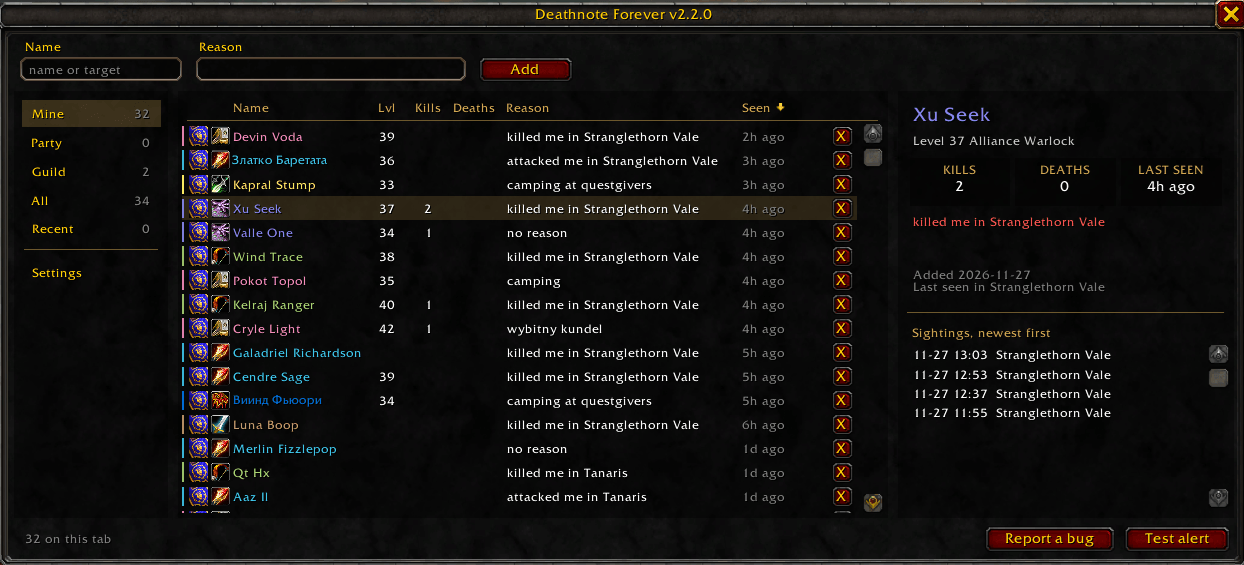
- Three panels: tabs down the left side (Mine, Party, Guild, All, Recent and Settings) with a count each, the list in the middle, the selected player's profile on the right. All is split into sections, so you always know where an entry came from. Party and Guild never repeat players already on your own list.
- Faction and class: pick them from a list for players you added by hand. They're also fist time you see the player.
- Class colours: names are coloured by class at a glance.
- Columns and sorting: level, kills, deaths, reason and when each player was last seen. Click a column header to sort by it, click again to reverse. Most recently seen players come first by default.
- Unread finds: a report you haven't read yet marks the row, so you can see at a glance w was closed.
- Player profile: click a row and the right hand panel shows that player, with kills, deaths and last seen on three tiles, their reason, and who wrote it.
- Reports: under the profile sits every time and place the player was spotted, by you, by your guild and party or by the realm. Mouse over a report to see who found them, click it to set a waypoint there.
- Kill tally: kills you land on a listed player are counted and announced in party chat, and so are the deaths they cause you, killer and assists alike. Both counts sit in the table, the row tooltip and the profile.
- Edit reasons: click a reason to change it.
- Hide shared entries: hide entries from others that you don't care about, for you only. Bring them back any time with Unhide.
- Settings: switch the group chat announcement and the on-screen notice for other players
- Test alert: see and hear the warning before it matters.
Commands
/deathnoteor/dnf: open or close the list/deathnote add: add your current target/deathnote add Name reason: add a player by name/deathnote del Name: remove a player (or your target)/deathnote way: waypoint to the latest report/deathnote net: realm network status,net testchecks it works/deathnote news: what is new in this version
Feedback and bugs
Found a bug, want something changed or missing a feature? Click Bug or idea in the Deathnote Forever window, or open an issue on GitHub: https://github.com/JakubGrzegowski/Deathnote/issues
Made for World of Warcraft Forever.
Deathnote Forever - Get Your Revenge Team