


Death Chime
- By
Death Chime plays a sound every time a group or raid member dies. Simple, configurable, and oddly satisfying.
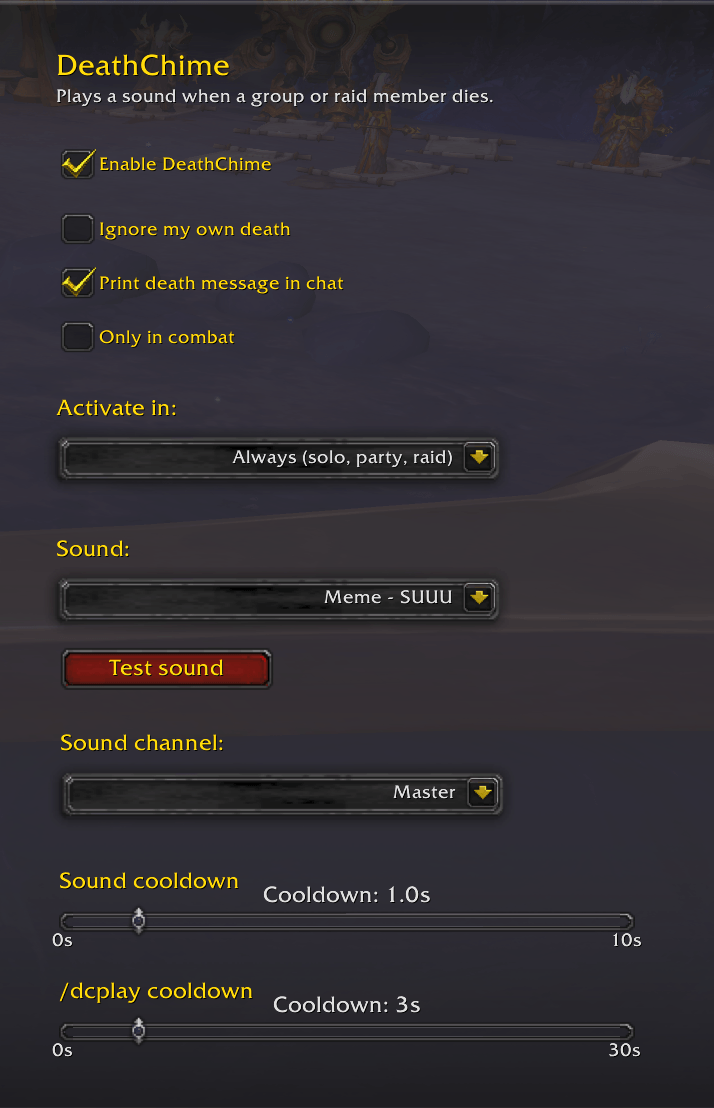
Screenshot 2026-06-05 210837.png
Description
Death Chime
"Ding dong, someone's dead."
Death Chime plays a sound every time a group or raid member dies. Simple, configurable, and oddly satisfying.
Features
- Automatic death detection: polls every second and reacts the moment a player dies, whether you are alive or dead yourself
- Multiple sounds: choose the sound that plays from the built-in list, or enable Random mode to let fate decide
- Volume control: independent volume slider so DeathChime never drowns out your game audio
- Configurable cooldown: set a minimum delay between sounds (0–10 s). If ten people die simultaneously, you hear one sound, not ten
- Activation modes; activate only in raids, in any group, or always (including solo and dungeons)
- Clean settings panel: all options accessible via ESC → Settings → AddOns → DeathChime or by typing
/dc - Addon presence check: use
/dccheckin a raid to see who else has DeathChime installed - Remote sound trigger: use
/dcplayto broadcast a sound to the whole raid (all players with the addon installed will hear it)
Settings panel
Open with /dc or through the in-game AddOns settings.
| Setting | Description |
|---|---|
| Enable | Toggle the addon on/off without uninstalling it |
| Activate in | Always / Party or Raid / Raid only |
| Sound | Pick a sound from the list, or enable Random mode |
| Test sound | Preview the currently selected sound instantly |
| Volume | 0 % to 100 %, in steps of 5 % |
| Cooldown | Minimum time between two sounds, 0 s to 10 s |
Slash commands
| Command | Description |
|---|---|
/dc |
Open the settings panel |
/dctest |
Play the selected sound locally |
/dcplay |
Broadcast a sound trigger to the entire raid |
/dccheck |
List raid members who have DeathChime installed |
Adding your own sounds
- Drop your
.oggfile intoInterface/AddOns/DeathChime/sounds/. - Open
DeathChime.luaand add a new entry to theSOUNDStable at the top of the file:
{ label = "My Sound", file = "Interface\\AddOns\\DeathChime\\sounds\\mysound.ogg" },
- Reload your UI (
/reload). The new sound will appear in the dropdown.
Credits
Made by Padi
Originally a guild joke that got out of hand. You're welcome.
If you enjoy Death Chime, consider leaving a ⭐ on CurseForge. Bug reports and suggestions are welcome in the comments.
The Death Chime Team
