Deadeye - Hunter Auto Shot, Range, Ammo & Feed Pet (Forever)
- By
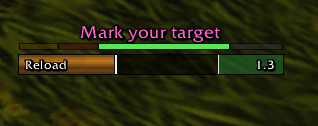
The Auto Shot bar with the range strip and the Hunter's Mark reminder above it.
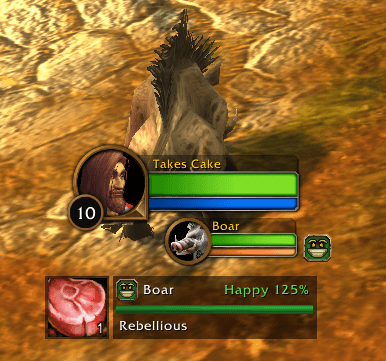
The pet panel shows happiness, loyalty and health. Click the button beside it to feed your pet.
Description
Deadeye
A hunter toolkit built for World of Warcraft: Forever.
Auto Shot bar
See exactly when you can move and when you have to stand still.
- Reload (orange): move freely.
- Aim window (green): the last half second before each shot. Stand still and don't cast.
- Red: you're moving or casting in the aim window, so your shot is being held back.
- Casting between shots: where Aimed Shot still fits before your next Auto Shot, and how much a cast will delay it.
- Optional "stop moving" sound as the aim window starts, or only if you're moving in it.
- Latency compensation, and an out-of-range dim.
Range strip
A color-coded strip on top of the bar shows which band your target is in: melee, dead zone, Auto Shot range or too far (or too close when the game can't tell melee from the dead zone).
The text above it warns you in combat:
- Face your target
- No line of sight
- Mark your target, if your Hunter's Mark isn't on an enemy you can shoot. One mark is enough: switching targets doesn't nag while your mark is on a living enemy in range.
- Aspect of the Cheetah is on (or the Pack), which gets you dazed, or No aspect.
Ammo, restocked for you
- An ammo counter beside the bar, with how many minutes of fighting your ammo lasts.
- Warnings before you run out, when a fight starts short, and when you leave town short.
- Automatic restocking at vendors: Deadeye fills your quiver, switches to better ammo you can use (and puts it in your ammo slot), and buys food your pet eats. It never spends more than half your money on its own, and a button below the vendor window does it with a click.
- Out of one kind of ammo? The next best you carry goes in your ammo slot after the fight.
Tranq Shot callout
For raiders with Tranquilizing Shot: a big "Tranq Shot!" when a boss enrages, and whether your shot removed it ("Enrage removed!" or "Still enraged!").
Pet panel
Happiness, along with the damage bonus or penalty that comes with it, plus health and loyalty. Hover it to see what your pet eats and its training points. Deadeye tells you when your pet needs feeding, warns you when a fight starts without it or you leave town without food it eats, and reminds you to turn off Growl in dungeons and raids.
Feed button
Click the button beside the pet panel to feed your pet. It picks the food for you: food close to your pet's level, lowest level first so your better food lasts. Food that makes you well fed is saved for you. Right-click to skip a food, and hover to see what it will use. It lights up while your pet isn't happy.
Delay report
After each fight, see how much Auto Shot time you lost to moving or casting (/deadeye stats).
Camera
Optionally raise the max camera distance (up to 39 yards) to keep an eye on your pet and the pull. One button zooms you all the way out.
Make it yours
Type /deadeye (or the shortcut /deye) for the options window. A live preview runs while it's open. You can change position, size, vertical or reversed bars, textures (LibSharedMedia supported), borders, the Auto Shot icon, colors, fonts, text placement, and the wording of every phase.
Every option also works from chat, for example /deadeye width 260, /deadeye texture flat,
/deadeye label above or /deadeye range show problems. /deadeye settings lists them all.
To move frames, use /deadeye move, the Unlock frames box, or Blizzard's Edit Mode.
Languages
Deadeye follows your game's language: English, Deutsch, Español, Français, Italiano, Português (Brasil), Русский, 한국어, 简体中文 and 繁體中文. The translations are first drafts, so corrections from native speakers are very welcome on GitHub. Chat commands stay in English everywhere.
Notes
- Hunters only.
- Built for Forever's addon rules. It uses the game's own swing event, and secret combat values are only shown, never computed with.
- This is a beta. Please report anything that looks off at
https://github.com/CakeRepository/Deadeye/issues. Output from
/deadeye debughelps a lot.
Deadeye - Hunter Auto Shot, Range, Ammo & Feed Pet (Forever) Team