Disenchanting Profit Scanner
- By
Find profitable disenchanting opportunities in WoW Forever. Scan Auction House material prices, evaluate equipment and compare estimated disenchant value against current listings.
DEProfitScanner8.png
DEProfitScanner9.png
DEProfitScanner10.png
DEProfitScanner11.png
Description
DE Profit Scanner
Find undervalued equipment. Calculate disenchant value. Discover profitable Auction House opportunities.
DE Profit Scanner is an Auction House utility addon created for World of Warcraft Forever. It helps players identify equipment that may be worth purchasing and disenchanting for profit by comparing equipment prices against the estimated value of the materials it can produce.
Instead of manually checking dozens of enchanting materials and calculating disenchant values yourself, DE Profit Scanner brings the entire process together in one convenient interface.
Features
Integrated Auction House Interface
The DE Profit Scanner window opens automatically when you open the Auction House.
All major functionality is accessible through one integrated menu. There is no need to remember multiple slash commands or switch between separate addon windows.
Automatic Material Price Scanner
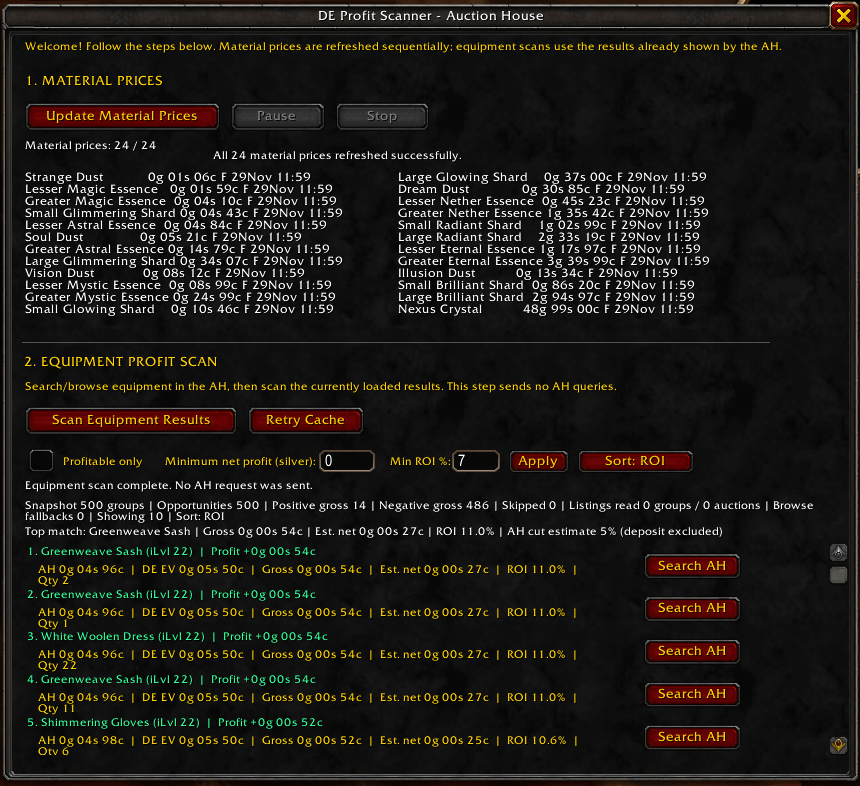
Scan all 24 supported disenchant materials using sequential Auction House browse queries.
The scanner collects:
-
Lowest observed Auction House price.
-
Available auction quantity.
-
Current price information for each material.
The supported material database includes dusts, essences, shards and Nexus Crystals across the relevant disenchant brackets.
The scanner includes:
-
Sequential, throttle-aware requests.
-
Pause and stop controls.
-
Saved material price observations.
-
Progress tracking.
-
Individual material price updates.
The scanner waits for Auction House responses before proceeding to the next material.
Equipment Profit Scanner
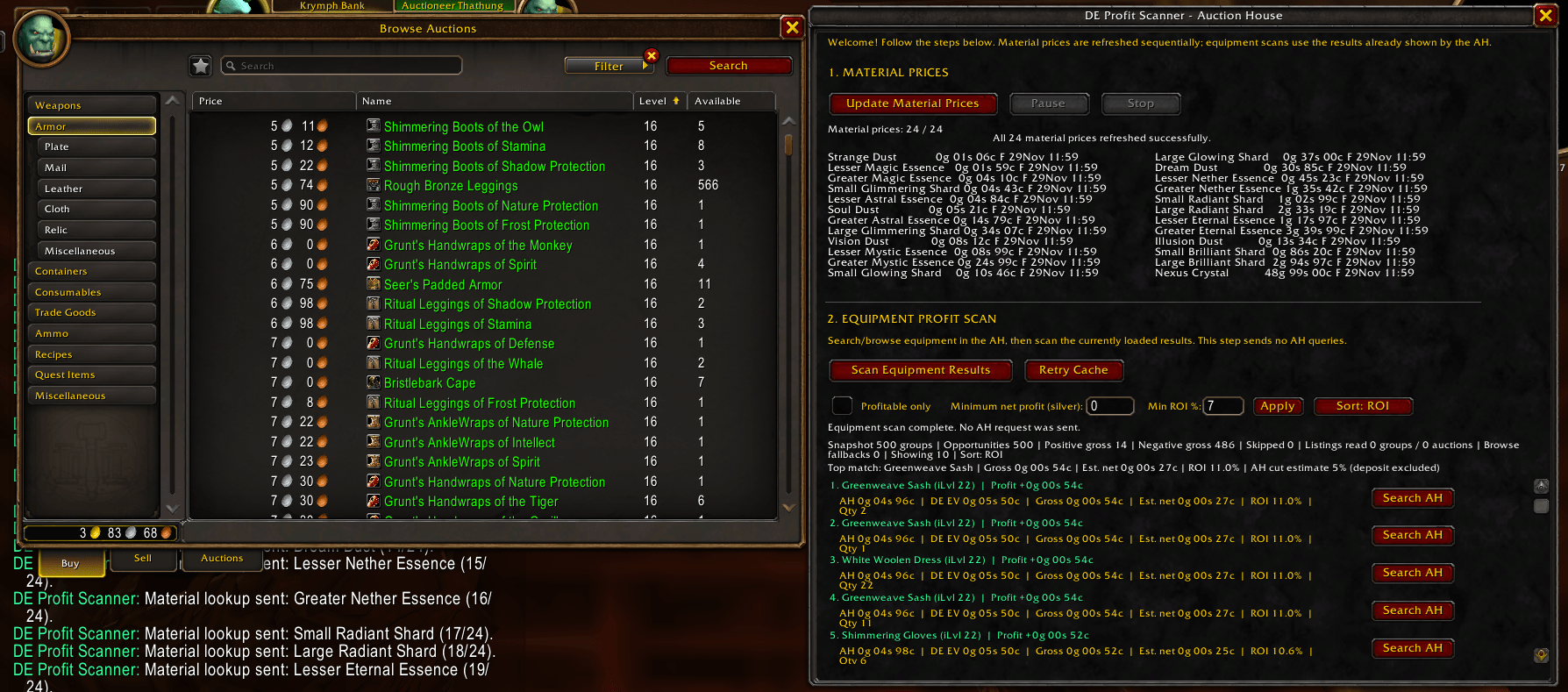
Browse equipment normally in the Auction House, then select Scan Equipment Results.
DE Profit Scanner evaluates the equipment currently present in the loaded Auction House browse results.
For each supported item, it calculates:
-
Current observed purchase price.
-
Expected disenchant material value.
-
Estimated potential profit or loss.
-
Return on investment (ROI).
-
Available auction quantity.
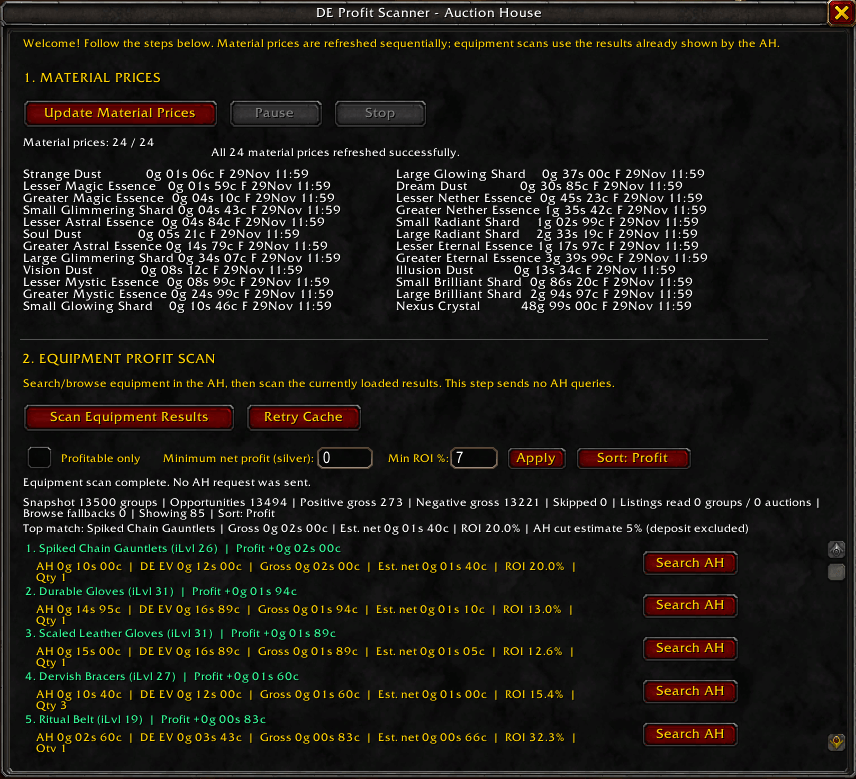
Results are ranked by estimated profit, with additional sorting options to help identify interesting opportunities.
The scanner supports large browse snapshots and displays up to 100 matching opportunities at a time.
Individual Auction Listing Analysis
DE Profit Scanner can inspect individual auction listings associated with an equipment item rather than treating every auction for the same item as one identical price.
Where individual listing data is available, the scanner can distinguish between:
-
Different auction prices.
-
Individual auction IDs.
-
Stack quantities.
-
Separate item variants.
-
Total available quantity.
This provides more accurate purchase-price comparisons when multiple auctions exist for the same equipment.
The scanner uses the Auction House item key, including variant-specific information such as item ID, item level and item suffix, when evaluating listings.
Profit Filters
Narrow down the results using:
-
Profitable items only.
-
Minimum profit threshold.
-
Minimum ROI percentage.
-
Sorting by estimated profit or quantity.
You can quickly remove items that do not meet your desired profit margin or investment return.
Individual Search AH Buttons
Every displayed opportunity has its own Search AH button.
Clicking it sends one Auction House browse query for that item's name, allowing you to inspect matching listings yourself.
No equipment searches are performed automatically by the scanner.
Item Hover Disenchant Predictions
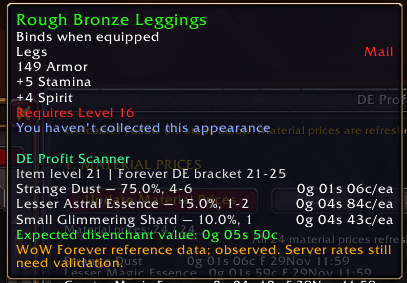
Hover over eligible equipment items to see their possible disenchant outcomes.
The tooltip displays:
-
Possible disenchant materials.
-
Estimated drop percentages.
-
Expected quantity ranges.
-
Current observed material prices.
-
Estimated total disenchant value.
-
Selected disenchant item-level bracket.
The scanner prioritizes the item level supplied by the Auction House item key when available, helping it distinguish between different item variants.
This makes it possible to evaluate equipment without having to open the scanner's results window.
How to Use
Step 1 – Open the Auction House
Open the Auction House normally. The DE Profit Scanner interface will appear automatically.
Step 2 – Update Material Prices
Click Update Material Prices and allow the scanner to refresh its 24 supported disenchant materials.
This should be done before evaluating new opportunities if you want current material prices.
Material prices are saved for subsequent calculations, so you do not need to refresh them every time you scan equipment.
Step 3 – Browse Equipment
Use the normal Auction House interface to search for equipment.
You can browse weapons and armor as usual. You can also search for specific item names or equipment variants.
Step 4 – Scan Equipment Results
Click Scan Equipment Results in the DE Profit Scanner window.
The addon evaluates the currently loaded Auction House results without requesting additional pages.
For larger browse snapshots, the scanner processes the available data and limits the displayed opportunity list to 100 results.
Step 5 – Review Opportunities
Examine the estimated profit, expected disenchant value, purchase price and ROI.
Use the profitable-only filter, minimum-profit setting and minimum ROI setting to narrow down your results.
Step 6 – Search for an Opportunity
Click Search AH next to an interesting item to perform an individual search and inspect its available listings.
Step 7 – Check Item Tooltips
Hover over equipment to see its estimated disenchant materials, probabilities, quantities and potential value.
Performance and Auction House Safety
DE Profit Scanner is designed to avoid unnecessary Auction House requests and keep scanning lightweight.
-
Material prices are refreshed sequentially.
-
Equipment scanning reads already-loaded browse results.
-
Individual auction listings are inspected when the Auction House has made their data available.
-
No automatic pagination or full Auction House replication.
-
No automatic equipment searches.
-
Search AH is only triggered by an explicit player click.
-
Retry Cache only retries item-data lookups for previously uncached items; it does not initiate new Auction House searches.
-
The addon never automatically purchases, bids on, posts or cancels auctions.
Large browse snapshots can contain thousands of item groups. The scanner processes available data while keeping the displayed opportunity list capped at 100 entries.
Calculation Information and Limitations
Disenchant values are estimates, not guaranteed returns.
The addon uses a bundled WoW Forever disenchant reference database containing material probabilities and quantity ranges.
The database distinguishes between:
-
Item-level disenchant brackets.
-
Uncommon, rare and epic equipment.
-
Armor and weapon disenchant outcomes.
-
Possible materials, drop probabilities and quantity ranges.
Where available, the Auction House item's actual item level is used to select the disenchant bracket. This is particularly important for equipment variants that share the same base item ID but have different item-level or suffix information.
The bundled reference data is based on public WoW Forever observations. Some rare and epic outcomes are inferred and have not all been independently verified against the current server build.
Expected disenchant value is calculated using the probability of each outcome, the midpoint of its quantity range and the observed lowest Auction House material price.
The displayed estimates do not currently account for:
-
Auction House deposits and selling fees.
-
How quickly materials will sell.
-
Market fluctuations between scanning and selling.
-
The possibility that an item will not sell at the expected price.
-
Competition from other sellers.
A positive profit estimate should therefore be treated as an opportunity to investigate, not a guarantee of profit.
Auction House results also depend on what data the client has loaded. Some item information may initially be unavailable and can become available after the game loads additional item data. Retry Cache can be used to retry those missing item-data lookups.
Compatibility
Developed specifically for World of Warcraft Forever.
Target client interface: 16001 (1.60.1).
The bundled disenchant reference table is based on public WoW Forever observations associated with client build 1.60.1.70755.
The addon has been tested in-game on WoW Forever client build 1.60.1.70938.
Some disenchant outcomes are inferred, and the data has not been independently sampled against every server build.
Installation
-
Download the addon ZIP.
-
Extract the
DEProfitScanner_Unifiedfolder into your World of WarcraftInterface/AddOnsdirectory. -
Start the game.
-
Enable DE Profit Scanner in the AddOns menu.
-
Open the Auction House.
No additional dependencies are required.
Credits
The bundled WoW Forever disenchant reference data is attributed in the source comments to the BootyBayBroker WoW Forever observed table.
Please retain the relevant attribution when redistributing modified versions of the reference data.
DE Profit Scanner is an independent community addon and is not affiliated with or endorsed by Blizzard Entertainment.
Disenchanting Profit Scanner Team