Provides In-Game Party Member List
Enhanced Convenience for Party/Raid Play
- Instant Status Updates: Easily check class, player ID, health bar, and active buffs.
- Mouseover Casting: Hover your mouse cursor over a party member's name to cast spells directly.
- Target Casting: Click on a party member's name to select and cast spells.
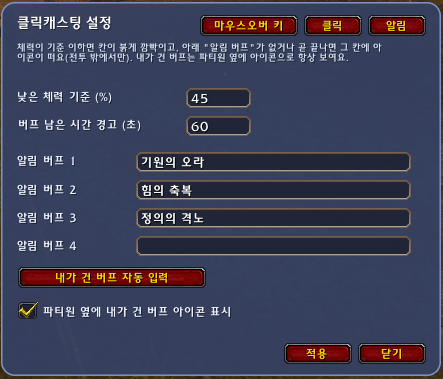
- Low Health Alert: Highlights group members when their health drops critically low.
- Buff Visuals & Timers: Displays buff icons and allows customizable timer alerts in the options menu.
- Custom Health Thresholds: Configure specific health percentages (e.g., set to 40% to highlight players below that threshold) in the options menu.
- Keybinding Settings: Assign and customize skill hotkeys directly within the options menu.
Designed with a clean and minimal interface to simplify buffing and healing for beginners while maximizing efficiency.
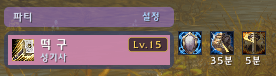
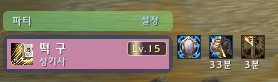
The background color changes automatically when using the small party setting.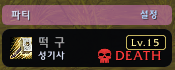
UI Updates Upon Death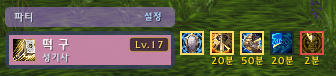
Display Order: My Buffs > Other Party Members' Buffs > Debuffs
Border Colors:
-
-
Gold: Buffs cast by me
-
None: Buffs cast by others
-
Red: Debuffs & Status effects
11/08 Update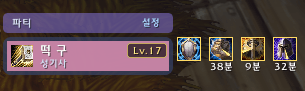
Added buff and debuff icons for other party members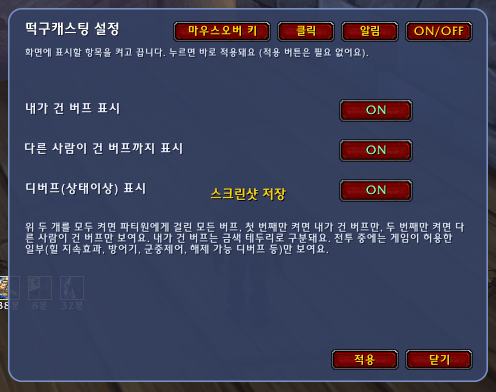
Added an ON/OFF toggle option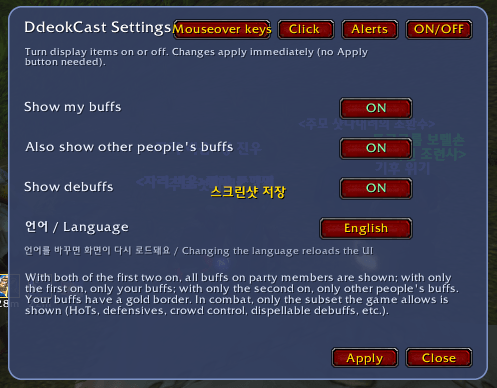
Added language selection (Korean / English) in Settings
-
DDclickcast Team