DaylightUI
- By
The first complete UI suite built only for WoW: Forever. Soft, minimal, one look across everything, and nearly all of it yours to change.
options.png
test.png
Description
DaylightUI
A complete UI suite made only for WoW: Forever
I am in New Zealand on Vacation until Oct 19th. I will have my laptop and do dev in the downtime but I promise this is still supported, even if dev slows down for the next two weeks.
Soft, minimal and consistent everywhere. Unit frames, action bars, nameplates, chat, bags, buffs, tooltips and the game's own windows all share one look. Nearly every part of it can be changed.

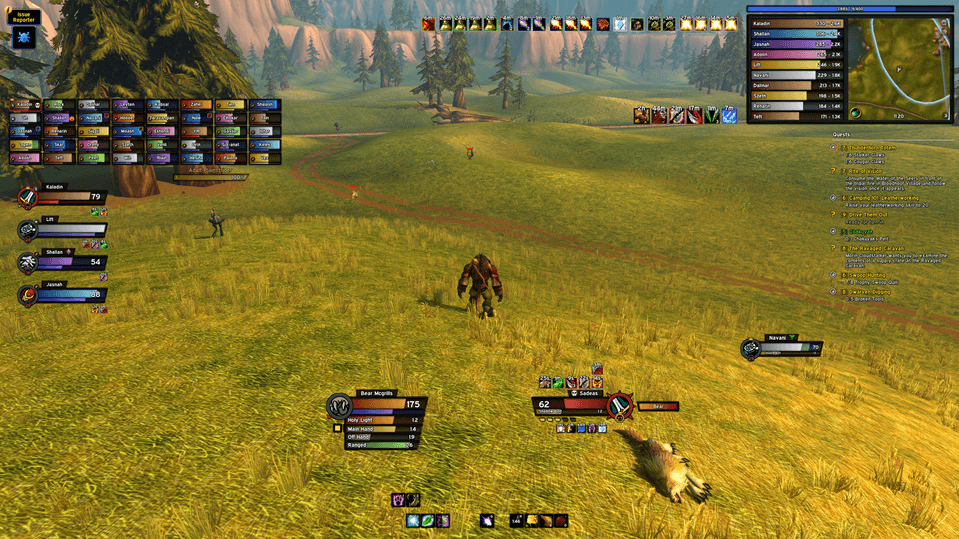
Everything at once in preview mode (/dui test): party and raid frames, the damage meter, chat, grouped buffs and swing timers under the cast bar.
Why DaylightUI?
- Made for Forever, not ported to it. Forever has its own addon rules: no combat log, values that are protected in combat, and frames you can't touch mid-fight. DaylightUI was written for those rules from day one. It works alongside the game's own code, so you don't get errors or broken frames when a pull starts.
- One look, everywhere. Every frame, bar and window uses the same fonts, borders, colours and spacing. Change your accent colour or font once and the whole UI follows.
- Take only what you want. Each part is its own addon. If you already love your nameplates or your chat, turn ours off and keep the rest.
- Ready in one click. The installer sets up each character, including the Edit Mode layout.
What's inside
- Unit frames: player, target, focus, pet, target of target, party and raid. Class portrait rings, cast bars, swing timers that only show while you're swinging, target auras and combo points.
- Action bars: laid out cleanly and skinned to match. The side bars fade out when you don't need them.
- Info panel (top right): XP bar, a damage meter with per-spell breakdowns, a square minimap, and the quest tracker tucked underneath.
- Chat (bottom left, the info panel's twin): reputation bar, short channel tags like [G] [P] [T], clickable links, and it fades when idle.
- Buffs and debuffs: buffs sorted into colour-coded groups (class buffs, consumables, world buffs and more). Debuffs are edged by what can dispel them.
- Nameplates: enemy and friendly. Cast bars with interrupt highlights, your debuffs, crowd control, quest marks, threat colours, and combo points on your target.
- Tooltips: class-coloured names, item quality borders and a slim health bar, at your cursor or in the usual spot.
- Window skins: the character sheet, spellbook, quest log, vendors, the map and more in the same style, plus a compact combined bag.
- Profiles: export your whole setup as a string, import someone else's, and keep several saved by name.

In combat: only what you need is on screen, and everything else fades back.
Make it yours
The defaults look good out of the box, but almost everything has a setting.
- Move anything: unlock, drag with grid snapping, then lock. Right-click a handle to put that frame back.
- The whole look at once: font (several bundled, or the game's own), border thickness, corner rounding, shadows, colour softness and brightness, UI scale and text size.
- Accent colour: the default, your class colour, or any colour you pick.
- Unit frames: size each frame on its own. Portraits as class icons, 2D, 3D or off. Choose how health reads, set cast bar and swing timer sizes, and turn range fading on or off.
- Buff bar: make your own groups, recolour and reorder them, and shift-click any buff to move it to a different group.
- Nameplates: size, text, how your target is marked (outline, glow or nothing, in any colour), icon sizes and which extras show.
- Damage meter: several modes, flat or gradient bars, and it can pop out into its own window.
- And more: chat fading and background, tooltip placement, bag icon size and columns, minimap size, and window skin packs you can switch off one by one.

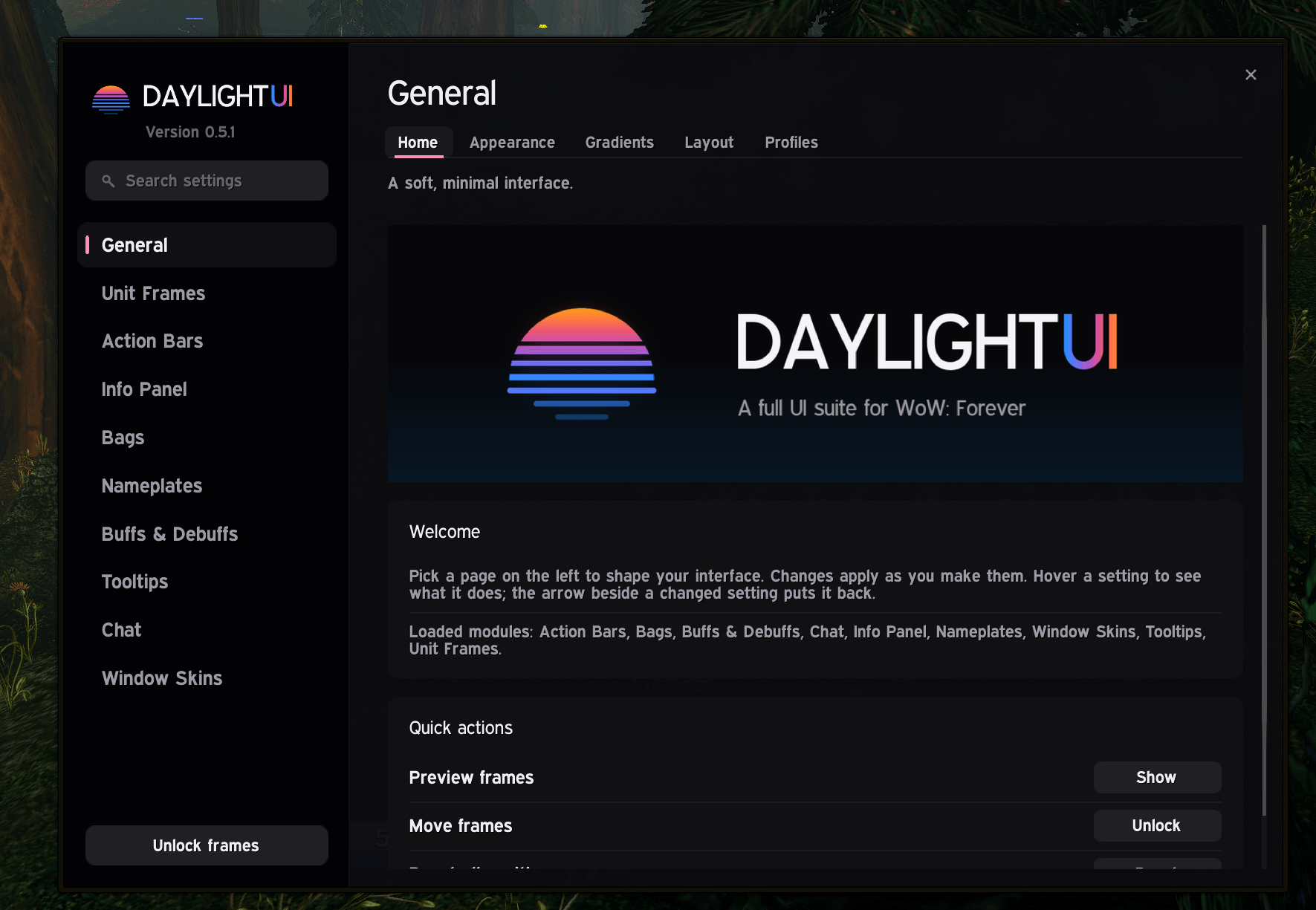
Every section in the sidebar, its pages as tabs, and a search box to find any setting.
Getting started
- Install DaylightUI with the CurseForge app. Every module comes with it.
- Log in, click Install DaylightUI on the popup, then reload.
That's all. The popup shows once on each new character, and /dui install brings it back whenever you want.
Commands
/dui: open the options/dui install: set up this character, then reload/dui unlock//dui lock: move frames, then lock them in place/dui reset: put every frame back where it started/dui test: preview everything with sample units, so you can style and move frames without a group/dui export//dui import: share your setup, or use someone else's
Modules
DaylightUI is the core, and every module needs it. You can turn any of the others on or off in the AddOns list.
- DaylightUI_UnitFrames: unit, party and raid frames, cast bars, swing timers
- DaylightUI_ActionBars: action bars
- DaylightUI_InfoPanel: XP bar, damage meter, minimap, quest tracker
- DaylightUI_Chat: chat panel and reputation bar
- DaylightUI_Buffs: grouped buff bar and debuff bar
- DaylightUI_Nameplates: enemy and friendly nameplates
- DaylightUI_Tooltip: tooltips
- DaylightUI_Skins: the game's windows and the combined bag
Status and feedback
DaylightUI is in beta. It gets played every day, but you might still hit the odd rough edge. If something looks wrong, please leave a comment.
The DaylightUI Team