
DavePanels
- By
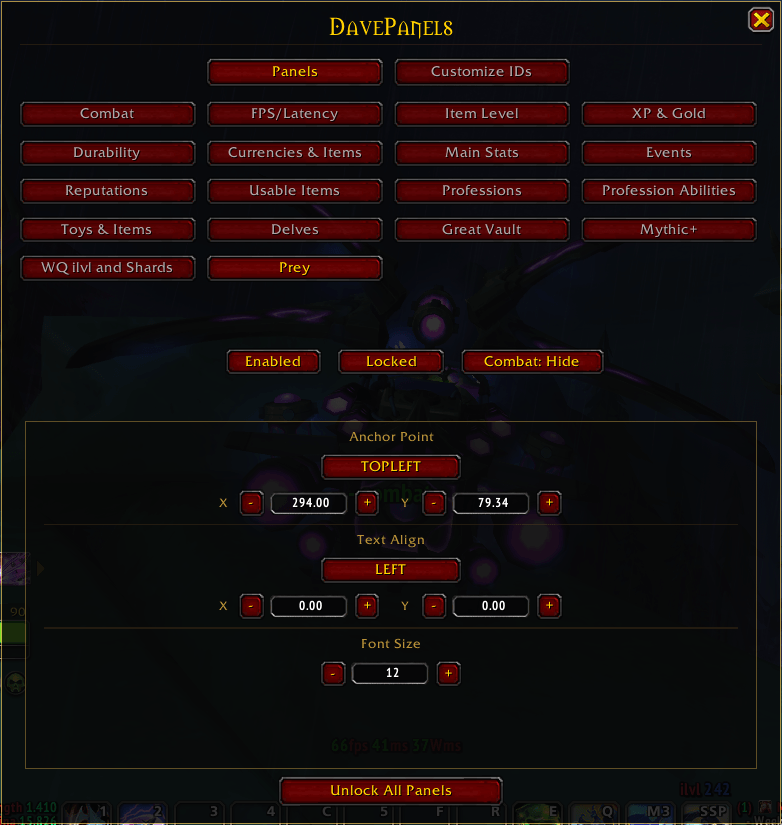
Shows a variety of info in panels (FPS, Latency, iLvl, XP, Durability, Currency, items, toys, professions, reputation, etc.). Console command /dp to open configuration window.
DavePanels is a modular info-hub for World of Warcraft that puts your most important data front and center — no more menu-diving. Toggle the panels you need and keep everything at a glance.
You can use /dp to open the configuration window or using the minimap button.
📋 Available Panels
| Panel | What it shows |
|---|---|
| Combat | Combat state indicator — + Combat + when in combat, - Combat - when out |
| FPS / Latency | Frames per second, local latency, and world latency |
| Item Level | Your character's average item level |
| XP & Gold | Session time, current/max XP, rested XP, and XP to next level — gold only at max level |
| Durability | Remaining durability per equipped item |
| Currency & Bag Items | Tracks currencies and items by ID; click any currency to open the Currency window, this panel only track currencies and items, to use items (clickable button on screen), add them to Usable Items Panel |
| Main Stats | Your character's primary stats |
| Professions | Your 2 main professions (sorry Cooking, Fishing and Archaeology 👀), knowledge points available (X), and ** if mounted gathering is unlocked — click the anchor to open the Professions book |
| Events | Tracks active events in Midnight Zones |
| Reputations | Midnight reputations and Valeera level |
| Usable Items | Clickable icons for items added via the main panel |
| Profession Abilities & Knowledge | Clickable icons for profession abilities (e.g. Carve Meat, Sharpen Knife) and knowledge-granting gathered items |
| Toys & Items |
Clickable icons for your toys and bag items |
| Delves |
Tracks the Number of Bountiful Delves for Midnight Zones |
| Great Vault |
Tracks the progress of the weekly Great Vault. |
|
WQ Ilvl and Shards |
Tracks World Quests rewarding better ilvl than the items equipped, also tracks World Quest that reward Coffer Key Shards |
|
Prey |
Tracks the number of available preys per difficulty to do. |
🌐 Languages
Supports English and Spanish.
💡 Tip: Use an addon like IdTip to easily find item and spell IDs.
DavePanels Team
