Damage Meter Skins
Reskins World of Warcraft Midnight’s built-in damage meter with The War Within and Midnight skins, plus colours, fonts, round icons and per-window looks.
Description
Damage Meter Skins
I really liked these skins on Details! however I was having issues with that addon's automation not working so I decided to swap to the Blizzard Damage Meter and reskin it!
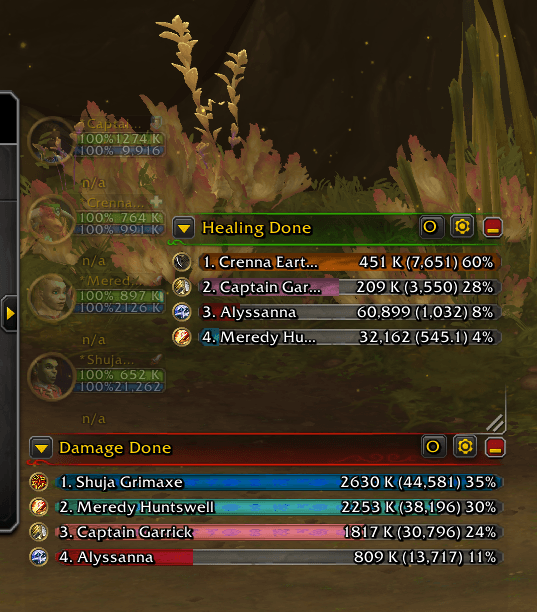
Pick from four skins, then recolour and restyle it to suit your UI. Nothing about how the meter counts changes, only how it looks.
Skins:
• Blizzard (Default): the meter as Blizzard made it, ready to recolour.
• The War Within: header and bars from the Details! TWW skin.
• Midnight (Void): the dark version of the Details! Midnight skin.
• Midnight (Light): the light version of the Details! Midnight skin.
Features:
• Tint the header, window background, bar backgrounds and icon rings.
• Keep Blizzard's class colours or pick one colour for every bar.
• Bar textures and fonts, including ones from other addons as long as they use SharedMedia.
• Round icons with a gold ring, in the style of the TWW skin.
• Text style, shadow, sizes and colours for the header, names and numbers.
• Give each meter window its own look, or share one look across all of them.
• A live preview in the options shows every change as you make it.
• Minimap button: right-click for quick options, Shift + Left-Click for settings.
• Works with Edit Mode and minimap button managers.
Commands:
/dms - show the command list
/dms options - open the settings pane
/dms skin <name> - blizzard, tww, void or light for every window
/dms skin void 2 - skin one window (with Same Settings for All Windows off)
/dms meter - show or hide the damage meter
/dms minimap - show or hide the minimap button
/dms refresh - re-apply the skin
/dms reset - reset every window to the defaults
Supported clients:
World of Warcraft: Midnight.
World of Warcraft: Forever - Coming Soon.
The Classic clients don’t have the built-in damage meter, so they aren’t supported.
Turn the meter on under Options > Gameplay Enhancements > Damage Meter.
Feedback and bug reports:
Please report problems in the comments, with the skin you’re using and any error messages.
If the options page looks different from the screenshots, /dms panelerror says why.
Credits:
Made by StormWolf
The War Within art by Karl-Heinz Schneider, from Details! - Skin ‘The War Within’ (MIT Licence).
Midnight art by Sandmaster, from Details! - Skin ‘Midnight (The War Within)’ (MIT Licence).
Damage Meter Skins Team