Description
Apologies from all of you for the delay in updating the addons.
I don't have too much time since i have a little one.
Required data broker display addon: Bazooka, ChocolateBar
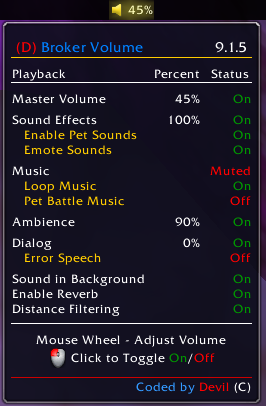
Data Broker - Audio Options Sound Panel Control
Features:
- Control the Master, Sound FX, Music, Ambience, and Dialog Volumes using the Mouse Wheel.
- Normal scroll 5% changes.
- Precise scroll 1% changes. (Hold shift key down while you scrolling.) - Toggle On / Off (Mute):
- Master Volume (On / Mute)
- Sound FX (On / Off)
+ Pet Sounds (On / Off)
+ Emote Sounds (On / Mute)
- Music (On / Mute)
+ Loop Music (On / Off)
+ Pet Battle Music (On / Off)
- Ambience (On / Mute)
- Dialog (On / Mute)
+ Error Speech (On / Off)
- Sound in Background (On / Off)
- Enable Reverb (On / Off)
- Distance Filtering (On / Off)
The (D) Broker Volume Team


Owner