


cxUI
- By
A lightweight, modular UI addon that auto-hides interface elements, displays absorb shields, and highlights ability procs for a cleaner WoW experience.
2026-09-21_102202.png
111111111.png
2026-11-01_021354.png
Description
# cxUI
**Minimalist interface addon for World of Warcraft**
Installation
- Extract the
cxUIfolder intoWorld of Warcraft\_retail_\Interface\AddOns\ - Restart the game or
/reload - Configure via ESC → Options → AddOns → cxUI
Settings window
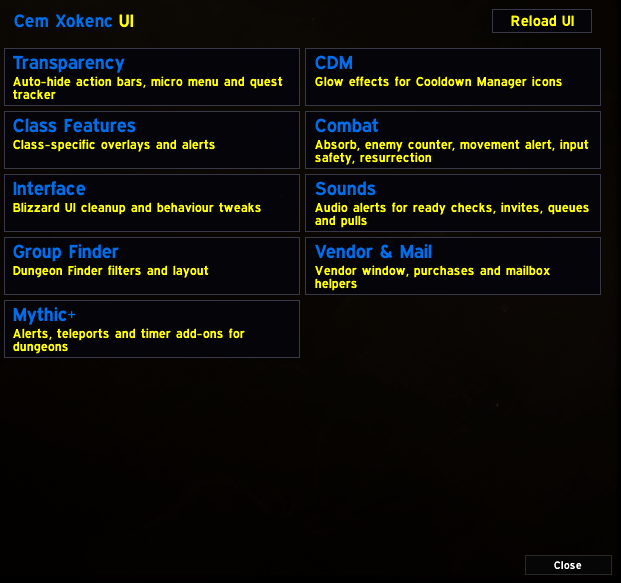
- Home page — the title and one large button per module (module name in blue, description in yellow).
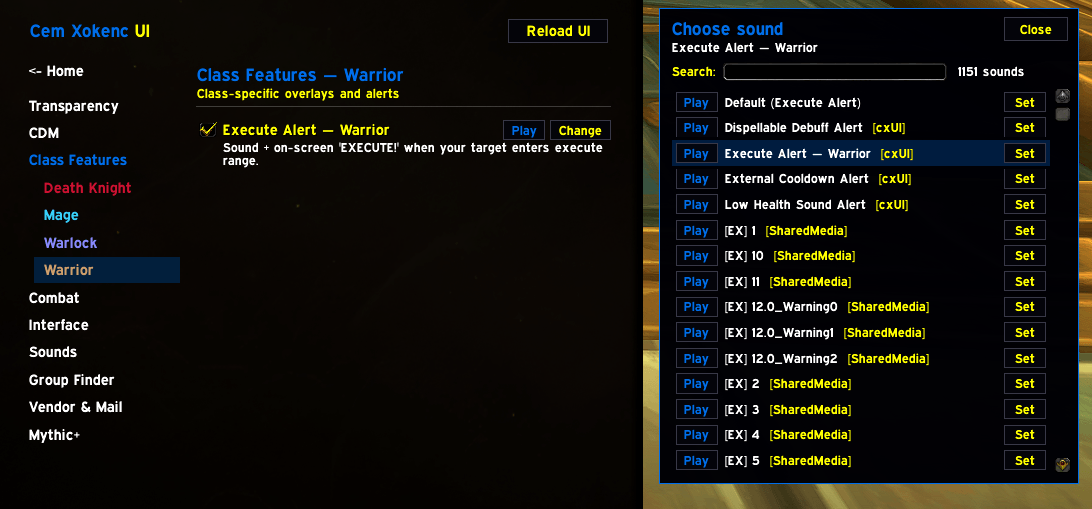
- Module page — module list on the left, that module's options on the right. Every option is two rows:
[x] Nameand a short description under it. Hover an option for a longer explanation when it has one. - Options marked (Requires Reload)* only take full effect after
/reload. Everything else applies immediately.
The window is generated from the module registry — adding a module or feature never requires touching options.lua.
Structure
cxUI/
├── cxUI.toc
├── core.lua                 # SavedVariables defaults + startup
├── options.lua              # settings window (built from the registry)
├── libs/
├── media/                   # one sub-folder per feature that owns files
│   ├── CDMGlow/             #   pixel-glow textures
│   ├── DispelAlert/
│   ├── ExecuteAlert/
│   ├── ExternalAlert/
│   └── LowHealthSound/
└── modules/
    ├── Modules.lua          # module registry + feature lifecycle (shared by all modules)
    ├── <Module>/
    │   ├── <Module>.lua     # registers the module + helpers shared by its features
    │   └── <Feature>.lua    # exactly one file per feature
    └── ...
Load order in cxUI.toc matters in one place: CDM before ClassFeatures (ClassFeatures uses the CDM glow engine).
Media paths are built with ns.Media("Folder", "file.ogg").
How features work (the lifecycle)
Every option is a feature object registered in its module:
local M = ns:GetModule("Sounds")

local F = M:NewFeature{
    key  = "myOption",              -- CXUI_DB key (also the default = true)
    name = "My Option",
    desc = "One short line shown under the checkbox.",
    -- default = false,             -- start disabled
    -- reload = true,               -- only (de)activated at login
    -- class  = "WARRIOR",          -- only ever runs on this class
}

function F:OnEnable()
    local ev = self:NewEventFrame()                 -- events/OnUpdate are removed automatically on disable
    ev:RegisterEvent("READY_CHECK")
    ev:SetScript("OnEvent", function() ... end)

    self:NewTicker(1, function() ... end)           -- timers are cancelled automatically on disable
    self:After(2, function() ... end)
    self:Hook("SomeBlizzardFunc", function() ... end)          -- installed once, inert while the option is off
    self:HookScript(SomeFrame, "OnShow", function() ... end)
end

function F:OnDisable()
    -- undo anything *visible* (hide frames, restore alpha/anchors, remove engine-side registrations)
end
Guarantee: an option that is off has no events, no timers and no OnUpdate scripts. Blizzard hooks (hooksecurefunc)
cannot be removed, so they are installed only if the option has been on at some point in the session, and return
immediately while it is off. Use F:IsOn() in any callback you write yourself.
(Requires Reload) features are only activated at login (their code does nothing at all if the option is off then).
Modules
1. Transparency — modules/Transparency/
Auto-hide action bars, micro menu and quest tracker.
Shared file: Transparency.lua
| File | Option | What it does | Reload |
|---|---|---|---|
ActionBars.lua |
Action Bar Auto-hide | Hides bars out of combat. Hover to reveal. | — |
MicroMenu.lua |
Micro Menu Auto-hide | Hides Micro Menu and Bags. Hover to reveal. | — |
QuestTracker.lua |
Quest Tracker Hover | Quest tracker only visible on mouseover. | — |
2. CDM — modules/CDM/
Glow effects for Cooldown Manager icons.
Shared file: CDM.lua
| File | Option | What it does | Reload |
|---|---|---|---|
CDMGlow.lua |
Enable CDM Proc Glow | Special highlights for class-specific procs. | — |
SuppressBlizzardGlow.lua |
Suppress Blizzard Glow on CDM | Hides all Blizzard proc glows on CDM frames. Action bars unaffected. | — |
3. Class Features — modules/ClassFeatures/
Class-specific overlays and alerts. Each class is its own submenu in the settings window.
Shared file: ClassFeatures.lua
| File | Option | What it does | Reload |
|---|---|---|---|
BurningRushReminder.lua |
Burning Rush Reminder — Warlock | Pulsing on-screen alert while Burning Rush is active. | — |
ExecuteAlert.lua |
Execute Alert — Warrior | Sound + on-screen 'EXECUTE!' when your target enters execute range. | — |
FesteringGlow.lua |
Festering Strike Glow — Unholy DK | White glow on Festering Strike when the buff has <5s left. | — |
FlurryCross.lua |
Flurry Cross — Frost Mage | Red x on Flurry CDM after Flurry is cast, until Ice Lance or 6s pass. | — |
FrostBarSwap.lua |
Swap ST/AOE — Frost DK | Swaps Obliterate/Frostscythe icons on the CDM when the action bar page changes. | — |
PutrefyCross.lua |
Putrefy Cross — Unholy DK | Red x on Putrefy CDM when Dark Transformation has <9s CD. | — |
ReaperCross.lua |
Reaper Cross — Unholy DK | Red x on Reaper CDM for 6s right after Dark Transformation is cast. | — |
4. Combat — modules/Combat/
Absorb, enemy counter, movement alert, input safety, resurrection.
Shared file: Combat.lua
| File | Option | What it does | Reload |
|---|---|---|---|
AbsorbDisplay.lua |
Enable Absorb Display | Shows total shield amount in screen center. | — |
EnemyCounter.lua |
Enemy Counter | Shows nearby enemy count in the center of the screen. Works for all classes. | — |
NoMovement.lua |
No Movement | Shows movement ability cooldown when unavailable. Works for all classes. | — |
AutoAcceptResurrection.lua |
Auto-Accept Resurrection | Automatically accepts resurrection requests, but not while the resurrecting unit is in combat. | — |
AutoReleasePvP.lua |
Auto-Release in PvP | Automatically releases your spirit in battlegrounds and supported world PvP zones, unless you can self-resurrect. | — |
BlockRightClick.lua |
Block Right-Click in Combat | Prevents accidental right-click targeting in dungeons and raids. | — |
BlockSpaceCast.lua |
Block Space Bar During Cast | Disables the Space bar while casting to prevent accidental jumps. | — |
5. Interface — modules/Interface/
Blizzard UI cleanup and behaviour tweaks.
Shared file: Interface.lua
| File | Option | What it does | Reload |
|---|---|---|---|
HideDurabilityMount.lua |
Hide Durability & Mount Seats | Hides the durability figure and the seat indicator shown on mounts that can carry passengers. | — |
HideExtraActionDecor.lua |
Hide Extra Action Button Decor | Removes the decorative ring texture from ExtraActionButton1 and ZoneAbilityFrame. | — |
HideHelpTips.lua |
Hide Talent Alerts | Hides annoying talent-related notifications. | — |
MacroOverride.lua |
Mega Macro Override | Redirects the default 'Macros' menu button to Mega Macro. | — |
NoAutoClose.lua |
No Auto Close | Opening a panel (map, bags, character…) no longer closes other open panels. ESC still closes them properly. | yes |
TransmogOutfits.lua |
Transmog Outfits (Account-Wide) | Adds a 'TransmogOutfits' button to the Wardrobe that saves outfits shared by every character. | yes |
6. Sounds — modules/Sounds/
Audio alerts for ready checks, invites, queues and pulls.
Shared file: Sounds.lua
| File | Option | What it does | Reload |
|---|---|---|---|
GroupInviteSound.lua |
Group Invite Sound | Plays a sound through Master when a group invite arrives. | — |
LowHealthSound.lua |
Low Health Sound Alert | Plays a custom sound when your health is low. | — |
PullTimerSound.lua |
Pull Timer Countdown Sound | Plays audio for the preparation countdown (10, 5, 4, 3, 2, 1). | — |
QueuePopSound.lua |
Queue Pop Sound | Plays a sound the moment a dungeon/raid, battleground, or arena queue pops. | — |
ReadyCheckSound.lua |
Ready Check Alert | Plays ready check sound through Master channel. Audible when alt-tabbed. | — |
7. Group Finder — modules/GroupFinder/
Dungeon Finder filters and layout.
Shared file: GroupFinder.lua
| File | Option | What it does | Reload |
|---|---|---|---|
DungeonFilter.lua |
Dungeon Finder: Advanced Filters | Adds party-fit, Bloodlust/Battle Res and same-spec filters to the Dungeon Finder search list. | yes |
MoveResetButton.lua |
Move 'Reset Filter' Button | Shifts the Dungeon Browser's 'Reset Filter' button to the left side to avoid overlap. | — |
8. Vendor & Mail — modules/VendorMail/
Vendor window, purchases and mailbox helpers.
Shared file: VendorMail.lua
| File | Option | What it does | Reload |
|---|---|---|---|
AutoConfirm.lua |
Auto Confirm Purchases & Mail Warnings | Automatically accepts the 'confirm purchase' and 'non-refundable' (mail) popups. | — |
BuyEmAll.lua |
Buy Em All | Shift-Click a vendor item to open a Max/Stack purchase window instead of Blizzard's default popup. | — |
ExpandVendorWindow.lua |
Expand Vendor Window (5x10 Grid) | Shows 5 columns x 10 rows of items on vendors instead of Blizzard's default 2x5. | yes |
FavoriteContacts.lua |
Favorite Contacts (Mailbox) | Adds a panel of favorite recipients next to the mailbox. Click one to fill in 'To'. | — |
RememberRecipient.lua |
Mail: Remember Last Recipient | Keeps the last recipient in the mailbox 'To' field after sending until the mailbox is closed. | — |
9. Mythic+ — modules/MythicPlus/
Alerts, teleports and timer add-ons for dungeons.
Shared file: MythicPlus.lua
| File | Option | What it does | Reload |
|---|---|---|---|
BossTimerPreview.lua |
Boss PB Preview (EllesmereUI M+ Timer) | Shows your best split for each upcoming boss in EllesmereUIMythicTimer. Needs EllesmereUI. | — |
DispelAlert.lua |
Dispellable Debuff Alert | Plays a sound when a party member gets a debuff your spec can dispel. Dungeons only. | — |
ESCTeleports.lua |
ESC Menu Dungeon Teleports | Adds clickable dungeon-teleport buttons for the current M+ season next to the Game Menu (ESC). | — |
ExternalAlert.lua |
External Cooldown Alert | Plays a sound whenever an external defensive (Pain Suppression, Guardian Spirit, etc.) is cast on you. | — |
Commands
/cdmglow test | testoff | debug | diag     CDM glow engine / CDM frames
/cxaoe scan | status | debug               Death Knight CDM overlays
/cxmage scan | force                       Flurry cross
/cxwarlock show | hide | status            Burning Rush reminder
/cxexternal debug | scan | status          External cooldown alert
/cxdispel debug | status                   Dispellable debuff alert
/cxautoconfirm debug | status              Auto confirm
Customising
- CDM proc glow spells — edit
PROC_CONFIGinmodules/CDM/CDMGlow.lua. - ESC teleport list — edit
DUNGEONSinmodules/MythicPlus/ESCTeleports.luaeach season. - Dispel spell-ID list —
SPELLS_BY_TYPEinmodules/MythicPlus/DispelAlert.lua.
License
Open source under the MIT License.
cxUI Team


