CVAR Browser
Browse, search and edit every CVAR, lock settings so graphics presets can't overwrite them, and see what each one does with Shift-hover tooltips
WowB_aNmM19cenE.png

WowB_fpwSD0rekr.png
Description
# CVarBrowser
this lets you see every single cvar the game has - search them, change them, lock them, and watch what the game is changing behind your back. i made it because i kept changing one graphics slider and it would quietly rewrite like 15 other settings
made for wow forever
## what it does
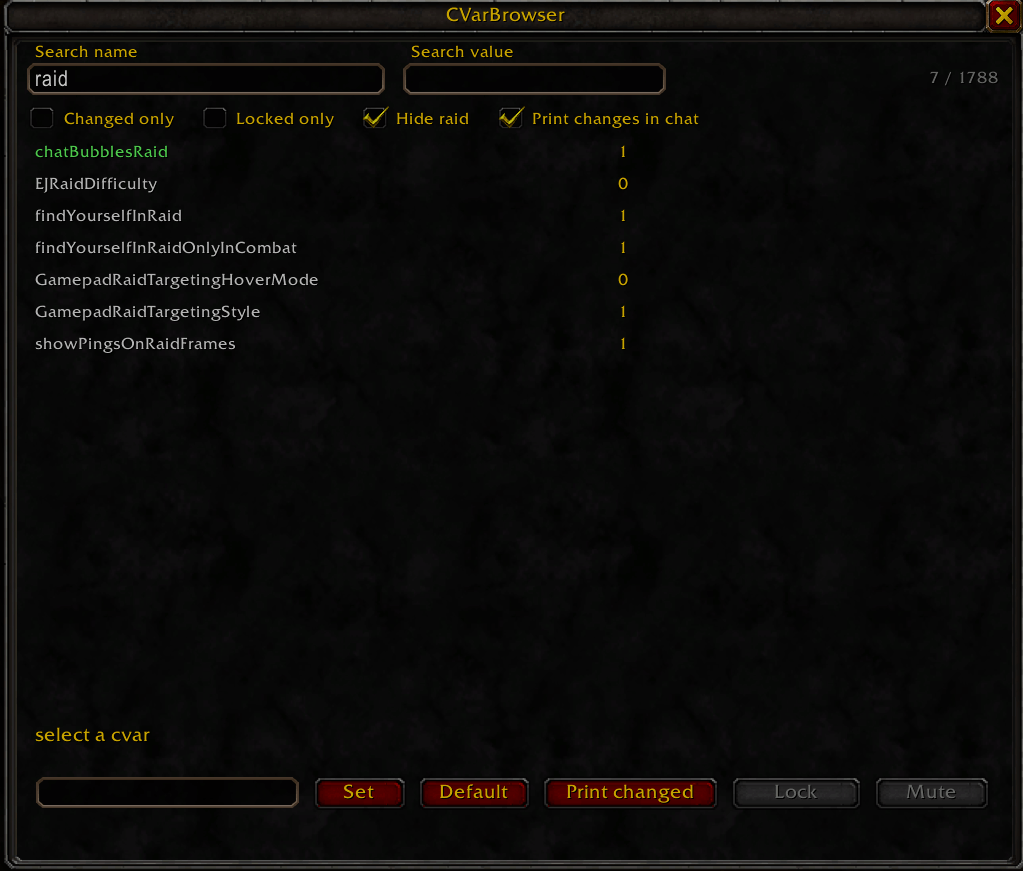
- shows every cvar - the whole list straight from the client with the current value next to it. anything you changed from default shows up green so you can actually find your stuff
- search by name or value - two boxes, use one or both. like name "shadow" + value "2048" if you want to be specific
- shift + mouseover = description - hold shift over any cvar and it tells you what it does and what happens when you raise or lower it. i wrote out 120+ of the common ones myself (graphics, lod, shadows, anti aliasing, fps stuff, camera, nameplates, sound etc). around 190 more use blizzards own menu tooltips in whatever language your game is in, and everything else falls back to the games built in help text. if im not 100% sure on one it says "best guess" so you know
- lock cvars - this is the big one honestly. stuff like view distance, environment detail and compute effects are presets, and when you touch them they overwrite a bunch of other cvars. lock the ones you care about and the browser just puts them back whenever a preset, the menu or the server changes them
- print changes in chat - turn it on and every cvar change shows in chat with where it came from (addon/script or game/preset/server). really good for figuring out what a menu option actually changes. if something spams you can mute it, and anything that keeps changing over and over gets muted for the session automatically
- read-only stuff is marked - if the game wont let you change something it shows [read-only] so you dont waste your time
- filters - changed only, locked only, and hide raid (hides all the raid/bg copies of settings because theres a ton of them)
- export - copy every cvar with its value and default into a window, or dump it to savedvariables
## commands
| command | what it does |
|---|---|
| `/cvb` | open/close the browser |
| `/cvb <name>` | prints the cvars value, default and flags |
| `/cvb <name> <value>` | sets a cvar |
| `/cvb lock <name> [value]` | locks a cvar (sets it first if you give a value) |
| `/cvb unlock <name>` | removes a lock |
| `/cvb locks` | lists everything you have locked |
| `/cvb mute <name>` / `/cvb unmute <name>` | stop/start printing changes for a cvar |
| `/cvb muted` | lists muted cvars |
| `/cvb copy` | copies all cvars (name, value, default, help) into a window |
| `/cvb export` | saves all cvars to savedvariables (gets written when you /reload) |
| `/cvb add <name>` | adds a cvar the client didnt list for some reason |
| `/cvb rescan` | rebuilds the list |
theres also buttons at the bottom for the cvar you have selected - set, default, print changed, lock, and mute (mute only shows up when print changes in chat is on)
## heads up
- some stuff on wow forever is controlled by the server (msaa and ray traced shadows for example, the `ClientSettings_` cvars). no addon can override those - you can lock them all you want and it wont stick, trust me i tried
- changing cvars can tank your fps if you go crazy with it - if you mess something up just hit default and its back to normal
## changelog
### 1.0.0
- first release
CVAR Browser Team