
CustomTalkingHead
- By
options.png
CustomTalkingHead_Paging1.png
CustomTalkingHead_Paging2.png
Description
CustomTalkingHead is a lightweight World of Warcraft Retail addon that customizes Blizzard’s original Talking Head frame without replacing the underlying dialogue system.
It keeps Blizzard’s native Talking Head behavior while giving you control over its size, text, portrait, background, and visibility. Positioning remains handled through Blizzard Edit Mode.
Features
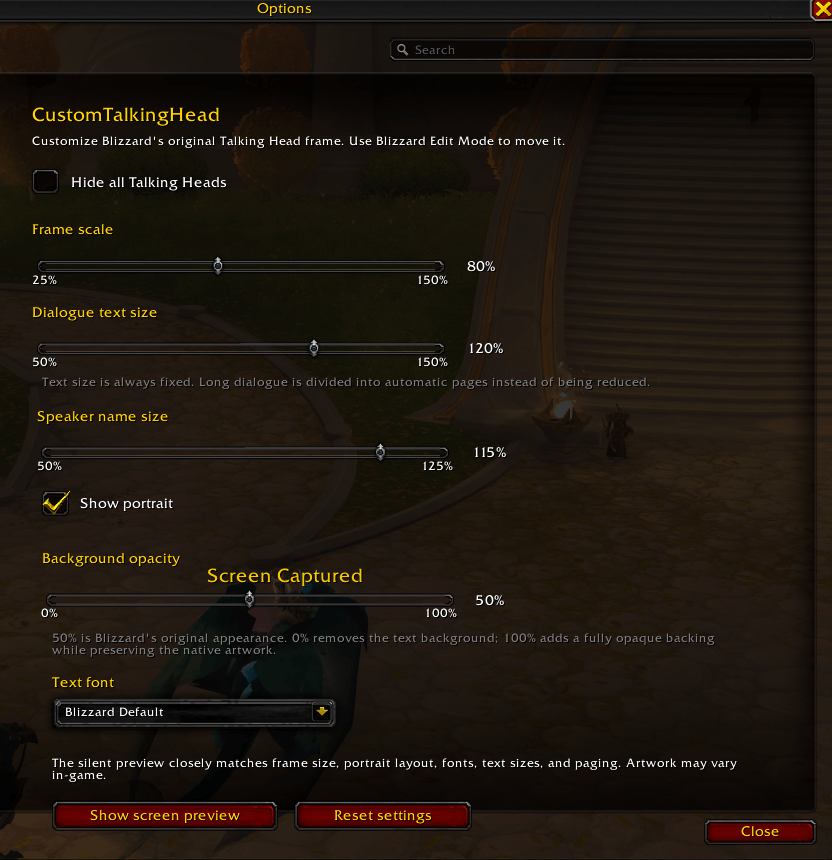
• Resize the Talking Head frame from 25% to 150%
• Adjust dialogue text size independently from 50% to 150%
• Adjust speaker name size independently from 50% to 125%
• Keep the selected text size fixed at all times
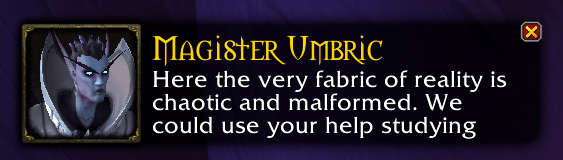
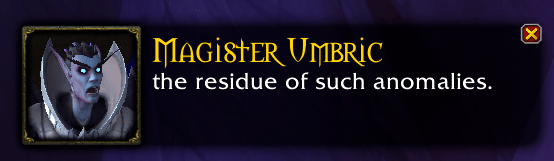
• Automatically divide long dialogue into pages instead of shrinking the text
• Show or hide the portrait and its surrounding artwork
• Hide the visual Talking Head frame while keeping voice and chat intact
• Choose between several native Blizzard fonts
• Adjust background opacity from 0% to 100%
• Use a screen preview that closely matches the real Talking Head size, text layout, portrait placement, fonts, and paging
• Save settings account-wide
• Automatic localization for English, Spanish, French, German, Italian, and Portuguese
• No external libraries or dependencies
Fixed text size and automatic paging
CustomTalkingHead never automatically reduces the text size selected by the user.
When a dialogue line is too long to fit, the addon divides it into automatic pages while preserving the selected font size. Words are kept intact and the pages advance during the original voice line.
This allows you to reduce the size of the Talking Head frame while keeping dialogue readable.
Independent speaker and dialogue sizing
The speaker name and dialogue text can be adjusted separately.
This lets you keep the speaker name compact while increasing dialogue readability, or customize both independently to suit your interface.
Portrait controls
The portrait can be shown or hidden.
When it is hidden, the dialogue text uses the available space on the left side of the frame.
This only changes the visual presentation and does not skip, close, or ignore the dialogue.
Hide all Talking Heads
If you do not want the Talking Head frame to appear at all, enable Hide all Talking Heads.
When enabled:
• The visual Talking Head frame is hidden
• Voice playback remains unchanged
• Chat behavior remains unchanged
• Your existing visual settings are preserved
• The other customization controls are temporarily disabled until Talking Heads are shown again
This option only hides the visual frame. It does not suppress or modify Blizzard’s underlying dialogue.
Background opacity
Background opacity can be adjusted from 0% to 100%.
• 0% removes the text background
• 50% matches Blizzard’s original appearance
• 100% adds a fully opaque backing while preserving the native artwork
Screen preview
CustomTalkingHead includes a silent screen preview so you can adjust the addon without waiting for a real Talking Head to appear.
The preview closely matches the elements controlled by the addon:
• Frame scale
• Portrait visibility and placement
• Speaker name size
• Dialogue text size
• Selected font
• Text layout
• Automatic paging
Blizzard may use different artwork, colors, portraits, or visual kits depending on the dialogue, so those elements may vary in actual Talking Heads.
Positioning
CustomTalkingHead does not add a separate dragging system.
Use Blizzard Edit Mode to move the Talking Head frame. The addon respects the position and footprint saved by Edit Mode.
Audio and chat
CustomTalkingHead does not modify:
• Voice playback
• Audio volume
• Chat events
• Dialogue skipping
• Talking Head close behavior
Its purpose is to customize the visual presentation of Blizzard’s Talking Head frame.
Slash commands
/cth
Open the settings panel.
/cth preview
Show or hide the screen preview.
/cth scale 80
Set the frame scale.
/cth text 125
Set the dialogue text size.
/cth name 100
Set the speaker name size.
/cth background 50
Set the background opacity.
/cth portrait on
Show the portrait.
/cth portrait off
Hide the portrait.
/cth hide on
Hide the visual Talking Head frame.
/cth hide off
Show Talking Heads again.
/cth reset
Restore the default settings.
Default settings
• Frame scale: 60%
• Dialogue text size: 100%
• Speaker name size: 100%
• Portrait: enabled
• Background opacity: 50%
• Font: Blizzard Default
• Hide all Talking Heads: disabled
Compatibility
Designed for World of Warcraft Retail.
Current release supports World of Warcraft Retail 12.1.
Feedback and bug reports
Feedback, suggestions, and bug reports are welcome.
When reporting a problem, please include:
• WoW client language
• Resolution or UI scale
• Frame scale
• Dialogue text size
• Speaker name size
• Whether the portrait was enabled
• Whether Hide all Talking Heads was enabled
• A screenshot or Lua error, when available
CustomTalkingHead Team
