
customraidtimer
- By
Custom Raid Timer to show a timer bar with a countdown for when to use you cooldown
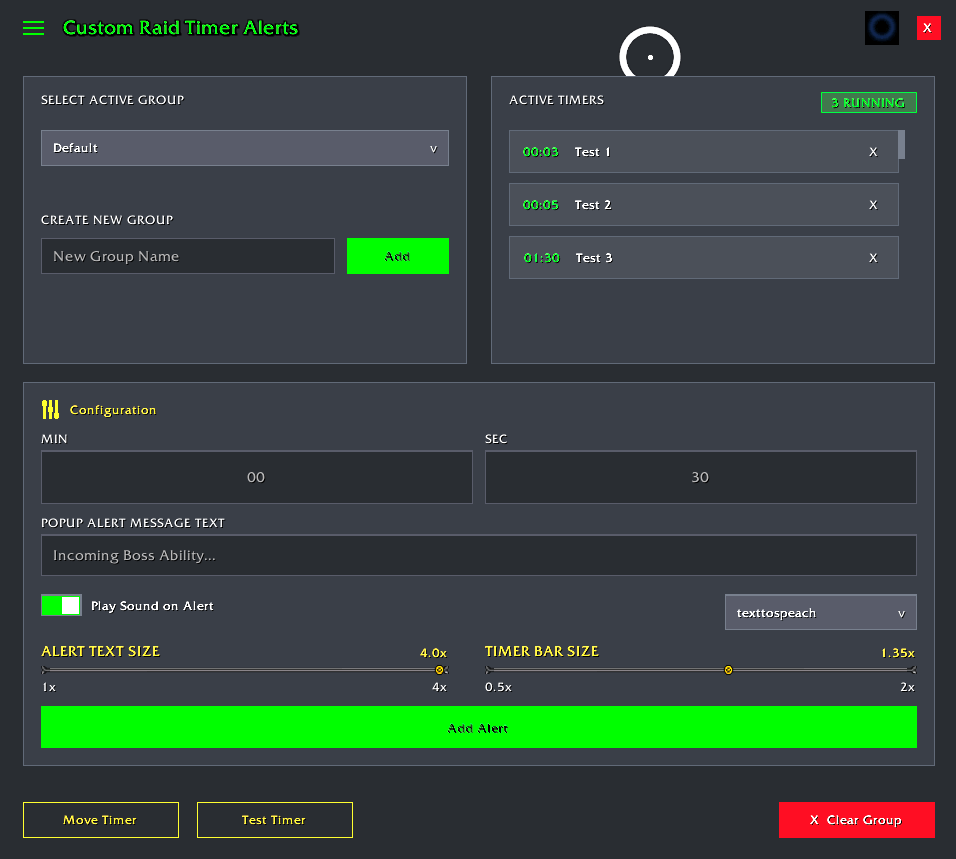
Screenshot 2026-07-04 130223.png
Description
⏱️ Custom Raid Timer (CRT)
Custom Raid Timer is a lightweight, modern, and highly customizable combat timer and alert engine designed to help players track critical boss mechanics on their own terms. Whether you need a simple visual countdown for your potion, a custom sound warning, or a Text-to-Speech (TTS) voice reminder for a major raid mechanic, CRT makes it easy to construct and manage encounter timelines.
✨ v1.30 Feature Update: Boss Spells Browser!
No more manual entry! Open the new Spells List browser panel to explore predefined boss cast timelines and import alerts instantly into your active timers profile.
🔑 Key Features
📦 1. Predefined Spells Timeline Browser (NEW!)
- One-Click Imports: Browse predefined boss spell timelines and toggle checkboxes to import them directly into your active alerts database.
- Filter Selectors: Dynamic dropdowns for Raid Zone, Difficulty, and Boss let you browse other fights and difficulties without modifying your currently active profile.
- Bulk Actions: Use Select All or Clear All to quickly import or wipe alerts.
- Expansion Ready: Easily add new boss timelines by placing a
.luafile inside theTimelines/directory and adding it to the addon's.tocmanifest. - Spell Timeline is from warcraftlogs.com raid logs
⏱️ 2. Dynamic Countdown Bars & Overlays
- Auto-Trigger: Automatically starts displaying a visual timer bar when a boss fight begins and hides it when the fight ends.
- Dynamic Target Tracking: The timer bar actively counts down to the next upcoming alert with a sliding pocket watch progression icon, then falls back to showing total combat elapsed time once all alerts are cleared.
- High-Visibility Text Popups: Triggers a prominent text alert in the center of your screen for 4 seconds at the exact second you specify.
📂 3. Nested Zone & Boss Profiles
- Sleek Navigation: Use two independent dropdowns to pick the Zone and the Boss.
- Auto-Loading: CRT automatically switches profiles when you enter a raid zone or change areas. It remembers your selections per zone and loads the correct profile when you step inside.
- Dynamic Profiles: Enter separator syntax (e.g.
Molten Core - Lucifron) in the name fields to create new zones and boss profiles instantly.
🗣️ 4. Text-to-Speech (TTS) & Custom Audio Warnings
- Hands-Free Focus: Use the integrated game engine TTS option to read your alerts aloud so you never have to look away from the action.
- Custom Media: Choose standard game warning files or custom media registered via
LibSharedMedia.
📐 5. Fully Adjustable Layouts & Testing
- Draggable Elements: Click Move Timer to unlock overlay anchors and drag them anywhere on your screen.
- Layout Scaling: Adjust sliders for the alert text size (1.0x to 4.0x) and the timer bar size (0.5x to 2.0x).
- Live Sandbox: Hit the Test Timer button to trigger a 20-second trial run to adjust visual layouts and audio settings safely outside of combat.
⚙️ How to Add a Custom Alert
- Type
/crtin your chat window to open the configuration dashboard. - Select your current Zone and Boss (or type a name to create a new profile instantly).
- Under the Configuration section, enter the target time (Minutes and Seconds).
- Enter your custom display message in the Popup Alert Message Text box.
- Click Add Alert. The alert will instantly register in your scrollable timeline.
💬 Slash Commands
/crt— Toggles the main configuration dashboard window.Esc— Closes the configuration window instantly.
customraidtimer Team
