Custom Racial Name (CRN)
- By
manari.png
Description
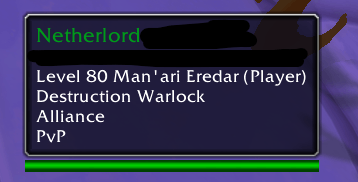
CRN is a simple local roleplay customization addon that changes how your character is displayed for you. It lets you assign custom race and class names so your tooltip reflects the identity you want for your character, instead of being limited to Blizzard’s default options.
These changes are entirely client-side. That means they are only visible to you, and only in specific places such as your tooltip and supported gossip texts. The addon does not modify anything server-side, does not affect gameplay, and does not make your custom race or class visible to other players.
Just as importantly, CRN has no communication or synchronization features of any kind. It does not connect with other users of the addon, does not share data, and does not pull in custom text from anyone else. This is a purely personal customization tool, which avoids the kinds of problems that could come from misuse by others, such as profanity, offensive labels, or inappropriate custom entries showing up in your game.
At last, enjoy your Man'ari Eredar, High Elf, Half Elf, San'layn, Darkfallen, Wildhammer Dwarf or whatever race/class you have in mind! :)
How to use
- Type
/crn configto open the addon settings. - You can also find the addon in the in-game Settings under Options ->
AddOns->Custom Racial Name. - Enter your custom race, class, and specialization names, then save them for that character.
- Leave any field empty to keep Blizzard’s default value.
- Use
/crnto quickly enable or disable the addon. - Your changes are fully local and only visible to you.
The Custom Racial Name (CRN) Team