Custom Chat Buttons
- By
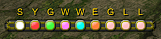
Movable chat channel bar above the chat window. Click a button to open say, party, raid, guild, whisper, or custom channels. Drag to move, block channels, set keybindings, flash on new messages.
ÐнÑмок екÑана 2026-06-20 204910.png
Description
Custom Chat Buttons adds a compact, movable button bar above the chat window in Mists of Pandaria Classic. Each button switches the chat edit box to a message type or channel: say, yell, party, raid, raid warning, instance, guild, officer, whisper, emote, and up to ten numbered channels (General, Trade, etc.).
Click a button to focus chat with the correct channel header already set, then type your message.
Features: drag to reposition, lock position, vertical layout, alternate skins, show/hide labels, channel blocking, sticky chat types, per-channel key bindings, flash on incoming messages, hide addon spam channels.
Optional dependency: Chronos (channel reorder only).
Custom Chat Buttons Team

Owner