Custom Boss Alerts
- By
Browse the Encounter Journal, pick the boss abilities you care about, and get personalized sound and visual alerts when they're cast.
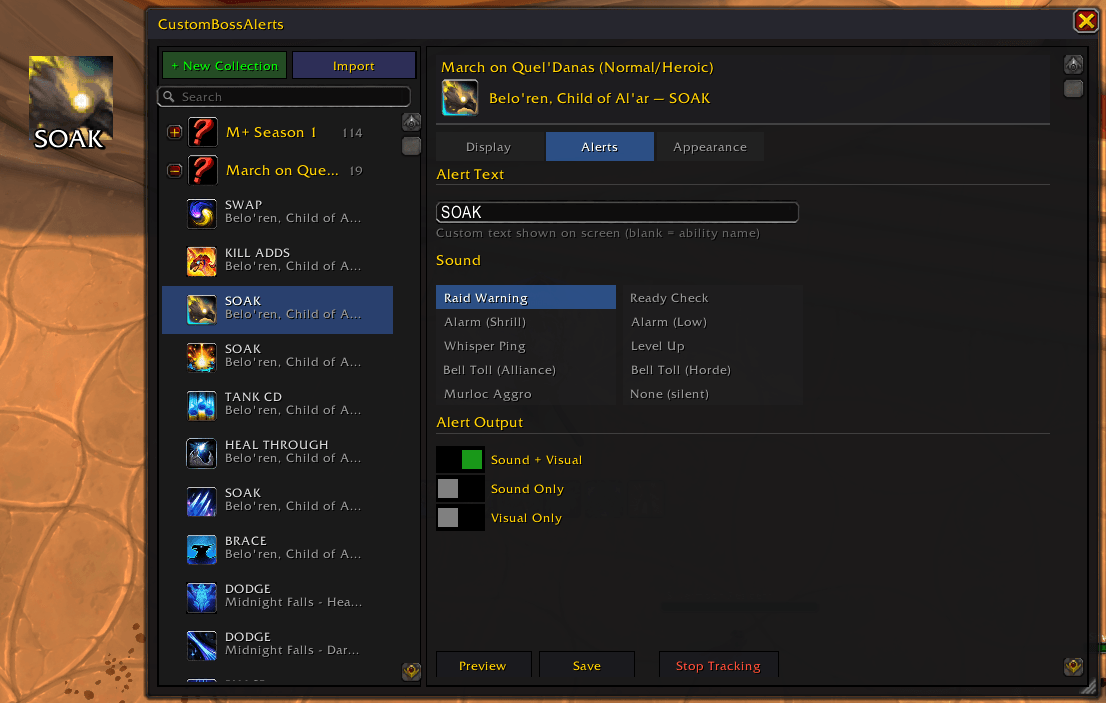
Custom Boss Alerts Example
Description
Requires BigWigs or DBM — the addon will refuse to load without one installed.
Pick the boss abilities you care about. Get alerts when they happen. Ignore everything else.
Custom Boss Alerts lets you browse the Encounter Journal, select specific boss abilities, and receive customizable sound and visual alerts when those abilities are cast. Think of it as a personal, per-ability warning system — you only see alerts for the mechanics that matter to you.
Requires World of Warcraft: Midnight (12.0.1+)
Requires BigWigs or DBM — the addon will refuse to load without one installed.
Features
Choose What You Track
Open the config with /cba, browse raids and dungeons from the Encounter Journal, and add the abilities you want alerts for. Group them into collections — one for M+ keys, one for your raid progression boss, one for the mechanics that keep killing you.
Pre-Built Collections
Ships with curated alert sets for all current content:
- Mythic+ Season 1 — all 8 dungeons with action callouts (DODGE, SOAK, TANK CD, KICK, etc.)
- Voidspire Citadel — all 6 bosses
- March on Quel'Danas — both bosses
- The Dreamrift — Chimaerus the Undreamt God
Customize Everything
- Alert type — sound only, visual only, or both (per ability)
- Sound — pick from built-in sounds or use a custom sound file
- Appearance — override icon, name, text color per ability
- Duration — adjust how long alerts stay on screen (1–15s, global or per ability)
- Screen flash — optional full-screen flash on alert
- Position — move the alert display via WoW's Edit Mode (Escape → Edit Mode)
Share With Your Group
Export any collection as a compact string and share it in guild chat, Discord, or wherever. Importing brings in all abilities and their settings — same format as WeakAuras.
Boss Mod Compatibility
| Boss Mod | Dungeon Support | Raid Support |
|---|---|---|
| BigWigs / LittleWigs | All difficulties | All difficulties |
| DBM | Mythic+ keystones only | Varies per boss |
BigWigs + LittleWigs is recommended for the best coverage across all difficulties. Due to Midnight's secret value system, spell IDs are hidden from addons in instances — boss mods decode them, and Custom Boss Alerts listens to their callbacks.
Slash Commands
| Command | Description |
|---|---|
/cba |
Open the configuration window |
/cba test |
Fire a test alert |
/cba test [iconID] [name] |
Test with a custom icon and name |
/cba list |
List all tracked abilities |
/cba reset |
Reset all settings to defaults |
Alert positioning is done through WoW's built-in Edit Mode (Escape → Edit Mode). Select the Custom Boss Alerts frame and drag it where you want.
How It Works
- Outside combat — browse the Encounter Journal in the config UI, pick abilities, organize them into collections
- Boss pull — Custom Boss Alerts listens for your boss mod's timer callbacks (BigWigs / DBM) and Blizzard's Encounter Timeline
- Ability detected — if the ability matches one you're tracking, you get your configured alert (sound, visual, or both)
- On-screen display — icon with countdown swipe, ability name, and target name where applicable
FAQ
Do I need BigWigs or DBM? Yes — it's a hard requirement. Custom Boss Alerts will refuse to load without one installed and print a message in chat.
Why didn't my alert fire?
Check: (1) the ability is enabled in at least one collection, (2) your boss mod covers this difficulty (see compatibility table above), (3) the encounter name matches — use /cba list to verify.
Can I use this alongside BigWigs / DBM? Yes. Custom Boss Alerts listens to their callbacks passively — it doesn't modify or interfere with your boss mod's own bars and warnings.
The Custom Boss Alerts Team