Screenshot 2026-04-20 at 7.35.20â¯PM.png
Description
Cursor Effects - World of Warcraft Addon
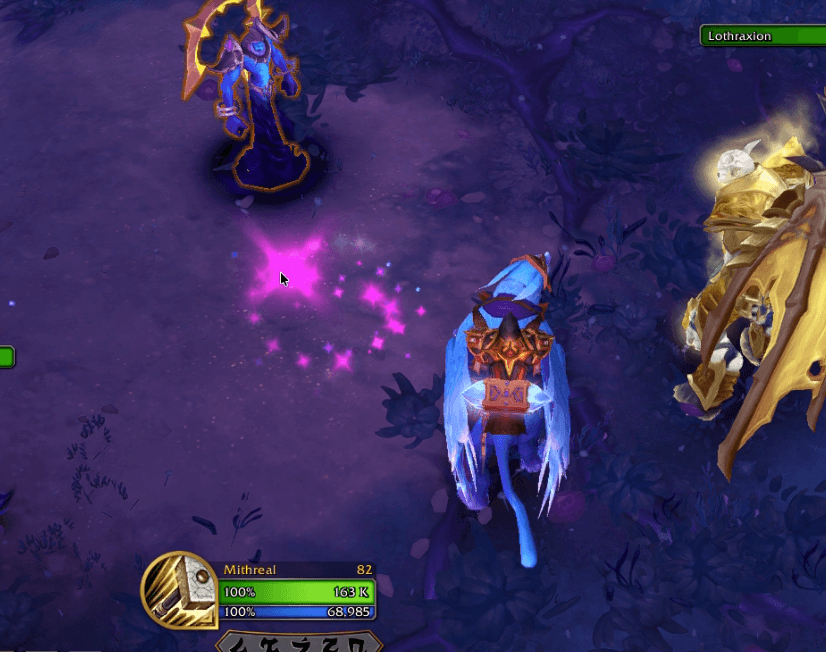
An addon that enhances your mouse cursor with customizable visual effects to make it more visible and distinctive during gameplay.
Features
- Multiple Effect Types: Glow, Pulse, Trail, and Sparkle — enable any combination simultaneously
- Per-Effect Colors: Assign a different color to each effect independently
- Rainbow Mode: Enable smooth rainbow color cycling for any effect
- Shake-to-Find Crosshair: Shake your mouse rapidly to trigger a crosshair animation that converges on your cursor and flashes
- 24 Preset Colors: Quick color buttons in the settings panel, plus a full color picker per effect
- Slash Commands: Full control via
/cecommands - In-Game Settings Panel: Accessible from Game Menu → Settings → AddOns → Cursor Effects
- Multi-Language Support: English, Portuguese (Brazilian), German, and French
- Saved Settings: All preferences persist across sessions via SavedVariables
Installation
Extract the
CursorEffectsfolder to your WoW AddOns directory:- macOS:
/Applications/World of Warcraft/_retail_/Interface/AddOns/ - Windows:
C:\Program Files\World of Warcraft\_retail_\Interface\AddOns\
- macOS:
Launch WoW, enable "Cursor Effects" in the AddOns menu on the character select screen.
Log in — you should see "Cursor Effects v1.0.0 - Loaded!" in chat.
Settings Panel
Open via Game Menu → Settings → AddOns → Cursor Effects, or type /ce options. text
- Enable Cursor Effects — Master on/off toggle
- Effect Types — Check any combination: Glow, Pulse, Trail, Sparkle
- Shake-to-Find Crosshair — Toggle the shake-triggered crosshair on/off
- Crosshair Sensitivity — Adjust how easily mouse shaking triggers the crosshair (0.5x – 2.0x)
- Mouse Size — Scale the effect (0.5x – 3.0x)
- Glow Intensity — Brightness of the glow layers (0 – 2.0)
- Pulse Speed — Animation speed for pulse effect (0.5x – 2.0x)
- Effect Colors — Pick a color for each effect individually (Glow, Pulse, Trail, Sparkle, Crosshair)
- Rainbow Checkboxes — Enable smooth rainbow color cycling per effect
- Set All Colors — Change every effect's color at once
- Preset Colors — 24 one-click color buttons (applies to all effects)
Slash Commands
All commands use /ce (or /cursoreffects):
| Command | Description |
|---|---|
/ce toggle |
Toggle effects on/off |
/ce effect <type> |
Toggle an effect on/off (glow, pulse, trail, sparkle, none) |
/ce size <n> |
Set cursor effect size (0.5 – 3.0) |
/ce intensity <n> |
Set glow intensity (0 – 2.0) |
/ce color <name> |
Set all effect colors by name |
/ce color <effect> <name> |
Set one effect's color (glow, pulse, trail, sparkle, crosshair) |
/ce rainbow [effect|all] |
Toggle rainbow cycling for effect(s) (glow, pulse, trail, sparkle, crosshair, all) |
/ce crosshair |
Toggle shake-to-find crosshair on/off |
/ce options |
Open the settings panel |
/ce help |
Show help message |
Available Color Names
red, green, blue, cyan, magenta, yellow, orange, pink, purple, white, gold, lime, teal, coral, lavender, mint, crimson, skyblue, peach, violet
Effect Types
| Effect | Description |
|---|---|
| Glow | Steady glowing aura around the cursor using layered star4 textures |
| Pulse | Expanding/contracting animation with adjustable speed |
| Trail | Star particles left behind as you move the mouse |
| Sparkle | Twinkling particles orbiting the cursor with color shimmer |
| Crosshair | Shake your mouse to trigger — 4 arms converge on cursor and flash twice |
Effects can be combined — e.g., enable Glow + Sparkle together for a glowing cursor with sparkle particles.
Default Settings
| Setting | Default |
|---|---|
| Enabled | Yes |
| Effects | Glow |
| Crosshair | On |
| Mouse Size | 1.5x |
| Glow Intensity | 1.0 |
| Pulse Speed | 1.0 |
| All Colors | Cyan (0, 1, 1) |
File Structure
CursorEffects/
├── CursorEffects.toc      - Addon manifest (Interface 120001)
├── icon.png               - Addon icon
├── core.lua               - Main addon logic, effects, shake detection, slash commands
├── options.lua            - Settings panel (scrollable, Settings API, per-effect colors)
├── effects.lua            - Effect utilities
├── localization.lua       - Multi-language strings (EN/PT/DE/FR)
└── README.md              - This file
Technical Notes
- WoW Version: 12.0.5 (Midnight), Interface 120005
- Settings API: Uses
Settings.RegisterCanvasLayoutCategory - Color Picker: Uses
ColorPickerFrame:SetupColorPickerAndShow() - Performance: Frame pooling for trail/sparkle particles with configurable caps (30 trail, 40 sparkle)
- SavedVariables:
CursorEffectsDB— automatically migrates old single-color and effectType settings - Shake Detection: Monitors mouse direction reversals within a 0.5s window; 3+ reversals with sufficient movement triggers the crosshair
- Languages: enUS, ptBR, deDE, frFR
Troubleshooting
| Issue | Solution |
|---|---|
| Addon not loading | Verify folder is named CursorEffects and contains .toc file |
| Effect not visible | Increase Mouse Size or Glow Intensity; try a brighter color |
| Performance lag | Disable Trail and Sparkle; use Glow or Pulse alone |
| Settings not saving | Check CursorEffectsDB is listed in .toc SavedVariables |
| Options panel empty | Type /ce options or /reload |
| Crosshair not triggering | Check it's enabled in settings; shake mouse faster side-to-side |
The Cursor Effects Team