Curse Alert
- By
A lightweight TBC Classic Anniversary addon for Mages. Shows a draggable, pulsing purple alert when any party member is afflicted by a Curse you can remove with Remove Lesser Curse.
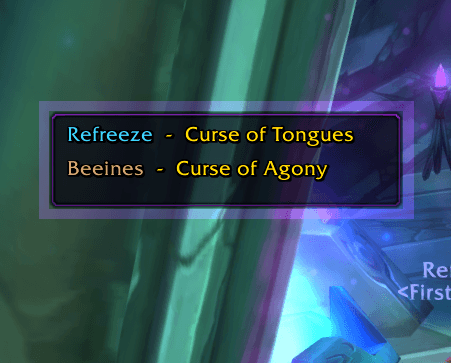
Screenshot_20260212_205841-1.png
Description
CurseAlert v1.00
A lightweight TBC Classic Anniversary addon for Mages. Shows a draggable, pulsing purple alert when any party member is afflicted by a Curse you can remove with Remove Lesser Curse.
Purely informational — no auto-targeting, no auto-casting, no click-to-decurse. Just a visual cue so you never miss a curse.
How It Works
CurseAlert listens for aura changes on you and your party (UNIT_AURA). When it detects a debuff with type "Curse" on any party member (including yourself), it shows a compact list:
PlayerName  -  Curse of Tongues
PlayerName  -  Curse of Agony
Each player name is displayed in their class colour. The frame has a pulsing purple border glow so it's hard to miss mid-combat. When all curses are removed, the frame disappears.
Installation
- Download and extract
CurseAlert.zip - Copy the
CurseAlertfolder into:
World of Warcraft/_classic_/Interface/AddOns/CurseAlert/- The folder should contain:
   CurseAlert/
   ├── CurseAlert.toc
   ├── CurseAlert.lua
└── README.md- Restart WoW or type
/reload
Slash Commands
| Command | Description |
|---|---|
/ca |
Show all commands |
/ca test |
Toggle test mode — shows fake curse data so you can position the frame. Type again to turn off. |
/ca lock |
Lock the frame in place (disables dragging) |
/ca unlock |
Unlock the frame (enables dragging) |
/ca scale 1.5 |
Resize the frame (range: 0.5 to 3.0) |
/ca reset |
Reset position, scale, and lock state to defaults |
Positioning
- Type
/ca testto show the frame with sample data - Left-click and drag the frame wherever you want it
- Type
/ca lockto prevent accidental moves - Type
/ca testagain to exit test mode
Your position is saved between sessions.
What It Detects
CurseAlert reacts to any debuff where the game's debuffType is "Curse". This covers all curses from both PvE and PvP sources, which is exactly what Remove Lesser Curse can dispel. Examples:
PvP: Curse of Tongues, Curse of Exhaustion, Curse of Agony, Curse of Doom, Curse of the Elements, Curse of Shadow, Curse of Weakness, Curse of Recklessness
PvE: Any boss or mob curse ability (e.g. Maiden of Virtue's Holy Fire is not a curse, but Shade of Aran's curses are)
What It Does NOT Do
- Does not target anyone
- Does not cast Remove Lesser Curse
- Does not modify your party frames or any other addon
- Does not work in raids (party only — up to 4 party members + you)
- Does not use any protected/secure frames — zero taint risk
Compatibility
- Game version: TBC Classic Anniversary (Interface 20505 / patch 2.5.5)
- Conflicts: None known. CurseAlert creates its own standalone frame and doesn't touch any Blizzard UI elements.
- Addons: Works alongside ElvUI, SUF, Grid, Decursive, WeakAuras, etc. without issues.
Saved Variables
CurseAlert stores your settings in CurseAlertDB (in WTF/Account/.../SavedVariables/CurseAlert.lua):
point,relPt,x,y— frame positionscale— frame scalelocked— whether dragging is disabled
Delete this file to fully reset all settings.
Technical Notes
- Uses
UnitDebuff(unit, index)which returnsname, icon, count, debuffType, ...in the TBC Anniversary client (norankreturn — that was removed in the modern client base) - Scans
player,party1throughparty4onUNIT_AURAandGROUP_ROSTER_UPDATEevents - Frame inherits
BackdropTemplateas required by the TBC Anniversary API - Uses
GetNumSubgroupMembers()(not the deprecatedGetNumPartyMembers()) - The pulsing border is four additive-blended edge textures, not a single glow overlay
License
Free to use, modify, and share. No restrictions.
Curse Alert Team