Cubby
- By
Raid-readiness for WoW Classic. Set a target count per consumable; Cubby auto-buys at vendors and shuffles bag↔bank to keep you topped up. Tracks world buffs (Chronoboon-aware) with an on-screen missing-list
Cubby_items.JPG
Cubby_buffs.JPG
Cubby_settings.JPG
Description
Cubby answers two questions before a raid:
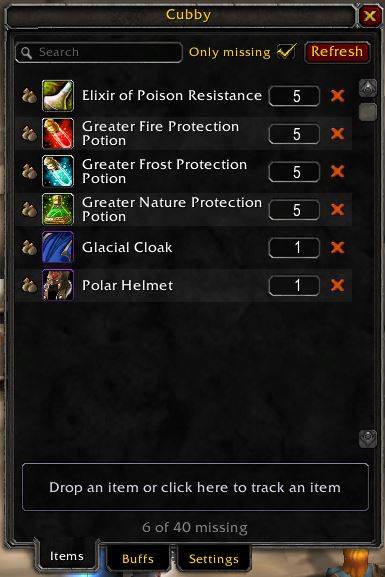
- Are my consumables stocked? Pick the items you want on hand and set a target count. Cubby auto-buys what you're short on at any vendor, and shuffles bag↔bank to match when you visit a banker. The on-screen tracker shows you only what's still missing.
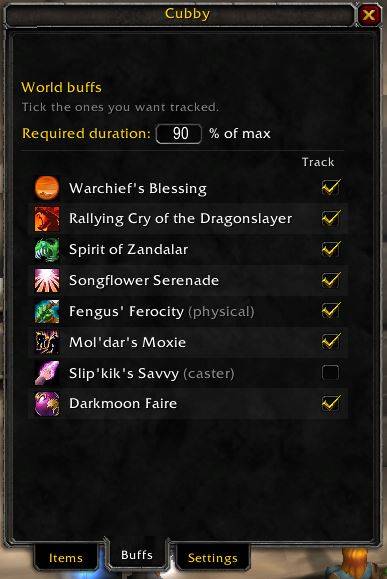
- Are my world buffs up? Tick the buffs you care about. The tracker shows the ones that aren't on you (or are about to expire). Chronoboon-stored buffs count as having the buff.
No profiles, no per-spec presets. One number per item, one tick per buff.
Items
- Drag any item into the main window — or onto the bottom drop strip — to track it. Default target is 20.
- Add by name: click the drop strip with an empty cursor, type the item, hit Enter. Items the client hasn't seen yet land under Not yet seen with a
?icon and graduate automatically the first time you encounter them (loot, tooltip, vendor, AH). - Edit the target inline. Changes apply immediately — including the live bank shuffle if you're at a banker.
- Vendor auto-buy — at any merchant, Cubby buys exactly what you're short on. Hold Shift on open to skip.
- Bank shuffle — at the bank, withdraws and stashes so each item ends at its target. Subset-sum stack picker reaches the target exactly when stack arithmetic allows. Hold Shift on open to skip.
- Live progress bar while the bank shuffle runs.
- Only-missing filter to collapse the list to just the items below target.
Buffs
- One row per applicable world buff (Warchief's, Rallying Cry, Zandalar, Songflower, Fengus', Mol'dar's, Slip'kik's, DMF). Tick the ones you want tracked.
- Class hint next to each name (physical / caster) so you know which buffs apply to your role.
- Required duration — the % of each buff's max duration below which it counts as about to expire (default 90%). A short buff shows on the tracker as
Buff name (Nm). - Chronoboon-aware — buffs stored in your Chronoboon Displacer count as active.
- Hover any row's icon for the spell tooltip.
Tracker (always-on)
- Sits on the right edge of the screen by default; drag to move; lock or hide from the Settings tab.
- Two sections — Buffs at top, Items below (grouped by category).
- Click anywhere to open the main window.
- Status icons: ✓ stocked, banker = bank can cover, auctioneer = even bank can't cover.
Slash commands
/cubbyor/cb— toggle the main window./cubby tracker— bring the tracker back after the in-session hide button./cubby reset— recenter the main window./cubby bank retry— re-run the bank shuffle after manually unwedging a slot.
Settings
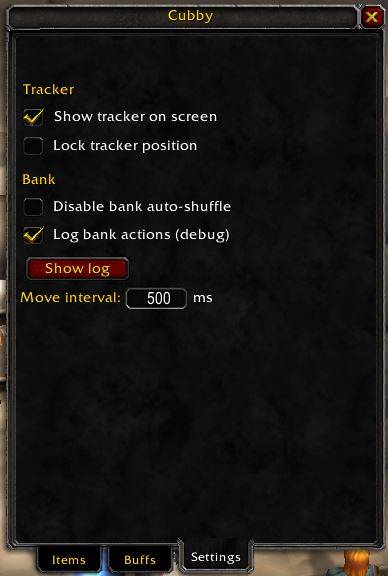
- Show / hide / lock the on-screen tracker.
- Disable the bank auto-shuffle entirely.
- Log every bank action (debug) — copy-paste from a popup if anything goes sideways.
- Tune the bank shuffle interval (ms).
Supported clients
- Classic Era (1.15.x) — primary.
- Cata Classic, Mists Classic, and Retail interface numbers are declared in the
.toc; the container API uses the cross-flavourC_Containershim. Reports welcome if you hit a flavour-specific quirk.
Attribution
The world-buff catalog and Chronoboon decode are adapted from JustAPoint's Buffs.lua, which mirrors KerathRaidcheck.
The Cubby Team