CrieffList: One-Click Mythic+ Key Listing
Have you ever opened the group finder to list your key and changed dungeon and had the whole group finder change? I have, and I hate it!
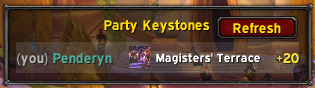
CrieffList is a small World of Warcraft addon for the Premade Groups finder. It adds a side panel that shows every party member's current Mythic+ keystone, and turns listing a key into a single click: pick the row for the dungeon you want to run, type the level (because you have to, can't automate that), hit List Group and go!
Overview
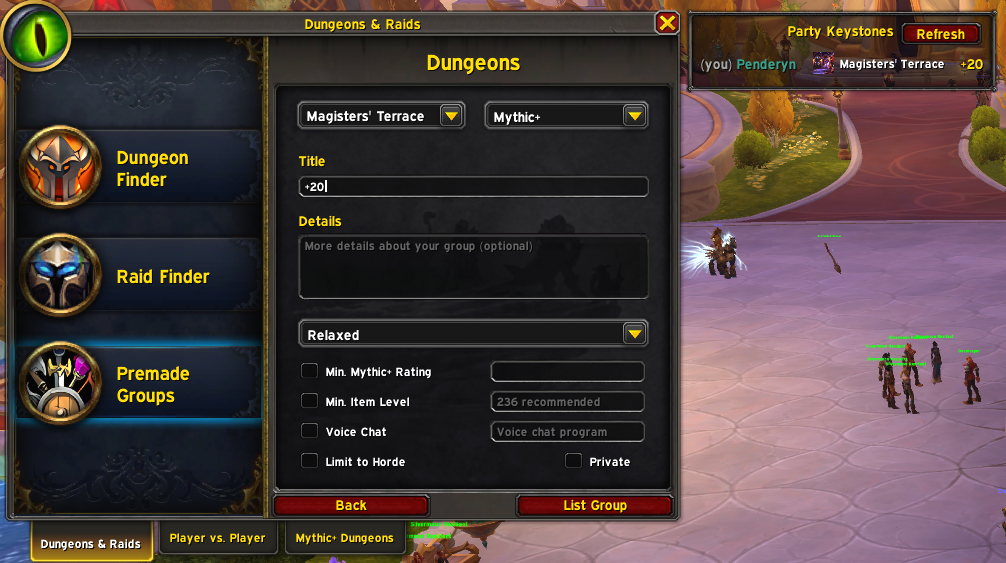
Open Group Finder → Premade Groups → Dungeons → Start a Group. The CrieffList panel anchors to the right of the dialog and lists each party member's keystone — dungeon and level — pulled live from the M+ ecosystem libraries.
Click a row and CrieffList does the rest:
- Selects the correct dungeon activity
- Sets the difficulty to Mythic+
- Sets the playstyle to Relaxed
- Focuses the Name field so you can type the key level
That's the whole addon. No options frame, no profiles, no tooltip integrations.
How It Knows Your Party's Keys
CrieffList reads keystone data from, in order:
- LibKeystone — shipped by BigWigs, Details!, MDT, and Plater. If anyone in your group is running one of those addons, their key shows up within seconds of opening the Group Finder.
- LibOpenRaid — a secondary fallback used by other M+ addons.
- CrieffList's own addon-channel broadcast — so two CrieffList users will see each other's keys even if nobody in the party runs any of the libraries above.
Your own key is read directly from the game and always appears.
Slash Commands
/kl(or/crieff) — opens the Group Finder and navigates straight to the Premade Groups → Dungeons → Start a Group dialog./kl debug— dumps the resolved activity for your current keystone, every M+ activity the client knows about, and the cached party keystones. Output goes to chat and to a copyable text window. Useful for reporting issues./kl test— opens a test panel listing every M+ activity LFGList currently knows about. Each row is hardcoded — clicking it bypasses CrieffList's matcher and asks Blizzard's UI directly. Helps isolate whether a problem is in matching or in the activity setup itself.
One Caveat: The Name Field
Blizzard's Group Finder Name field is engine-protected — addons can read focus and selection but cannot write text into it. CrieffList focuses the field for you, but you'll still need to type the key level (e.g. +15) yourself. Everything else — dungeon, Mythic+ difficulty, Relaxed playstyle — is set automatically.
Installation
CrieffList supports retail WoW (The War Within / Midnight, Interface 12.0.0 and 12.0.5).
- WowUp — search for "CrieffList" in the WowUp Hub catalog.
- Manual — download the latest release zip from the Releases page and extract it into
World of Warcraft/_retail_/Interface/AddOns/.
Reporting Issues
If something doesn't work, run /kl debug, copy the output, and open an issue at https://github.com/rkst/crieff-list/issues with the dump attached. The debug dump includes the addon version, your locale, and the activity table — usually enough to pinpoint a name-matching or localization mismatch.
The CrieffList Team