
CraftQ
- By
A tradeskill planner for WoW Classic that queues recipes, shows exactly which materials you're missing across bags and bank, and supports per-recipe stock targets so your consumables stay topped up.
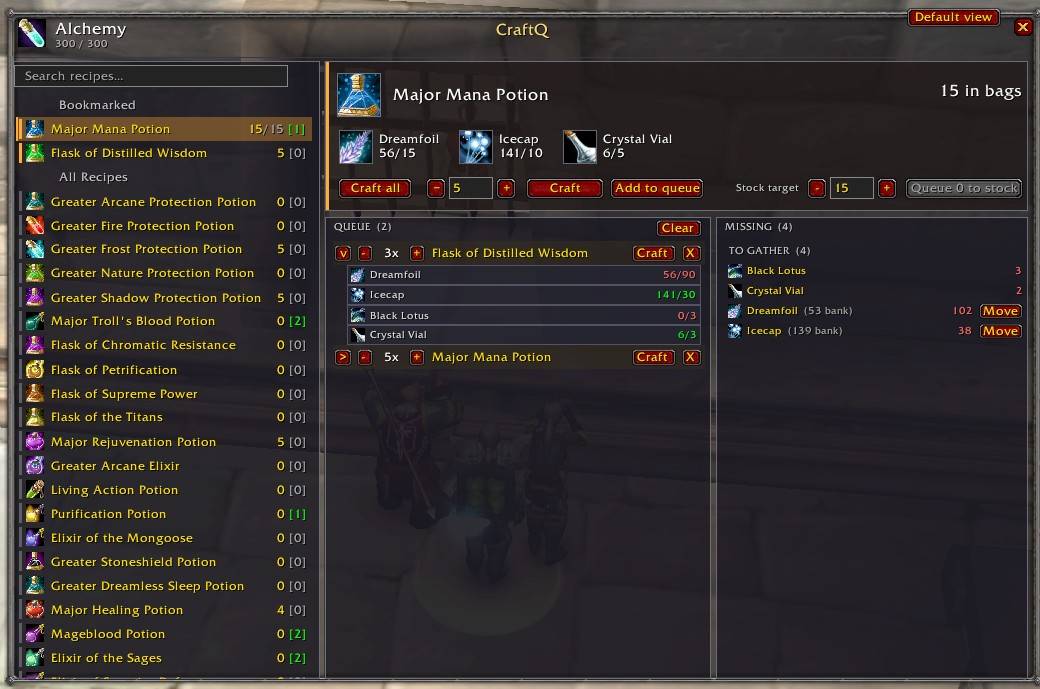
craftq.jpg
Description
Overview
CraftQ is a focused tradeskill planner for WoW Classic. It scans your profession recipes, lets you queue what you want to make, and shows exactly which materials you're missing across your bags and bank — so you always know what to gather, what to craft, and what to retrieve from the bank.
Features
Recipe browser
- Per-character, per-profession recipe lists captured directly from the tradeskill window.
- Bookmark your favourites — they pin to the top in a dedicated section.
- Live search filter and a single-click bookmark indicator on every row.
- Each row shows your current inventory of the output item and how many you can craft right now with current reagents.
Selected-recipe panel
- Item icon, name, and reagent chips with colour-coded have / need counts.
- Quantity stepper with
Craft,Craft all, andAdd to queueactions. - Per-recipe stock target with a
Queue N to stockbutton — automatically queues the gap between your inventory and your target.
Crafting queue
- Inline +/− stepper on every queued row; no popups.
- Expand a row to see its dependency tree: intermediates in gold, raw inputs indented.
- Queue counts decrement as each cast actually succeeds — cancelling a session leaves the un-crafted portion intact instead of vanishing the whole stack.
- One-click
Craftor remove (X) per row, plus a queue-wideClear.
Missing materials
- Split into two clear groups: TO GATHER (raw materials) and TO CRAFT (intermediates), so you always know whether to forage or to fire up the forge.
- Each unique item appears once with an aggregated total — no duplicates from multiple parents.
- Items held in the bank are annotated
(N bank)so you know they're retrievable. - A
Movebutton transfers the exact missing quantity from bank to bags — stacks are split precisely so you never overshoot.
Automatic tracking
- Bag and bank inventory refresh in the background as items move; no manual rescans.
- Profession data updates whenever the tradeskill window is open.
- Cached craftable-recipe index so the planner stays snappy even across multiple professions.
Quiet by default
- Routine scan/cache messages are silenced; toggle them on with
/cq chatif you want the chat feedback.
Usage
Open any profession window and CraftQ adds a CraftQ button to switch into the planner view. Press Escape to close. Use /cq for a status summary or /cq show to open the planner standalone.
CraftQ Team
