CraftProfit Forever
- By
Craft cost and profit for every recipe, right in the WoW Forever profession window.
UI.jpg
Description
CraftProfit
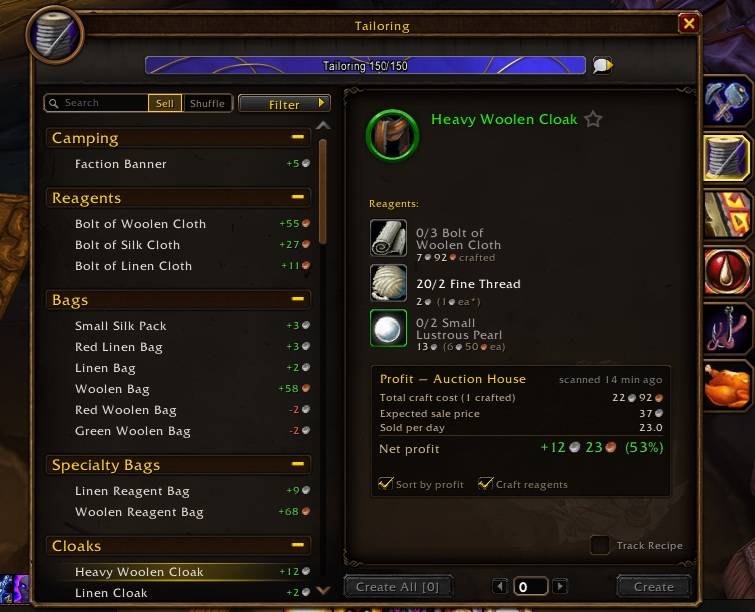
Know which recipes make gold before you craft them. CraftProfit shows the cost and profit of every recipe right inside the default profession window of WoW Forever. There is no extra window to open and nothing to configure to get started.
Features
- Profit on every recipe row: a compact tag such as
+12.4gor-35s, green or red, so the list doubles as a profit ranking. Switch it to margin (+27%) or show both. - Sort by profit: the most profitable recipes come first within each category. Toggle it from the profession window's Filter menu.
- Reagent prices: line totals and unit prices under every reagent. Vendor-bought reagents (thread, vials, dyes) are priced at the vendor price when that is cheaper.
- Profit breakdown panel: total craft cost, expected sale price, estimated sales per day and net profit after the Auction House cut. Hover it for a per-reagent breakdown.
- Craft your own reagents: reagents you can craft yourself (Bolt of Woolen Cloth for a Woolen Bag, for example) are priced at their own craft cost when that beats buying them. This also works through chains, for example ore → bar → tube → finished item. Open each profession once so its recipes are known.
- Item tooltips: the auction price, where it came from and how old it is, on every item.
- Shared across your characters: scan on your banker and see the prices on your crafters.
Price sources
- Its own Auction House scan: click CraftProfit Scan in the Auction House (10–60 seconds).
- Auctionator: picked up automatically if it is installed.
- TradeSkillMaster: picked up automatically if it is installed. Price strings can be changed.
Leave the source on Automatic to use the first one that has data, or choose one in the options.
Getting started
- Open the Auction House and click CraftProfit Scan (bottom left, next to your money). Skip this step if you use Auctionator or TSM.
- Open any profession. Every recipe now shows its profit.
Settings: Options → AddOns → CraftProfit, or type /cp for the command list.
Commands
| Command | What it does |
|---|---|
/cp scan |
Scan the Auction House (it must be open) |
/cp status |
Show the price source, scan data and settings |
/cp options |
Open the settings panel |
/cp sort |
Toggle sort by profit |
/cp tag profit \| margin \| both |
Choose what recipe rows show |
/cp craft |
Toggle pricing reagents at their own craft cost |
/cp cut <percent> |
Set the Auction House cut used for net profit (default 5%) |
/cp source auto \| craftprofit \| auctionator \| tsm |
Choose the price source |
/cp reset confirm |
Wipe all scan data and settings |
Notes for the WoW Forever beta
- Older beta builds did not load addon saved files. Current builds do, but CraftProfit also keeps a compact backup copy in the client's console settings file, so your scans and settings survive even if a future build breaks saving again.
- WoW Forever is in beta and its API can change between builds. If something breaks after a patch, please report it on Discord (#bug-reports) or in the comments, with the output of
/cp status. - Auctionator and TSM support has not been tested in game yet. CraftProfit's own Auction House scan is the tested price source. If prices from Auctionator or TradeSkillMaster (including custom TSM price strings) look wrong or missing, switch to the built-in scan with
/cp source craftprofitand please report it on Discord or in the comments. - "Sold per day" counts every listing that disappeared between two of your scans, expired ones included. Treat it as an upper bound.
Help, bugs and ideas
Join the Vystery Addons Discord: https://discord.gg/hbJXz7qqpJ
Questions go in #addon-help, bugs in #bug-reports, ideas in #suggestions.
License
MIT. Made by Vystery.
CraftProfit Forever Team