
CraftProfit
- By
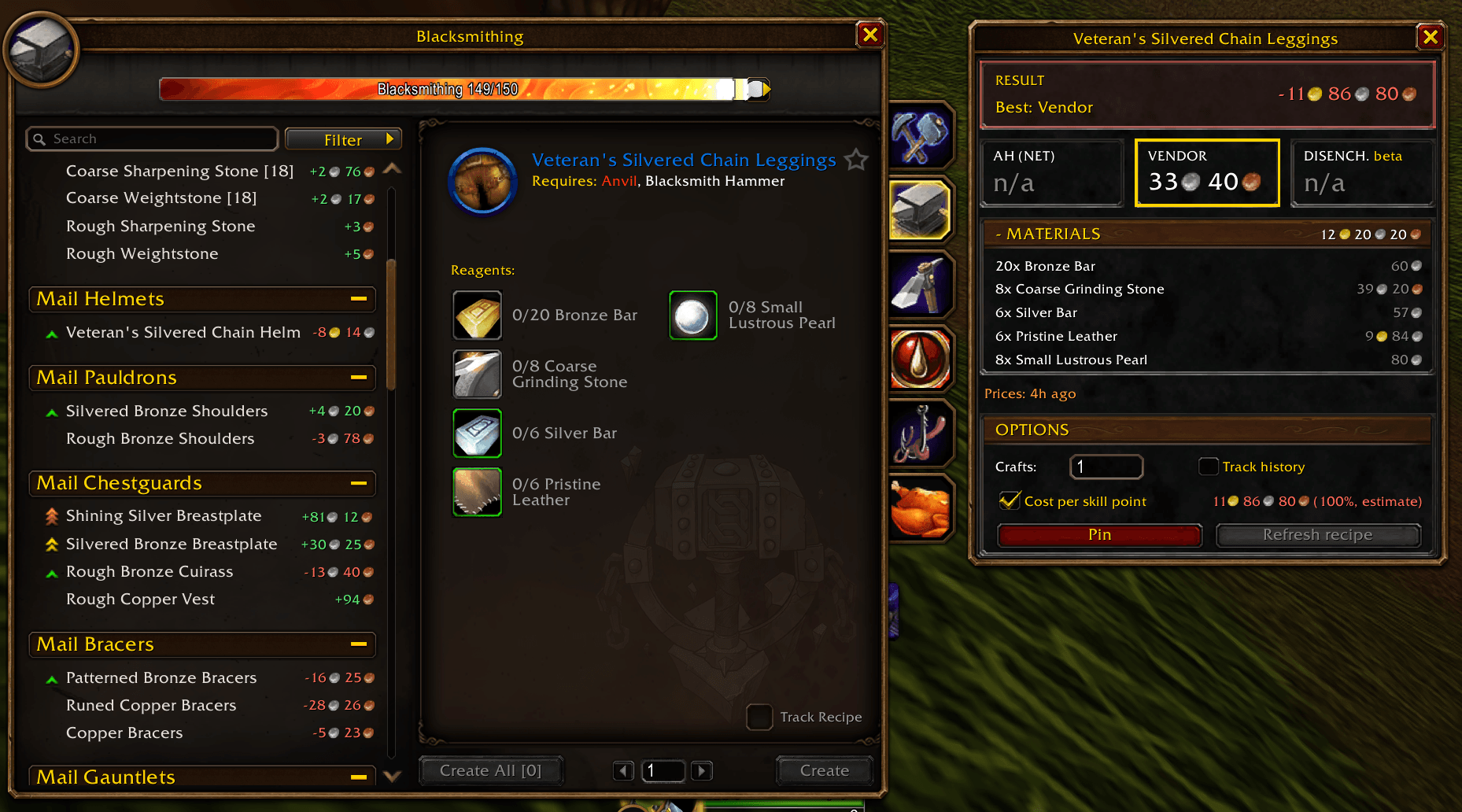
01-main-window.png
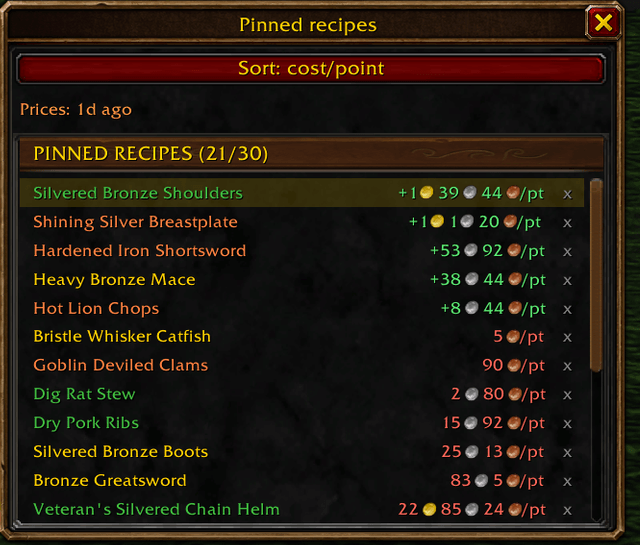
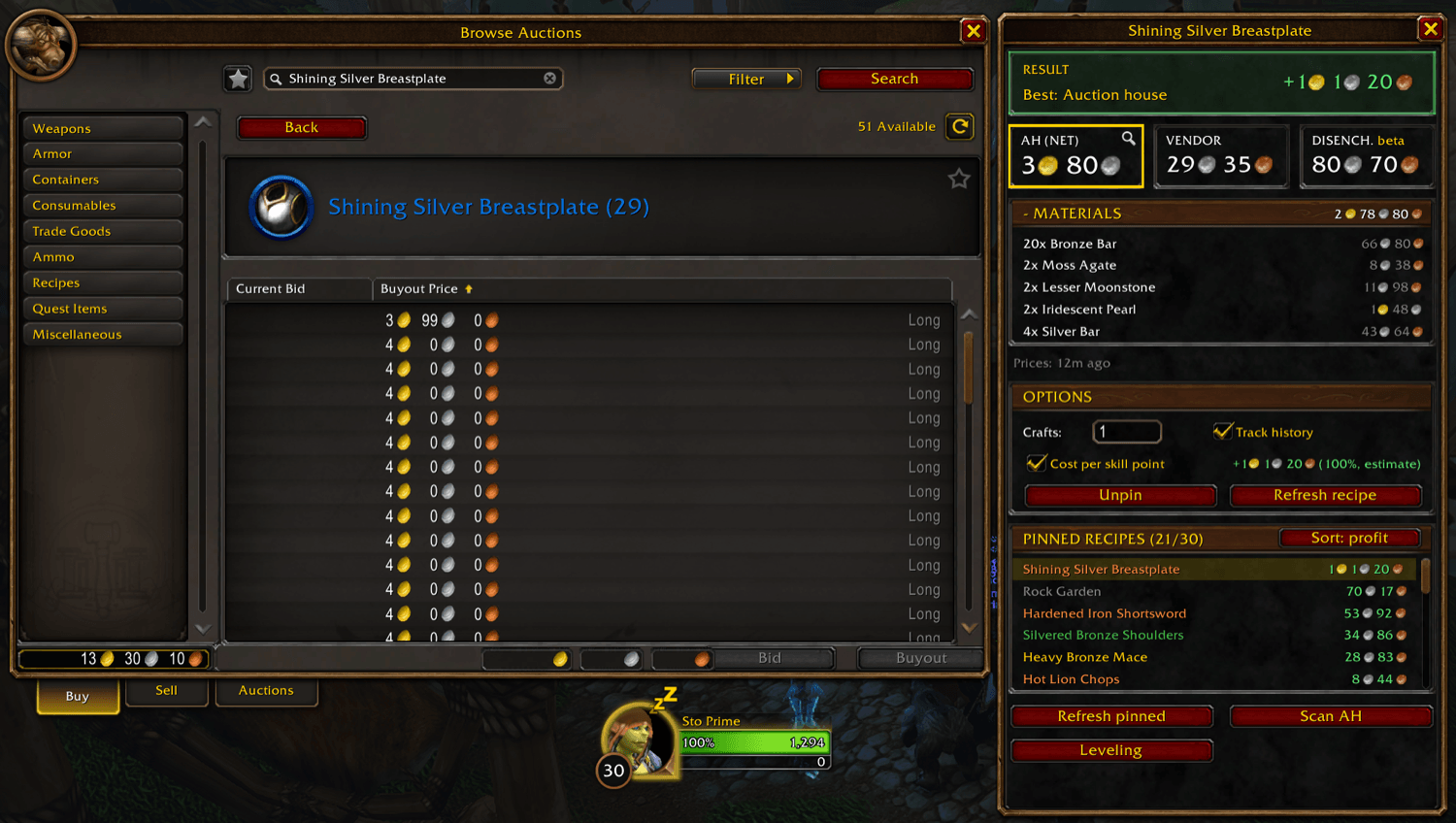
02-pinned-window.png
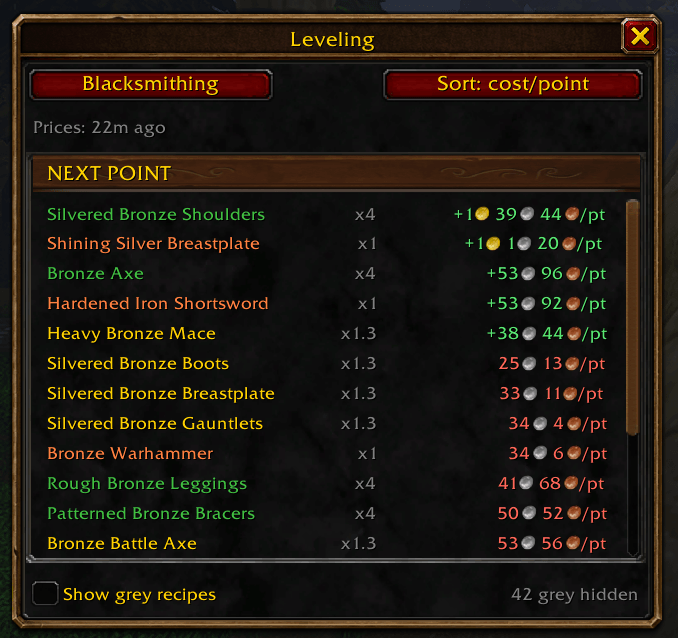
03-leveling.png
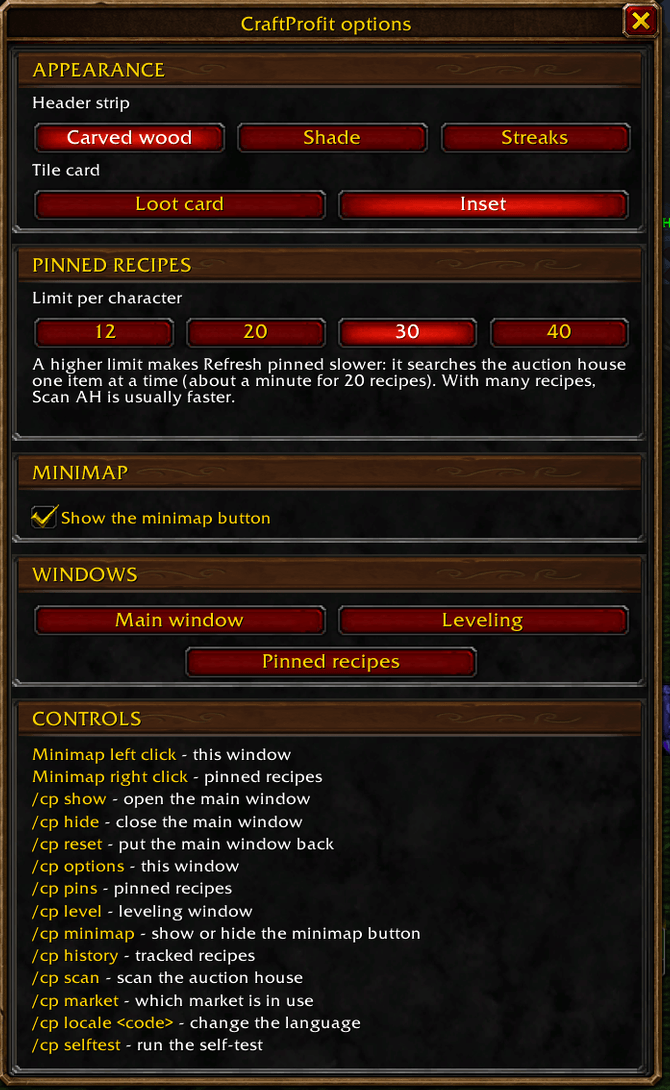
04-options.png
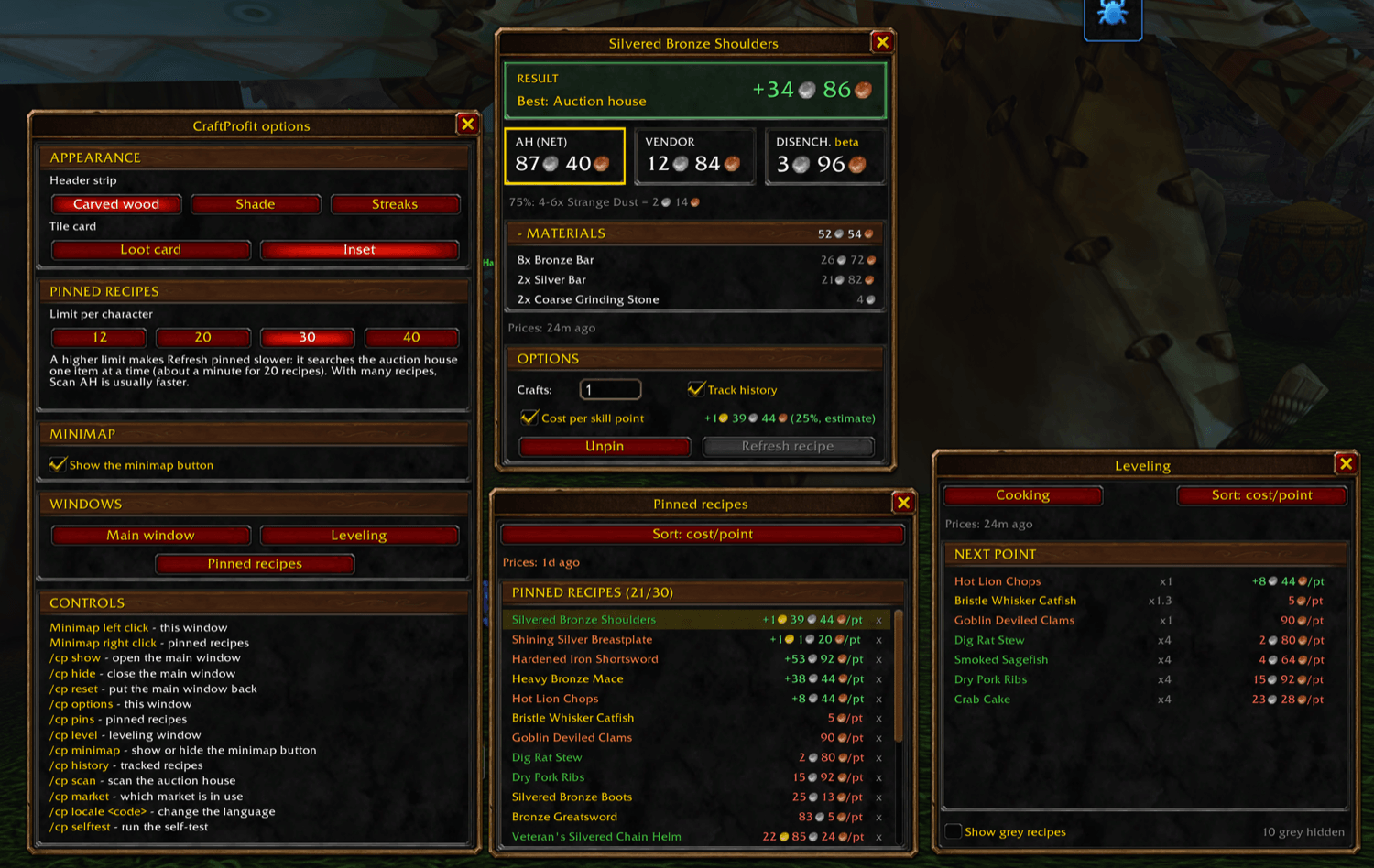
05-all-windows.png
Description
CraftProfit tells you what a profession recipe really costs at the auction house, and what to do with the result.
Select a recipe you know and a small window appears next to your profession window. It adds up the reagents at auction house prices, then compares the three ways to get rid of the crafted item: auction house (after the 5 % commission), vendor and disenchant. It marks the best one and shows the net result, so you can level a profession at the smallest loss, or look for a profit.
And when it is time to buy, click a reagent: CraftProfit opens the auction house, types the item name, starts the search and presets the quantity the recipe needs. No more typing names or counting reagents. You choose the listing and press Buy; CraftProfit never buys anything for you.
Features
- Recipe cost from live auction house prices, with the reagent detail one click away.
- Click & search: click a reagent to search it at the auction house, with the item name typed for you and the quantity already filled in (multiplied by your number of crafts). Click the crafted item to see how many are for sale and at what price. It works from the main window and from pinned recipes.
- Auction house, vendor and disenchant compared, best option highlighted, net result of the craft.
- Profit on every recipe of the profession window: at the right of each recipe row, what one craft earns or loses, with the gold, silver and copper coin icons (green gain, red loss, grey at break even, amber when a price is missing). It shows for the recipes you know and have prices for, follows scrolling, filters and profession tabs, and can be turned off in the options window.
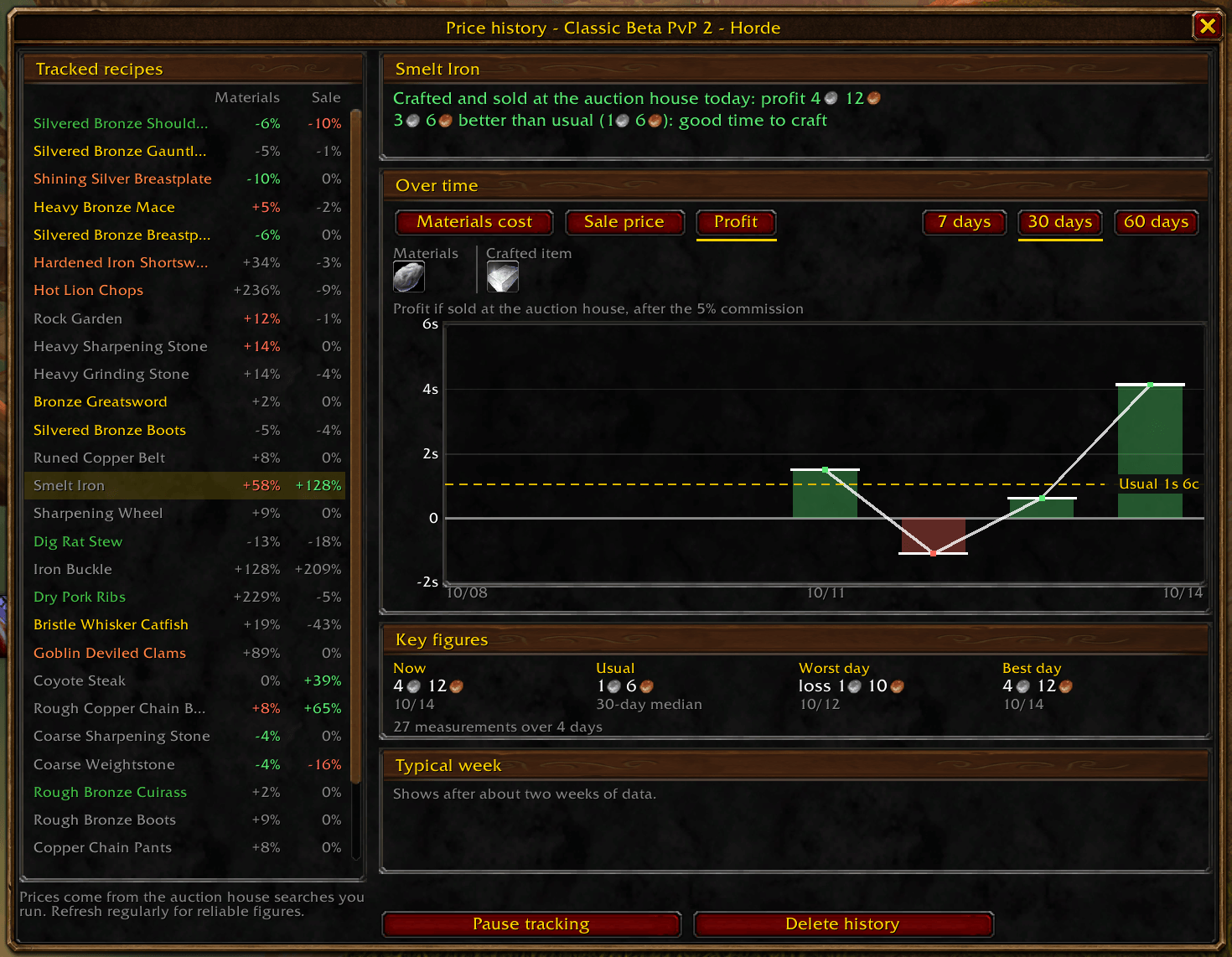
- Price history window: tick Track history on up to 30 recipes to keep their prices scan after scan, then open History to see them. A plain-words verdict tells you what crafting and selling at the auction house earns today and how today's prices compare with the usual ones; a chart over 7, 30 or 60 days shows the materials cost, the sale price, the profit or a single item, with the usual price, a zero line for the profit and a typical week. When there is too little data, the window says why and which items are missing measurements.
- History percentages in the main window: for a tracked recipe, a small coloured percentage beside the Materials total and on the auction house tile compares today's cost and sale price with their usual level (green is good for you, red is bad), with the figures behind it in a tooltip.
- Cost per skill point (optional): what each point really costs, from the recipe colour; shown as a gain when the crafts pay for themselves.
- Several crafts at once: multiply a recipe by 1 to 9999.
- Leveling window: every recipe you know in a profession, ranked by the cost of the next skill point (or by speed).
- Pinned recipes (20 per character by default; 12, 20, 30 or 40 in the options window), sorted by profit or by cost per point, to decide what to craft next. They show under the main window at the auction house and, anywhere, in their own window with the last known prices.
- Auction house tools: Refresh recipe prices the recipe on screen in a few seconds; Refresh pinned prices every pinned recipe (about a minute for 20); Scan AH reads the whole auction house (usually faster when many recipes are pinned).
- Options window and minimap button: pick the look of the windows, the pinned recipes limit and the profit on recipe rows, open the other windows, see every command.
- Standalone: no Auctionator or other addon needed.
- English, French and Spanish, following the game language (saved recipe names follow it too).
Usage
- Open a profession window: the recipes you know show their profit. Select one to see the detail.
- Go to the auction house and press Refresh recipe (the recipe on screen), Refresh pinned (pinned recipes) or Scan AH (everything; the game allows one full scan every 15 minutes).
- Click a reagent in the Materials list to search it with the quantity filled in, then choose the listing and press Buy.
- Pin recipes with Pin, tick Cost per skill point if you are leveling, and compare from the list.
- Tick Track history on the recipes you craft often, then open History (button under the pinned list, or
/cp history) to see whether today is a good day to buy, sell or craft.
Slash commands
/cp or /craftprofit: show, hide, reset, options, pins, level, minimap, scan, history, market, locale <code>, selftest.
/cp history opens the History window; /cp history list prints the tracked recipes in the chat. The minimap button opens the options (left click) and the pinned recipes (right click).
Compatibility
Made for World of Warcraft: Forever (beta build 1.60.1, Interface 16001). Not for Retail or Classic Era.
Good to know
- Prices are snapshots from your last search or scan; the window shows their age.
- Click & search needs the auction house open and the Materials list unfolded (click its header to unfold it).
- The profit on recipe rows and the history percentages use the prices CraftProfit has already read: refresh them at the auction house. Percentages disappear after 24 hours without new prices rather than show stale figures.
- History needs a few days of measurements to say anything: the window tells you how many it has and which items lack them.
- Disenchant values come from the Classic tables and are marked beta until verified in Forever. Epic items above item level 60 have no table yet.
- Skill-up chances are estimates based on recipe colour.
- CraftProfit works with known recipes only and has no sales speed: the game gives no sales history.
- Items that are bound when picked up cannot be sold at the auction house, so they are not searched there.
FAQ
The window does not appear. Select a recipe you know in the profession window, or type /cp show.
Clicking a reagent does nothing. Open the auction house first (with it closed, the click only tells you to open it), and unfold the Materials list.
Prices show ?. Press Refresh recipe, Refresh pinned or Scan AH at the auction house.
A recipe has no profit next to it. Only recipes you know, with prices already read, get one. Refresh them at the auction house, or check that the profit on recipe rows is on in the options window.
The History window says there is not enough data. It needs several days of measurements: keep Track history ticked and refresh prices on a few different visits. The window lists which items are missing.
The scan never finishes. The game allows one full scan every 15 minutes, including those started by other addons. Wait and try once.
Does it buy for me? No. It searches; you press Buy.
Links and support
- Source code and issue tracker: https://github.com/Renaud-Sto/CraftProfit
- User guide: https://github.com/Renaud-Sto/CraftProfit/blob/main/docs/user-guide.md
- Guide d'utilisation en français : https://github.com/Renaud-Sto/CraftProfit/blob/main/docs/user-guide.fr.md
CraftProfit is a fan-made addon, not affiliated with or endorsed by Blizzard Entertainment.
CraftProfit Team
