


CraftBuddy
01-today.jpg
02-path.jpg
04-list.jpg
06-glows.jpg
07-fishing.jpg
Description
CraftBuddy
Every profession to 300 in World of Warcraft: Forever, without a browser tab. CraftBuddy tells you what to craft next, what to buy, what sells, where to gather and fish, and how to get there, in one clean window that looks like part of the game.
- Ready the moment you log in. Pick a language and a look (Classic, the game's own frames, or Modern) and you are done. The welcome window shows what CraftBuddy turned on for you, each with its switch.
- Light by design. Every feature can be turned off. With everything off, CraftBuddy does nothing at all: no events, no hooks, no frames, as if it were not installed.
- Plays nice. Works with the plain Blizzard UI and with Questie, TomTom, Auctionator, Pawn, ElvUI and more. Where another addon already does a job, CraftBuddy says so and steps aside.
Today: your next step, one click away
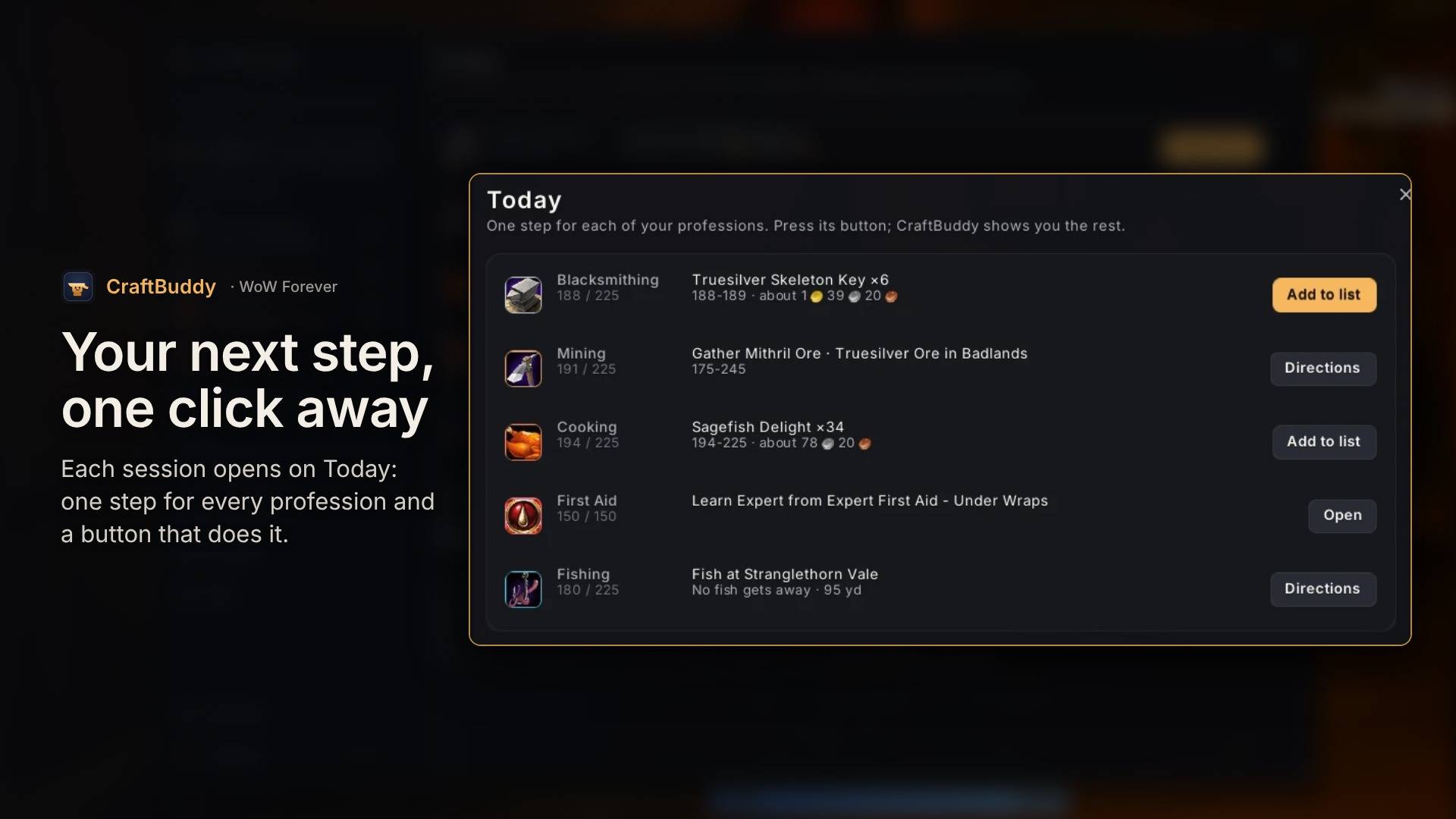
Each session opens on Today: one step for each of your professions (craft this recipe, fish at that water, gather in that zone, learn the next rank) and one button that does it or takes you there. No profession yet? It tells you how to get one.
Crafting: Path · List · Profit
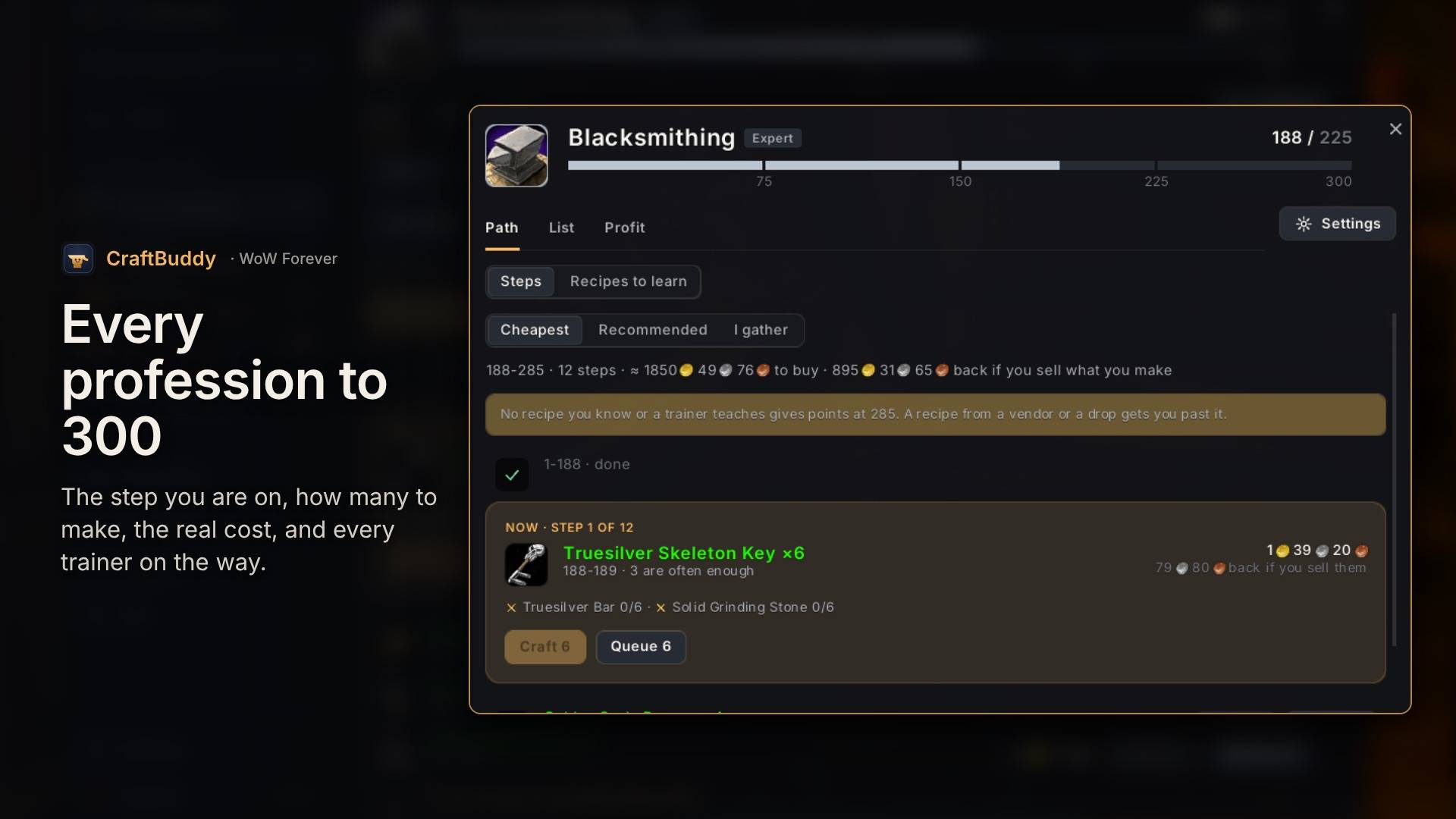
Blacksmithing, Leatherworking, Tailoring, Engineering, Alchemy, Enchanting, Cooking, First Aid: every crafting profession gets the same three tabs.
- Path to 300. The step you are on as a big card: recipe × how many, the skill range, your reagents and the real cost after you sell the products back to a vendor. Then the next steps, and a trainer step at every rank's cap. It picks the recipes an experienced crafter would and tells you when another is much cheaper right now. Craft the step from the guide with one click.
- Specializations. At Armorsmith, Weaponsmith, Gnomish or Goblin Engineering, Dragonscale, Elemental or Tribal Leatherworking, the guide names each choice's quest and who gives it, with a button that points the arrow there.
- Recipes to learn. What you are missing and where to learn or buy it (trainers and recipe vendors, Forever's own too), with Pawn's upgrade percentage on the gear you could make.
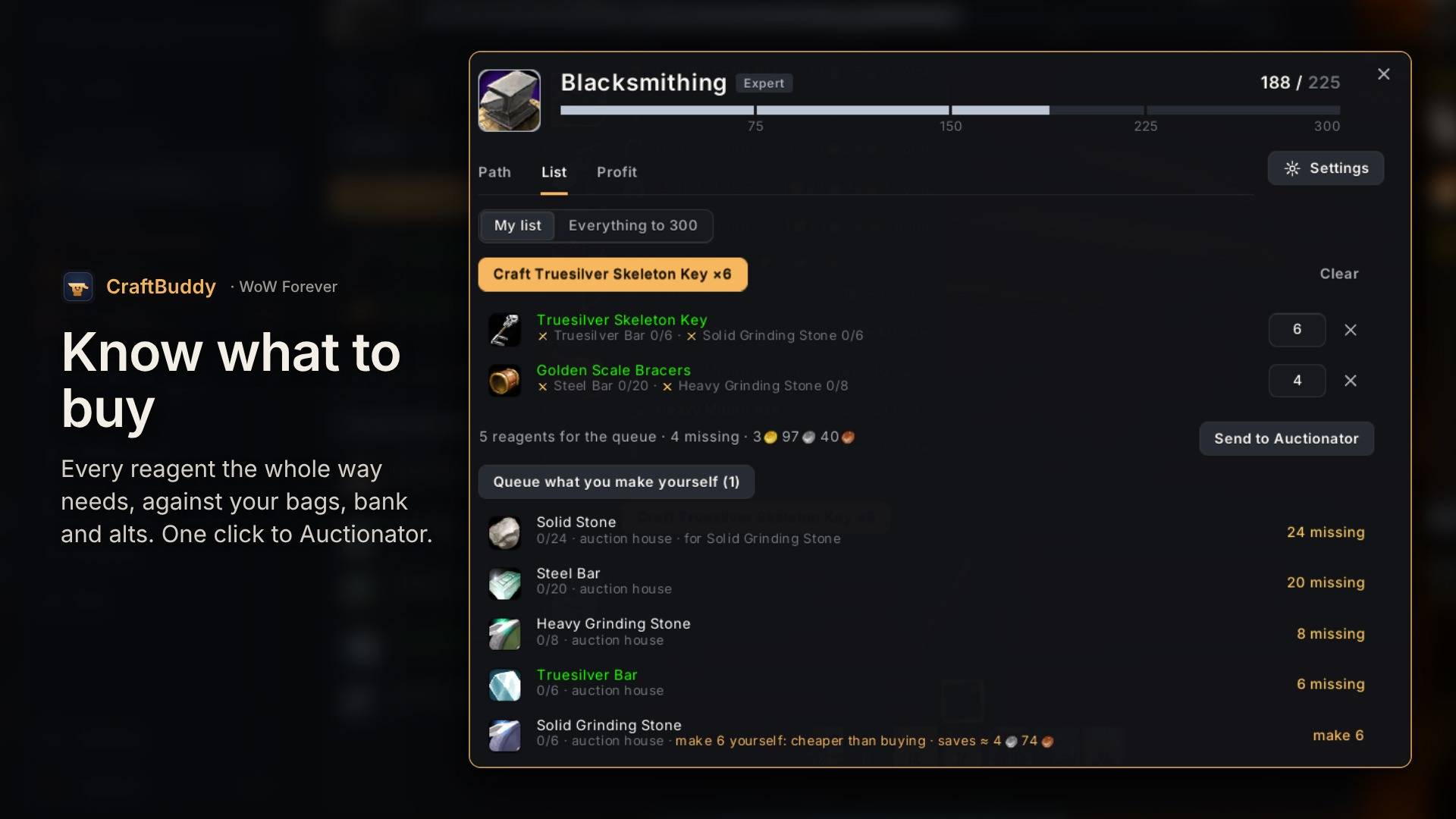
- List. Your craft queue (drag to reorder; at the profession window one click crafts the next row) and every reagent the whole way needs, counted against your bags, your bank and your other characters. When making a reagent yourself is cheaper, it says "make 93 yourself" and what that saves. Send to Auctionator builds a shopping list of just the auction house items.
- Profit. Your recipes, or what a trainer teaches you now, ranked by profit, each reagent from its cheapest source: vendor, auction house or your own craft.
- Enchanting. An Enchant and confirm button that also answers "replace the enchant?", a Disenchant tab that asks "disenchant or sell?" and keeps Pawn upgrades safe, a disenchant list beside the profession window, and Alt + click to disenchant in your bags.
Gathering: Mining, Herbalism, Skinning
- Where to gather at your skill, with directions to each zone.
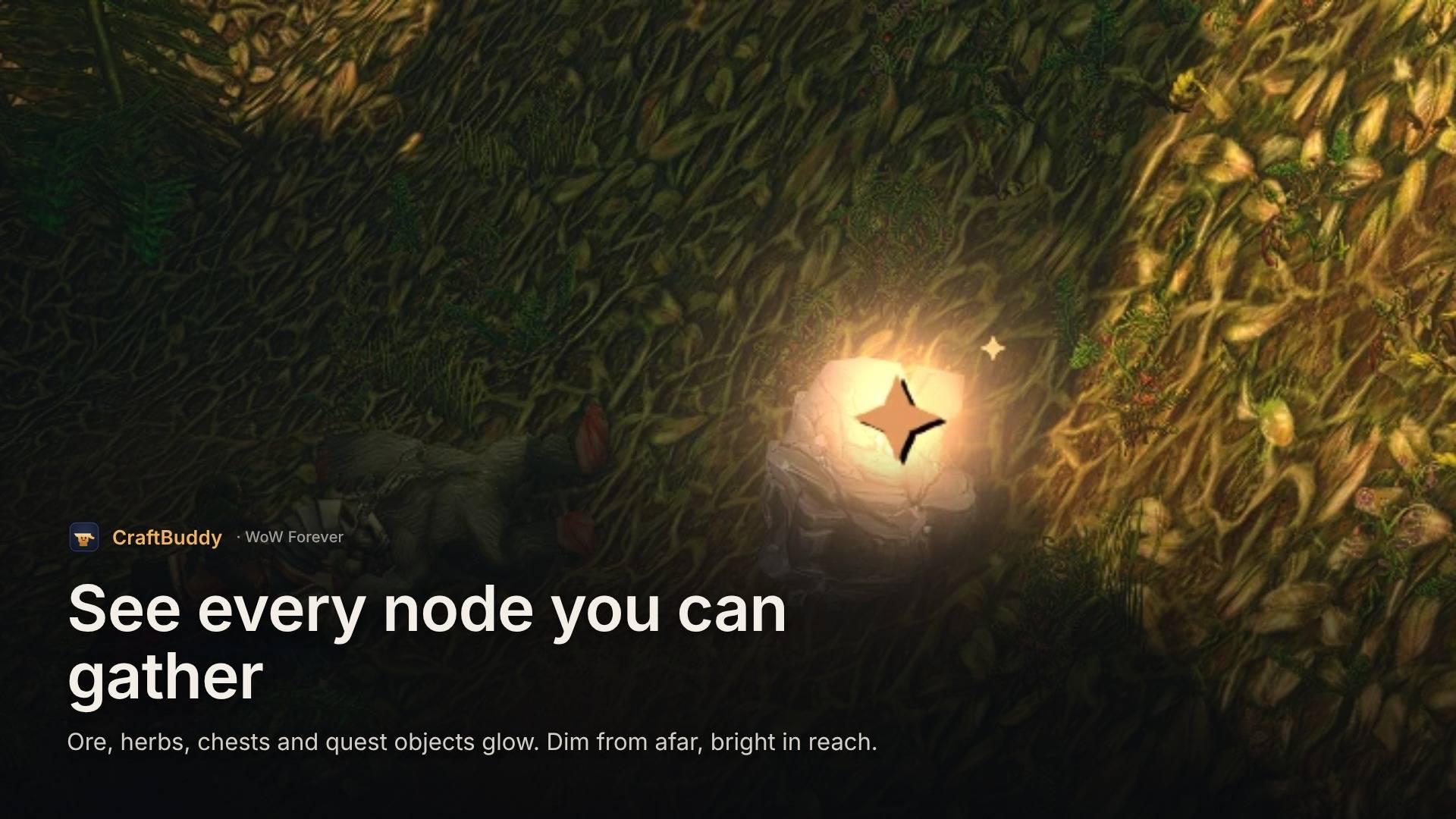
- Glows on the ore, herb, chest or quest object in front of you: small and dim from afar, bright once your skill and range allow.
- Skinnable corpses wear the game's own hide icon, and a skinning key skins the one in front of you.
- Sessions with gold per hour by place, a tracking reminder, and node memory with a route on the minimap.
Fishing: Path · Fish · Sessions
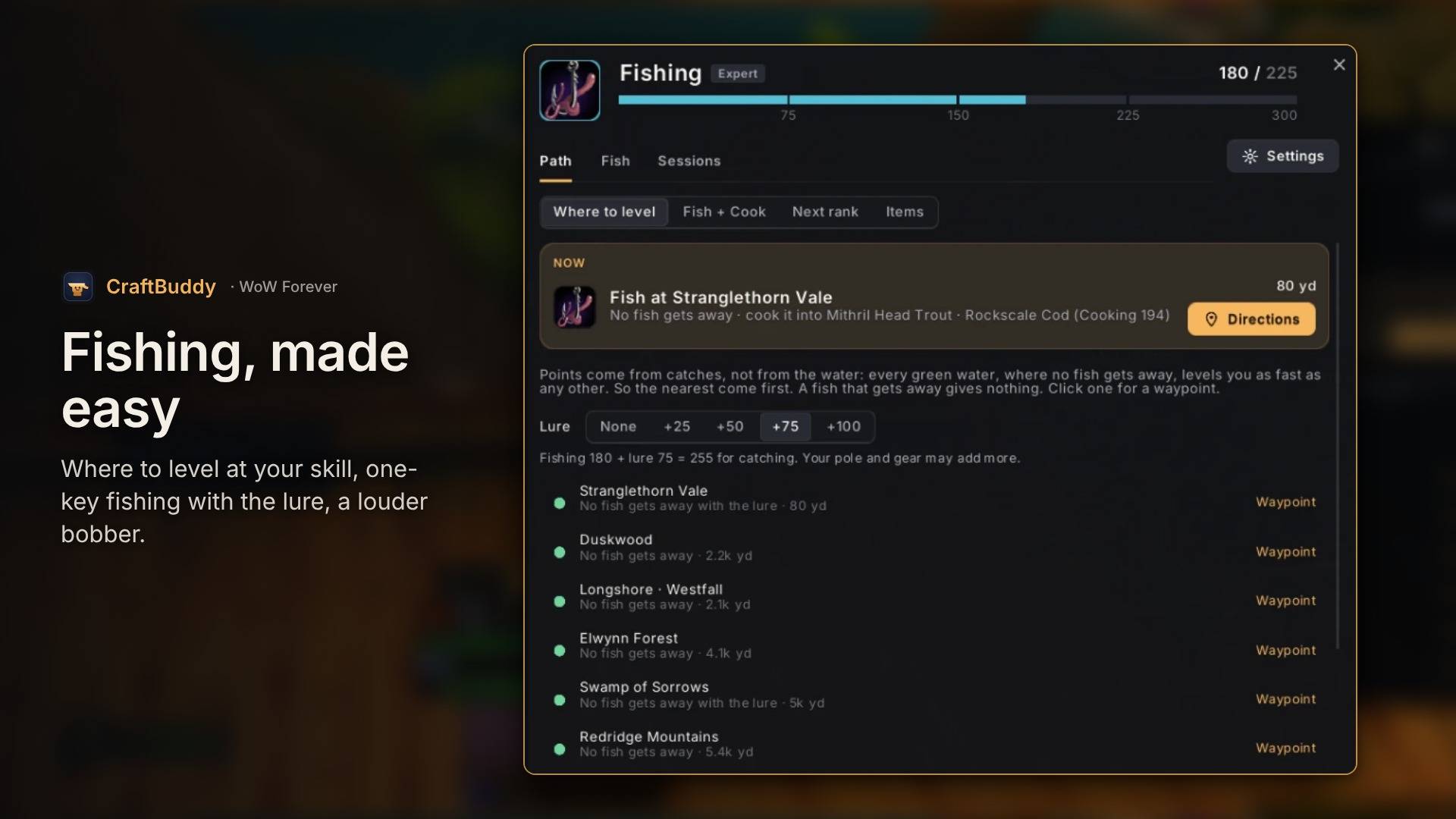
- Opens on what to do now: the nearest water where no fish gets away, a Directions button, and what that fish cooks into.
- One-key fishing that puts the lure on too, a louder bobber splash, and a lure reminder.
- Where each fish is caught, catch alerts (sound or voice), and a fishing outfit that goes on and off with your session.
Also in the box
- Directions. Shift + right-click the world map, or type a town into "Search or go": a step-by-step route on foot, by flight, boat or zeppelin, with CraftBuddy's direction pill (or TomTom's arrow) and flight times.
- QoL. Auto-repair (guild funds first), sell junk, the best food at vendors, the best quest reward, fast loot, auto-accept and turn in quests, game bars hidden or shown on mouseover.
- Info Bar. Your main profession, the next cooldown, gold, durability, bag space, latency, FPS, clock, XP and more.
- Characters. Every character's professions and cooldowns; tooltips say what your guides still need and which of your characters knows a recipe.
- Minimap. One button that holds your addons' minimap buttons.
- Profiles, a search that finds every setting, and a layout mode that moves everything at once.
Languages
Fully localized in English and Turkish. Pick a language at first login and switch any time without a reload (/craftbuddy lang).
Commands
/craftbuddy(or/cbuddy): open or close the CraftBuddy window/craftbuddy menu: the quick menu/craftbuddy search <text>: search settings and pages, or a town to go to/craftbuddy move: layout mode/craftbuddy help: every command/craftbuddy safe: turn every integration and hook off, for troubleshooting
Compatibility
CraftBuddy works with the plain Blizzard UI and plays nicely with popular addons (Questie, TomTom, OpenMap, Auctionator, Pawn, ForeverGear, Forever Fishing, Lueur, ElvUI). Where another addon already does the same job, CraftBuddy says so and steps aside. It never changes another addon's settings, uses its own tooltip, and every integration can be turned off. It needs no libraries; LibDBIcon and LibDataBroker are used when another addon provides them.
Credits
- Zone tables are derived from the Questie / QuestieDB database (GPLv3). Thanks to the Questie team and its contributors.
- The fishing waters (what each area and fishing school gives, and where the schools appear) and where recipes are learned come from the CMaNGOS classic-db database (GPLv3). Thanks to the CMaNGOS team.
- Font: Inter, under the SIL Open Font License 1.1.
- CraftBuddy is released under GPLv3.
Support
CraftBuddy is free, and every feature is for everyone. If it saves you time, you can support its development:
Crypto (send only on the network shown):
- Tether (USDT), Tron (TRC-20) network:
TXDtCu6dMR9HMVmAGDHBeLcyWXfTVmjGdY
In game: Support at the bottom of the sidebar (you can hide it in Settings → About).
CraftBuddy Team
