
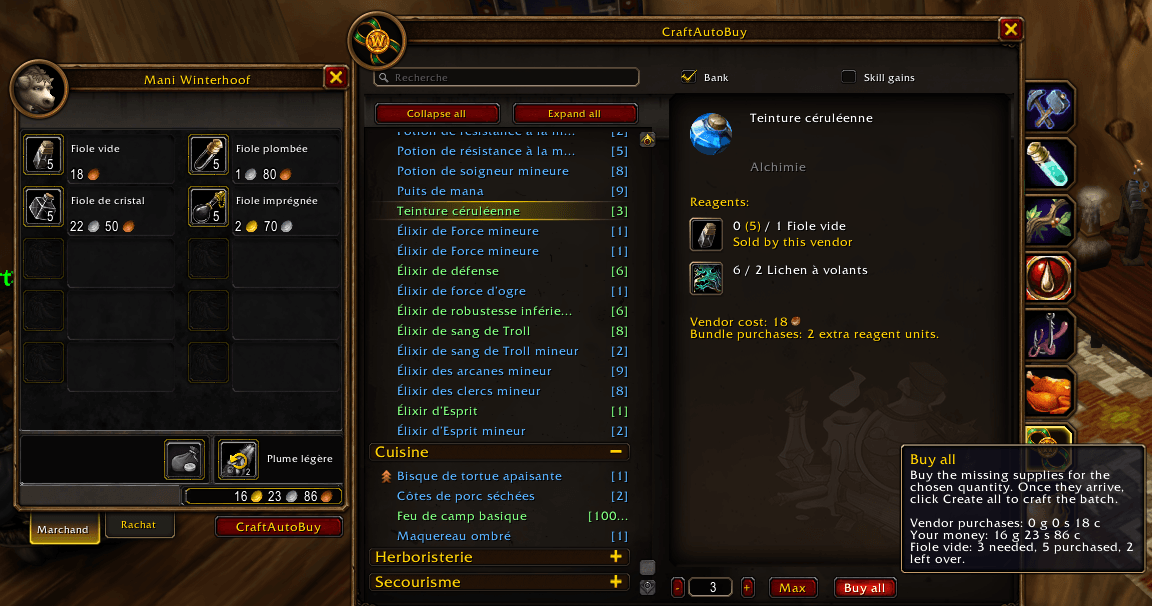
The green lines: the harvestable components are in your bags; you only need to buy the necessary amount from the vendor.
Description
CraftAutoBuy
Spend less time checking materials and more time crafting in World of Warcraft: Forever.
CraftAutoBuy shows what you can make using the materials in your bags and personal bank, while accounting for supplies sold by vendors. Missing a few vials or spices? You can still see which recipes your main materials will allow you to craft.
Plan, buy, craft
Choose a recipe and quantity, visit a suitable vendor, then click Buy all to purchase the missing supplies. Once they arrive, click Create all to start crafting.
CraftAutoBuy also accounts for intermediate components, such as oils needed for a potion. Each recipe in the chain is crafted with a separate click.
Use it directly from:
- Your regular profession windows, with crafting counts and material information integrated into the interface.
- The CraftAutoBuy tab, which brings your known professions together in one list.
Recipe colors help you see what you can prepare with your bags and vendor supplies, and what requires a trip to the bank.
Your crafting stock at a glance
Can’t remember whether those materials are in your bags or your bank?
The Stock tab displays both in separate lists, with a shared search. Visit your bank once to record its crafting materials, then consult that stock wherever you are. The record updates when you visit again.
Make it yours
Open the addon settings or type /cab to:
- Choose from 12 languages, or follow your game’s language automatically.
- Enable or disable vendor-supply purchasing.
- Automatically open CraftAutoBuy when visiting crafting supply vendors.
Purchases only happen when you click Buy all—you stay in control.
CraftAutoBuy Team
