


Craft Ledger
- By
Description
CraftLedger — What to craft, what to craft?
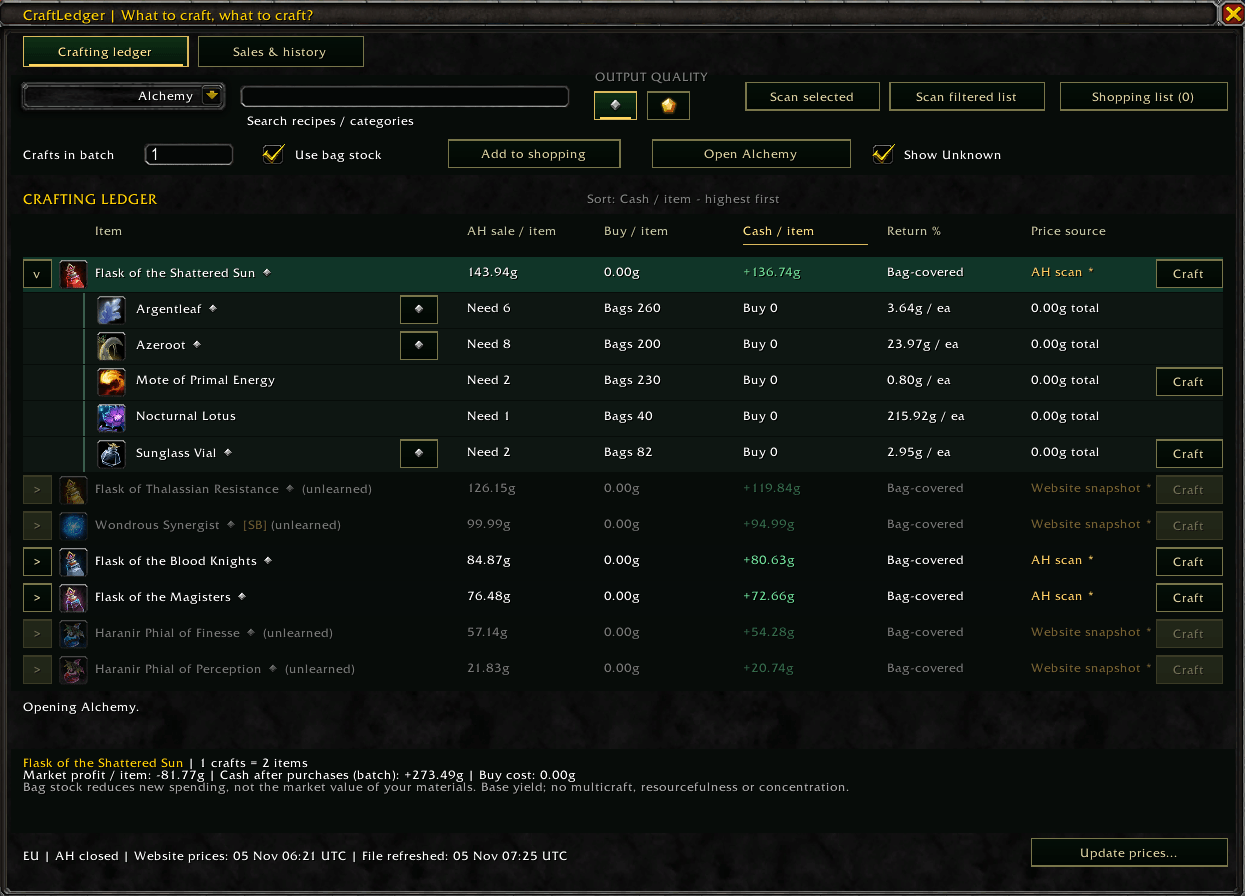
Find profitable crafts without leaving World of Warcraft. CraftLedger compares Auction House sale prices with reagent costs and checks your bags to show what you still need to purchase.
A clear crafting ledger when you need answers. A separate sales-history tab when you want to dig into the numbers.
Features
- Compare crafting margins: AH sale price, reagent cost, profit per item and return on cost.
- Check prices: scan selected recipes or your filtered list at the Auction House, or use a downloaded CraftLedger price snapshot.
- Plan batches: choose how many crafts to make and calculate spending using materials already in your bags.
- Inspect ingredients: click a recipe row to expand its reagents, quantities, owned stock and prices.
- Choose qualities: compare output qualities and change individual reagent qualities using familiar in-game quality icons.
- Build shopping lists: combine recipes, merge shared ingredients and deduct bag stock once. Remove individual ingredients as needed.
- Search the AH: Shift-left-click an item or reagent to fill the Auction House search field.
- Open exact recipes: jump directly from the ledger to the selected recipe in Blizzard’s crafting window.
- Control recipe visibility: show confirmed learned recipes or enable Show Unknown to include faded unlearned and unverified entries.
- Understand soulbound requirements: clearly marked ingredients are excluded from AH costs, with acquisition guidance available on hover.
- Enjoy a consistent interface: dark pine-green and gold buttons, clear selected tabs and sortable column headings.
Sales & crafting history
Open Sales & history to explore your recorded activity without cluttering the crafting view.
- View AH proceeds collected, reported quantities sold and units created.
- Browse daily history and previous weekly-reset periods.
- See proceeds charts and breakdowns by item, profession, category or character.
- Keep previous periods in the add-on’s local save file.
Sales are recorded when you collect confirmed Auction House sale mail while CraftLedger is enabled. Returned deposits and AH fees are excluded from the proceeds figure.
These figures are sales proceeds, not profit. CraftLedger does not assume that a sold item was crafted by you or attempt to assign material costs to it. History uses the collection date, which may differ from the actual sale date.
Unknown sale quantities remain marked as unknown. Items without an unambiguous catalogue match appear under Other / Unclassified. Item qualities are combined where auction invoices omit quality information.
Getting started
- Type
/craftledgeror/cl. - Choose a profession and press the glowing Update list button.
- CraftLedger attempts to load your profession recipes transparently, then close the newly opened profession window. After successful loading, the button becomes Open [profession] and stops glowing. An already-open profession window stays open.
- Select a recipe, choose your output quality and set your batch size.
- At the Auction House, press Scan selected or Scan filtered list.
- Expand recipes to inspect ingredients, or add batches to your combined shopping list.
Recipe readiness is remembered for the current UI session. Reloading the UI, logging out or restarting WoW resets that check.
For quick access, press Esc → Macros and create a new macro. Give it any name, enter /craftledger in the Enter Macro Commands box, then drag the macro’s icon onto your action bar.
To start recording sales history, collect your AH sale mail with CraftLedger enabled. Previously collected sales cannot be recovered.
Understanding the numbers
Market profit values all tradable reagents at AH prices and deducts the 5% AH cut from the expected sale price.
With Use bag stock enabled, the ledger instead highlights the cash remaining after purchasing only your missing materials. Owned reagents reduce new spending; they still have market value.
Soulbound reagent costs are excluded and clearly marked. You must supply those ingredients yourself.
Estimates use base recipe output. They do not simulate multicraft, resourcefulness, concentration, optional reagents or character-specific crafting bonuses. Selecting an output quality compares prices—it does not predict whether your character can craft that quality.
Listed AH prices do not guarantee a sale, and the cheapest listing may not cover your entire batch.
Price snapshots & local history
CraftLedger uses in-game AH scans and downloaded website snapshots. The add-on cannot fetch website prices directly. To refresh the installed snapshot, run the included Refresh-CraftLedger.ps1 outside WoW, then return to the game and type /reload.
Bag calculations include carried bags and the reagent bag. Banks, warband storage, mail and other characters’ inventories are not included.
Sales and crafting history stay on your computer in CraftLedger’s SavedVariables file, which WoW writes on logout or /reload. No website account or automatic upload is required.
Early release
CraftLedger is actively being developed. Some imported recipes remain visible with unavailable estimates where definitions or pricing support are incomplete.
Sales history and the transparent recipe-loading workflow are new features. Feedback and bug reports—especially around bulk mail collection, recipe loading and client compatibility—are welcome!
Explore the companion website: wowcraftledger.com.
Craft Ledger Team
