
Could've Lived
- By
Medal_R0IC43H4FB.png
Medal_Dro3BQorLM.png
Medal_et06rrJsm9.png
Medal_4Kqg5WOGm8.png
Medal_N9OLrYBjpd.png
Description
Find out why you died — and whether something you had ready would have saved you.
Most death recaps show you a wall of numbers. Could've Lived answers the one question that matters after a death: could I have lived? It reads the game's own death recap, checks what you had ready in that moment — potions, Healthstones, protection potions, your class defensives, your racial — and tells you plainly whether any of it would have kept you alive.
The verdict comes first
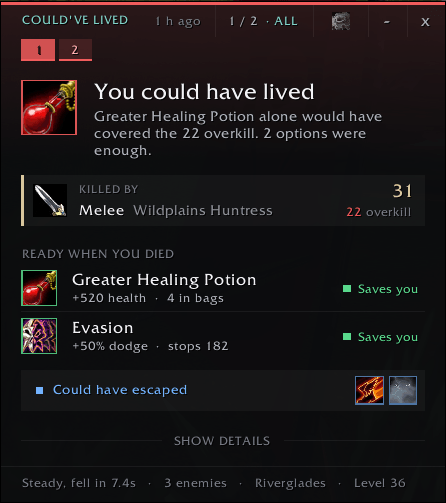
The moment you die, a compact window opens next to the release button with one clear line:
- You could have lived — "Greater Healing Potion alone would have covered the 73 overkill."
- You might have escaped — you had time to react, and Vanish or Blind could have ended the fight.
- Close, but not enough — your potion would have helped, but the overkill was too big.
- Nothing would have saved you — "Half your health to dead in 0.6s — faster than anyone can react."
- Nothing was ready — every defensive on cooldown, no potion in your bags.
It is honest both ways: it points out the potion you forgot, and it never blames you for a death no one could have survived.
Ready when you died
Everything that was off cooldown when you died, each with a clear tag: Saves you, Helps, Escape, or Too slow. It only shows what fits the fight you actually died in:
- Absorbs and immunities count against the damage they would really have met — no Fire Protection Potion against a nature death.
- Evasion counts only melee, Stoneform only physical damage.
- Single-target escapes (Blind, Gouge, Hammer of Justice) only show when one enemy did most of the damage. Enemies are counted exactly by their unique ID.
- Running away (Sprint, Blink, Frost Nova) only shows when melee did most of the damage.
- Will of the Forsaken only after a fear, charm or sleep; Escape Artist only after a root.
- Mana, Forbearance and Weakened Soul are respected. Bandages are never suggested.
The killing blow
Spell, attacker, damage in its school's colour and the overkill. Crits and crushing blows are marked, and deaths to other players are tagged PvP.
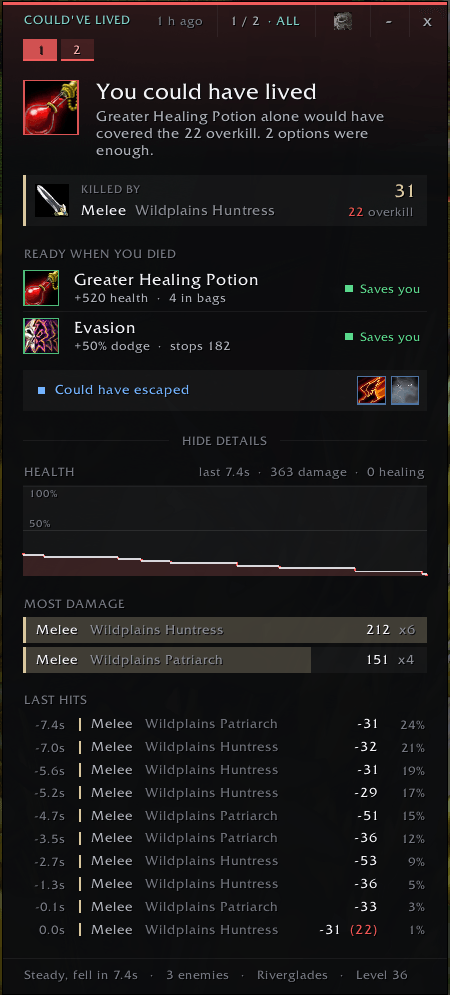
Details, when you want them
Health graph, the biggest damage sources, and every last hit with your health after it.
Your deaths, kept
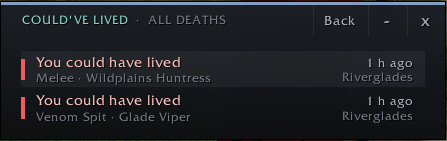
The last 20 deaths per character, as numbered tabs coloured by verdict. Hover for a summary, click to open, scroll to step through them, or open the full list.
Built for the run back
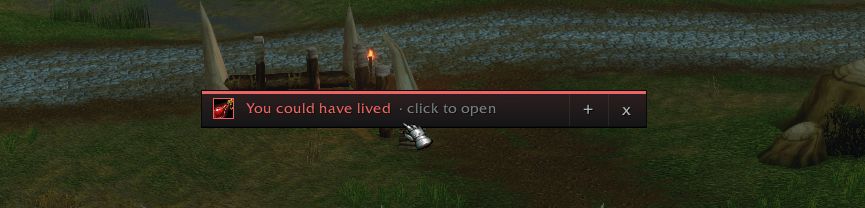
When you release, the window folds into a slim bar in the same place. One click unfolds it while you run back; it disappears once you are alive.
Settings, where you need them
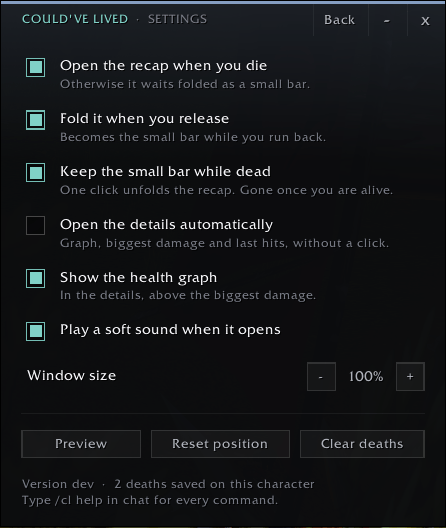
The gear in the header opens the settings right in the window — the same settings are on Blizzard's AddOns page. The window remembers where you put it.
Commands
/cl last death · /cl history all deaths · /cl test preview · /cl test burst scenarios (nopotion, burst, close, pack, feared, pvp, empty) · /cl options settings · /cl scale 1.1 · /cl reset · /cl clear · /cl help
Good to know
- Your own deaths only — party members' cooldowns and bags are not visible to the game.
- Light: while you play it only notes your mana and a few debuffs; the real work happens once, after you die.
- Flat and dark, at home next to EllesmereUI or the default interface. Made for WoW Forever.
Could've Lived Team
