Cooldown Skin
- By
Square icons, gradient timer bars and skinned Tracked Bars for the Cooldown Manager.
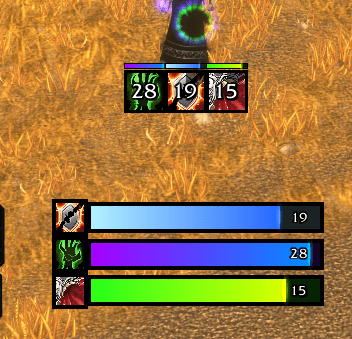
screenshot.png
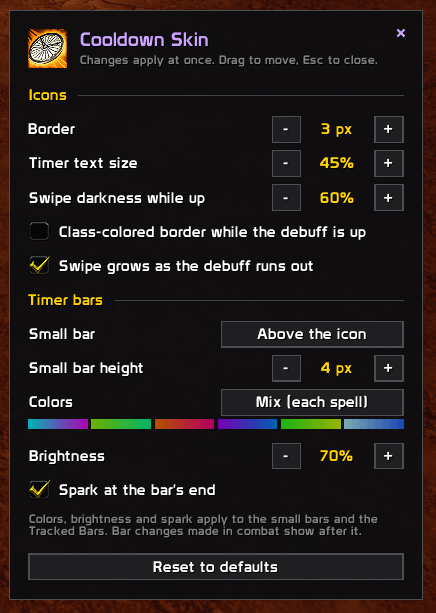
options.png
Description
Cooldown Skin
A cleaner look for the game's Cooldown Manager, made for WoW: Forever.
Cooldown Skin restyles the Cooldown Manager you already set up. Your spells, rows, layout and Edit Mode settings stay the game's own. Only the look changes.
Features
- Square icons. Essential, Utility and Tracked Buff icons are cropped square inside a black border, instead of the round frames.
- No more yellow wash. While your debuff or buff is up, the icon stays bright and a dark swipe grows as it runs out. You can turn on a class-colored border for that time too.
- Timer bars. A thin gradient bar above each icon counts down your debuff or buff, with a spark at its end. It covers:
- your DoTs on an enemy,
- your HoTs and buffs on a friendly target,
- buffs on yourself,
- whichever rank of the spell you cast.
- Skinned Tracked Bars. The Tracked Bars row gets a square icon, black edges, the same gradient colors and a spark.
- Color sets. In Neon mix, Catppuccin, Cyberpunk and Dracula, every spell gets its own color pair. There's also your class color and single presets (Neon, Toxic, Sunset, Void, Fel, Ice), with an adjustable brightness.
- Crisp timers. Outlined numbers, sized to the icon.
- Works in combat. The game fills the swipes and bars itself, so they keep running during fights.
Options
Type /cskin, click Cooldown Skin in the minimap addon menu, or go to Options > AddOns > Cooldown Skin. Every change applies at once:
- border size, timer text size and swipe darkness,
- where the timer bar goes (above, below or off) and its height,
- the color set with a live preview, its brightness, and the spark.
Getting started
- Turn on the Cooldown Manager in Options > Gameplay Enhancements if you haven't yet.
- In its settings, move the spells you want out of "Not Displayed".
- That's it. Cooldown Skin styles whatever the Cooldown Manager shows.
Space between the icons is the game's own setting: in Edit Mode, select the cooldown row and change its Icon Padding.
Tested so far
This is a first release, tested on a Warlock and a low-level Priest only:
- Warlock DoTs.
- Priest: Shadow Word: Pain, Power Word: Shield on yourself and on a party member, and Renew.
The look should be the same for every class, since it styles the Cooldown Manager's own icons. The timer bars for other classes' spells are untested.
Cooldown Skin Team