CooldownCall
- By
One-click whisper that asks an assigned raid member to cast a cooldown. Set up calls (spell + caster from your group), get clickable on-screen bars, click to whisper. Class-coloured, role-sorted, dark mode. TBC Classic.

Bildschirmfoto_20260530_204016.png
Bildschirmfoto_20260530_203935.png
Bildschirmfoto_20260530_203945.png

Bildschirmfoto_20260530_204032.png
Description
CooldownCall
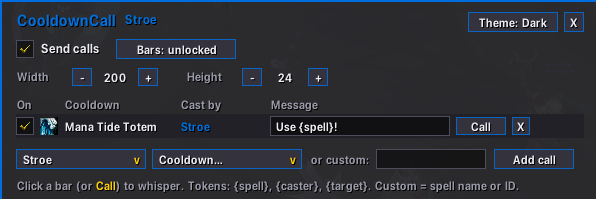
One-click whisper that asks an assigned raid member to cast a cooldown. You set up calls — a cooldown (Power Infusion, Innervate, Blessing of Protection, …) tied to a specific player from your group — and CooldownCall shows them as small clickable bars on screen. Click a bar and the assigned player gets a whisper like "Use Power Infusion!".
It does not announce anything when you cast a spell. It is a request tool: a fast, quiet way to ask the right person for the right cooldown at the right moment.
Why
In a raid you often need a cooldown from someone else now — Power Infusion on the mage, Innervate on a healer, Blessing of Protection on yourself. Calling it out in voice or fumbling a manual whisper is slow. CooldownCall turns it into a single click.
- Pick the caster from your group/raid — class and role are detected automatically.
- Only cooldowns that caster's class actually has are offered (or type any custom spell).
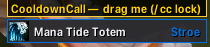
- Each call becomes a clickable on-screen bar with the spell icon, the cooldown name, and the caster's name in their class colour.
- Bars are sorted by role (combat rez, defensives, mana, throughput, …), resizable, and movable.
- Clicking a bar sends a configurable whisper (with a clickable spell link) to the assigned player.
- Once the caster uses the spell, the bar shows the remaining cooldown and greys out until it's back up.
Standalone, lightweight, pure Lua — not a WeakAura, not bolted onto another addon. No companion app, no setup beyond installing it.
Requirements
- TBC Classic / Anniversary (Interface
2.5.x)
Installation
Install via your addon manager, or unpack into the AddOns folder:
World of Warcraft/_anniversary_/Interface/AddOns/CooldownCall/
(For non-Anniversary TBC use _classic_ instead of _anniversary_.)
Setup
- Open the options: click the minimap button, or type
/cc. - While in a group/raid, pick a caster from the dropdown — their class is detected.
- Pick a cooldown from that class's list (or type a custom spell name/ID).
- Click Add call. A bar appears on screen.
- Edit the message per call if you like. Tokens:
{spell},{caster},{target}. /cc unlock, drag the bars where you want them, then/cc lock.
To fire a call: click its bar (or the Call button in the options window). The assigned player receives the whisper.
Appearance
- Dark mode (default): charcoal background, caster names and the window accent in class colour.
- Light mode: class-coloured background with a charcoal border and text.
Toggle with the Theme button in the options window.
Commands
All commands also work with /cdcall and /cooldowncall.
| Command | What it does |
|---|---|
/cc |
Open / close the options window |
/cc on | off |
Enable / disable sending calls |
/cc lock | unlock |
Lock / unlock the on-screen bars for moving |
/cc minimap |
Show / hide the minimap button |
/cc status |
Show current state |
Notes & limitations
- The cooldown catalog is hand-curated for TBC and grouped by class. It is not exhaustive — anything missing can be added with the custom field (spell name or ID). Spells from later expansions (e.g. Pain Suppression, a WotLK ability) are intentionally absent on TBC.
- Casters are chosen from your current group/raid, so class/role detection needs you to be grouped when adding a call. The call is remembered afterwards.
- The whisper is sent with
SendChatMessageto the assigned character name. If that player is offline or on another realm, the whisper simply won't arrive — CooldownCall doesn't track delivery. - Settings are stored per character profile (AceDB).
License
MIT — see LICENSE.
Author
Stroe-Spineshatter
CooldownCall Team