


ConfigManager
- By
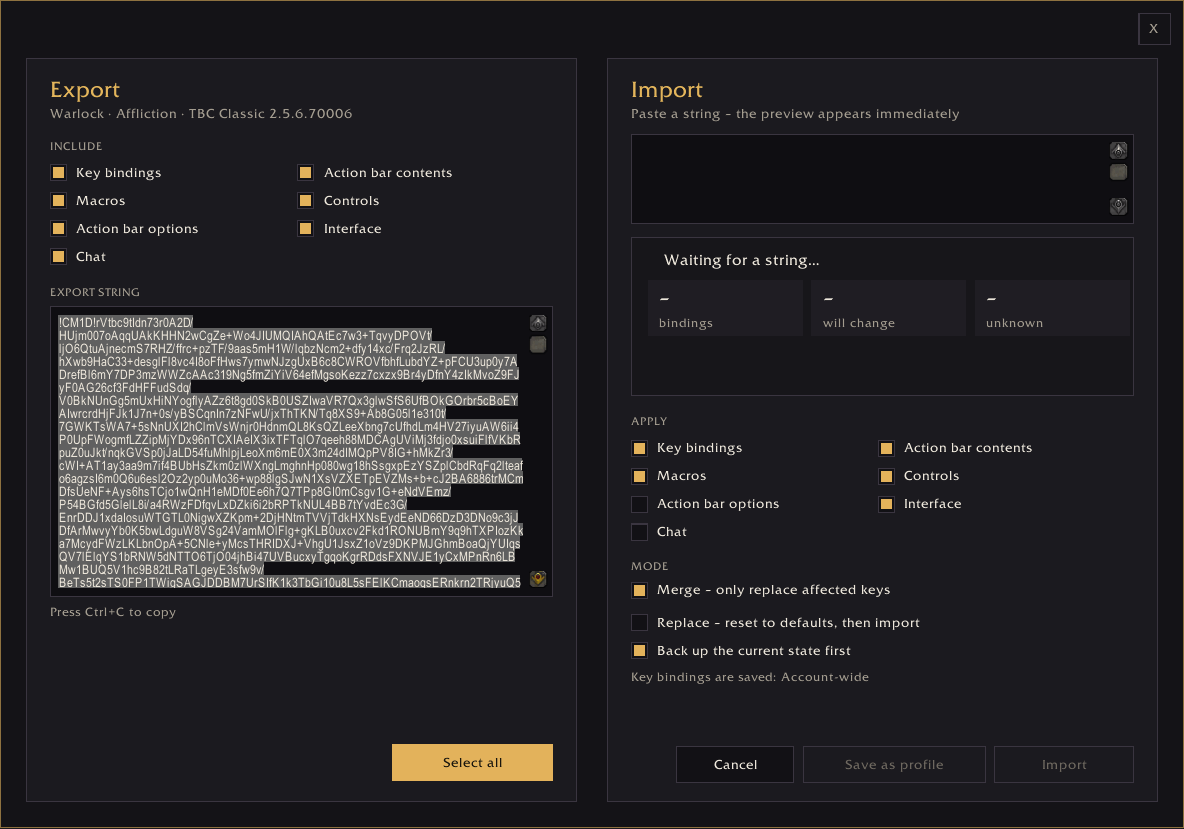
Export / Import Key bindings, action bar contents, macros, action bar options, chat options, controls, interface options with ease.
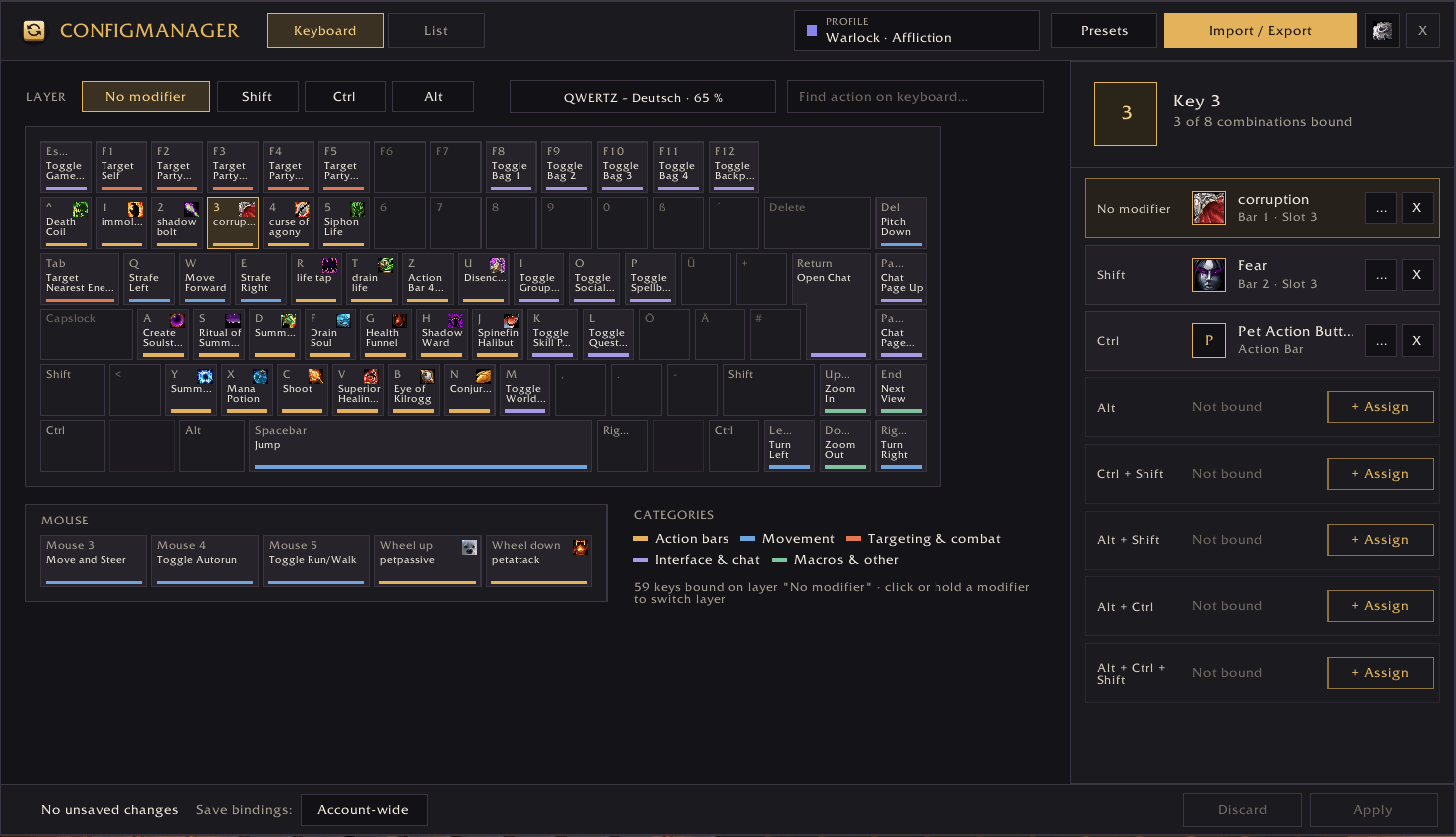
Set your keybindings and use this list view (like the blizzard interface) or keyboard view
Description
ConfigManager
Take your setup with you – to every version of World of Warcraft.
ConfigManager copies your key bindings, action bar contents, macros, game settings and chat setup between WoW versions with a single export string. Set up your UI once, then carry it from Classic Era to TBC, from the Forever beta to the Forever launch, or from Midnight back to Classic.
Why ConfigManager?
For years the usual advice was to copy your WTF folder. That only works within the same game version: Classic Era, TBC Anniversary, MoP Classic, WoW Forever and Midnight each use their own folders, their own spell IDs and their own settings.
ConfigManager reads your setup inside the game, stores it in a version-neutral format, and writes it back on the other side. Anything the target version doesn't have is skipped and listed for you. Nothing breaks, and nothing is changed without you knowing.
What gets copied
You choose each part separately, both when you export and when you import:
| Section | What it contains |
|---|---|
| Key bindings | All bindings shown in the game's key binding menu, including Shift / Ctrl / Alt combinations, mouse buttons and the mouse wheel |
| Action bar contents | Spells, items and macros on every action bar slot |
| Macros | Name, icon and text of your account and character macros |
| Controls | Auto loot (and its modifier key), loot under mouse, click-to-move interaction, self cast, cast on key down, … |
| Action bar options | Which extra bars are enabled, lock action bars, always show bars, cooldown numbers |
| Interface | Name display, nameplates, status text, target of target, buff durations, floating combat text, quest tracking, minimap rotation, tutorials |
| Chat | Chat window names, font sizes and message types, the standard channels per window (General, Trade, LocalDefense, LookingForGroup, …), colours per message type, class-coloured names, timestamps, chat style, whisper mode, chat bubbles, profanity filter |
The game settings deliberately stick to options that exist in every WoW version (based on Classic Era), so the same string works everywhere.
What is not copied
- Graphics, camera and sound settings (too different between versions)
- Positions and sizes of Blizzard frames
- Custom chat channels (only the standard channels are transferred)
- Settings of other addons (planned for a later version)
Built for moving between versions
- Keyboard layouts are converted. A binding on the key next to T stays on the key next to T, whether that key is called Z (QWERTZ) or Y (QWERTY). You can also switch to "keep key name" if you prefer.
- Spell ranks are handled. If a spell ID doesn't exist in the target version, ConfigManager finds the spell by name and uses your highest known rank.
- Missing bars are skipped safely. Bars 6–8 from Retail-style clients are skipped and counted on Classic clients instead of causing errors.
- Missing settings are reported. The import preview shows exactly how many settings or chat colours don't exist in the current version.
- Every export remembers where it came from, e.g. Classic Era 1.15.9 or Forever 1.60.1, and the import preview shows it.
Two ways to see your bindings
Keyboard view
A full on-screen keyboard showing what is bound to every key, colour-coded by category (action bars, movement, targeting, interface, macros & other), with spell icons right on the keys.
- Click a key to see all 8 modifier combinations for it in the side panel, and assign, change or remove bindings directly.
- Click or hold Shift, Ctrl or Alt to switch the whole keyboard to that layer.
- Search for an action, and the matching keys light up.
- Mouse buttons and the mouse wheel get their own panel.
List view
An improved version of the Blizzard key binding list:
- Shows the actual spell or macro behind every action bar slot, not just "Action Button 3"
- Search by action or by key, e.g. Whirlwind or Shift+E
- Filters: Bound, Unbound, Changed
- Category sidebar with counters
- Clear key capture: click a field, press the new key (mouse buttons and wheel work too), Esc cancels, right-click removes
- Changes are collected and only saved when you click Apply; Discard reverts everything
Profiles per specialization
- ConfigManager saves a profile for each specialization and switches it automatically when you change spec. On Classic Era, where there are no specializations, the profile follows your talent tree with the most points.
- New spec without a profile? A short dialog suggests what to load: the saved profile of this spec, a profile of the same class, a Tank / Healer / DPS role preset, or nothing. Roles your class can't play are greyed out.
- The profile manager lets you sort profiles (manually, by name, date or class), rename them, load them, and delete several at once.
- Automatic backups are created before every import. The five most recent are kept.
Import modes
- Merge: only the keys and slots contained in the string are changed.
- Replace: resets key bindings to the game defaults first, then imports.
- Save as profile: keep an imported string for later without applying it.
The import preview shows the source character, class, specialization and game version, plus how many bindings will change and how many entries are unknown on this character, before anything is applied.
Settings
- Language: follows your client automatically or can be chosen manually. English, German, French, Spanish (EU/LatAm), Italian, Portuguese, Russian, Korean, Simplified and Traditional Chinese.
- Keyboard layout: German, Austrian and Swiss QWERTZ; US and UK QWERTY; French and Belgian AZERTY; Spanish, Latin American, Italian, Portuguese (PT/BR), Swedish/Finnish, Danish, Norwegian and Russian.
- Keyboard size: full size with numpad, tenkeyless, or compact 60 %
- Extra mouse buttons: 0 to 12
- Window scale, minimap button, automatic profile saving, spec suggestions
How to open it
- Minimap button. Left-click opens ConfigManager, right-click opens the settings. Built on LibDBIcon, so minimap collectors such as MinimapButtonButton pick it up.
- Addon compartment (Forever, Midnight)
- ConfigManager button inside the game's key binding settings
- Key binding of your choice (Key Bindings → AddOns → ConfigManager)
- Slash commands:
| Command | Action |
|---|---|
/cfgm or /configmanager |
Open / close the main window |
/cfgm export |
Open the export dialog |
/cfgm import |
Open the import dialog |
/cfgm list |
Open the list view |
/cfgm profiles |
Open the profile manager |
/cfgm settings |
Open the settings |
/cfgm spec |
Show the specialization suggestion again |
/cfgm errors |
Show the error log (for bug reports) |
Safe by design
- Locked in combat: nothing can be changed or imported while you are in combat.
- Target version first: only settings that exist in the target version are written.
- Backup before every import, restorable from the profile manager
- Stays out of Blizzard's way: no Blizzard UI functions are replaced, so ConfigManager won't block other UI actions.
- Built-in error log: errors are kept across logouts and can be copied straight into a bug report with
/cfgm errors.
Supported game versions
- Classic Era, including Hardcore and Season of Discovery
- TBC Anniversary
- Mists of Pandaria Classic
- WoW Forever, including the beta
- Midnight (Retail)
Quick start: moving your setup
- On the source character, type
/cfgm export, leave all sections ticked and copy the string (Ctrl+C). - Save the string somewhere safe, e.g. in a text file.
- On the target character (any supported version), type
/cfgm importand paste the string. - Check the preview, choose Merge or Replace, and click Import.
Tip for Forever beta players: export every character before the beta closes. Action bar contents are stored on the server and can only be read by an addon in-game. Once the beta is offline, they can't be recovered.
FAQ
Do I need ConfigManager on both versions? Yes. It has to read your setup on the source side and write it on the target side.
My character doesn't know some of the spells yet. What happens? Those slots are skipped and counted in the import summary. Import again after learning them, and only the missing slots are filled.
Will it overwrite my other addons' settings? No. ConfigManager only touches the game's own key bindings, action bars, macros and the listed game and chat settings.
Does it work with action bar addons like Bartender or ElvUI? ConfigManager works with the game's own key bindings and action slots. Addons that use those, like EllesmereUI, pick up the imported bindings automatically. Addons that keep their own separate binding system aren't affected.
I found a bug. What should I include?
Type /cfgm errors, click Select all, copy the log and add it to your report together with your game version.
Feedback & translations
Bug reports, ideas and translation fixes are very welcome. Please use the issue tracker or the comments section. The non-English and non-German translations would especially benefit from native speakers.
ConfigManager Team
