


CompMatcher
- By
Captura de pantalla 2026-06-05 123710.png
Description
CompMatcher — M+ Composition Advisor
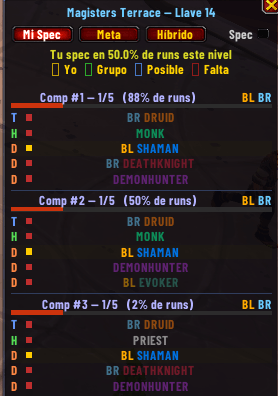
CompMatcher is a Group Finder companion for Mythic+ content. When you create a group listing, a panel appears automatically showing the top meta compositions for your dungeon and keystone level — pulled from real weekly Raider.IO run data. As players join, the panel updates live so you always know which slots are filled and what to look for next.
The addon activates only when you are the host of an active M+ listing. It closes automatically when you cancel the listing or stop searching.
How It Works
- Open the Group Finder and create a Mythic+ listing.
- The CompMatcher panel appears automatically, anchored next to the Group Finder window.
- The panel shows the top 3 compositions ranked by usage frequency for your dungeon and keystone bracket.
- As you accept applicants, each slot row updates to show which roles your group already covers.
- Cancel your listing → panel closes. Done.
You can also toggle the panel manually at any time with /cm.
Three Modes
| Tab | Description |
|---|---|
| My Spec | Compositions where your exact spec appears, ranked by how often they're run at your keystone level. Shows your spec's overall presence rate. |
| Meta | Top global compositions for this dungeon and bracket, regardless of your spec. The pure meta. |
| Hybrid | Global meta comps with blue slots highlighting where your class could theoretically fit. |
Slot Colors
| Color | Meaning |
|---|---|
| 🟡 Gold | You fill this slot |
| 🟢 Green | A group member fills this slot |
| 🔵 Blue | Your class could fit here (Hybrid mode) |
| 🟣 Purple | Meta suggestion for an empty slot (Synthetic comp) |
| 🔴 Red | Not yet covered by anyone |
Special Features
Out of Meta banner — If a group member's class doesn't appear in any shown comp, a banner flags them: "Out of meta: SHAMAN".
Wildcard block — When someone is out of meta, a 4th amber-colored block appears with the best available comp that includes them, even at low run rates.
Synthetic comps — When your group combination doesn't match any known comp in the data, CompMatcher builds group-anchored suggestions. Your actual members are always shown as covered; empty slots show the top meta options for that role, filtered to avoid duplicating classes already in your group. Each of the three comps suggests a different top-ranked option for the missing slot.
Applicant hints — When someone applies to your listing, a chat message shows which comp slot they would fill.
Keystone Brackets
| Bracket | Range |
|---|---|
| 1 | +1 – +4 |
| 5 | +5 – +9 |
| 10 | +10 – +14 |
| 15 | +15 – +19 |
| 20 | +20 and above |
Slash Commands
| Command | Action |
|---|---|
/cm |
Toggle the panel |
/cm mode flex |
Switch to My Spec mode |
/cm mode meta |
Switch to Meta mode |
/cm mode hybrid |
Switch to Hybrid mode |
/cm reset |
Reset panel to default position |
/cm data |
Print data version and run count |
/cm debug |
Full diagnostic output |
Localization
The addon is fully localized in English and Spanish (esES / esMX). The language is detected automatically from your WoW client settings.
Data & Updates
- Composition data comes from Raider.IO M+ run rankings.
- Updated automatically every Tuesday (post-NA reset), Wednesday (post-EU reset), and Friday (mid-week refresh).
- Covers all current-season dungeons across all keystone brackets.
- A warning is shown if data is more than 14 days old.
Requirements
- World of Warcraft: Midnight (12.0.5+)
- Works for any class and spec — no configuration needed.
- No external dependencies.
Support the Project
If you find CompMatcher useful and want to support continued development and weekly data updates, consider buying me a coffee! Every contribution helps keep the data fresh and the addon maintained.
*Data provided by Raider.IO · Updated weekly · *
CompMatcher Team
