Screenshot 2026-11-09 095712.png
Screenshot 2026-11-07 192821.png
Screenshot 2026-11-09 095802.png
Description
Compact Quests
A smaller quest list for the objective tracker in WoW Forever.
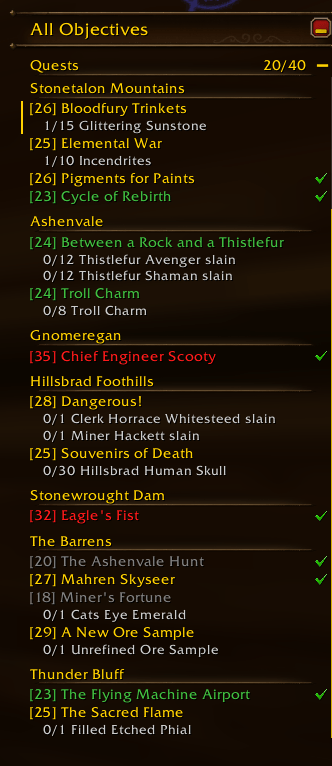
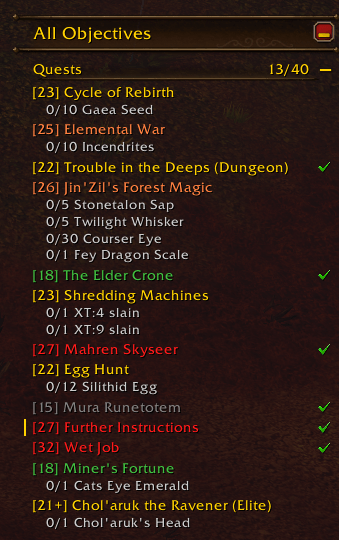
Blizzard's quest list eats a lot of screen space. There's a gap after every quest, quests ready to hand in still spell out the whole turn-in text, and with a dozen quests tracked it runs halfway down the screen. Compact Quests swaps that section for a tight list with the same information in far less space.
Only the Quests section changes. Blizzard's own quest list is hidden completely, so there's no leftover header or empty space. There's no extra features, no map changes or chat messages when you complete a step, just a cleaner quest list.
What you get
- One line per quest, coloured by level the same way Blizzard does.
- A green tick on quests ready to hand in, and nothing else on that line.
- Unfinished quests list only the objectives that are left, in a smaller font underneath.
- Quests with a usable item show it as an icon to the left. Click the icon to use the item, in or out of combat. The icon shows the cooldown and charges, and turns red when you're out of range.
- Hover a quest for the full details: objectives, turn-in text and the next waypoint.
- Set how many quests to show, and the rest scroll with the mouse wheel.
Clicks
- Left-click a quest to open it in the quest log.
- Shift-click to stop tracking it, or to link it in chat if the chat box is open.
- Right-click to focus the quest, which puts a gold bar next to it. Right-click again to unfocus.
- "New quest" and "click to complete" popups show up as rows at the top and work like Blizzard's.
Options
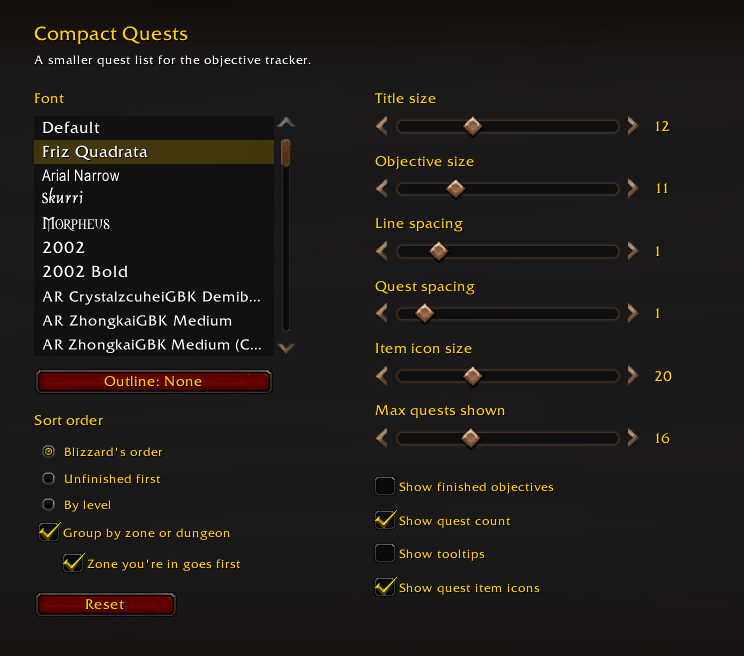
Type /cq, right-click the list header, or go to Options > AddOns > Compact Quests. Changes apply straight away.
- Font: the built-in fonts, plus every LibSharedMedia font if one of your other addons includes it. Each font in the list is drawn in its own style.
- Text Outline: none, outlined or thick.
- Title size, objective size, line spacing, quest spacing and item icon size.
- Max quests shown: All, or a number. Past that, the list scrolls.
- Sort order: Blizzard's order, unfinished first, or by level.
- Toggles for finished objectives, the quest count, tooltips and the item icons.
- Reset puts everything back to the defaults.
- Grouping quests by their zone.
- If grouped by zone, each zone is collapsable on it's own.
- Optional sort to put current zone quests at the top.
Settings are saved account wide.
Slash commands
/cqopens the options/cq sort blizzard,/cq sort unfinished,/cq sort level/cq reset/cq help
Compact Quests Team