CommanderGurke
- By
The ideal tool for no-voice runs: quickly share your own boss tactics and explanations in the chat.
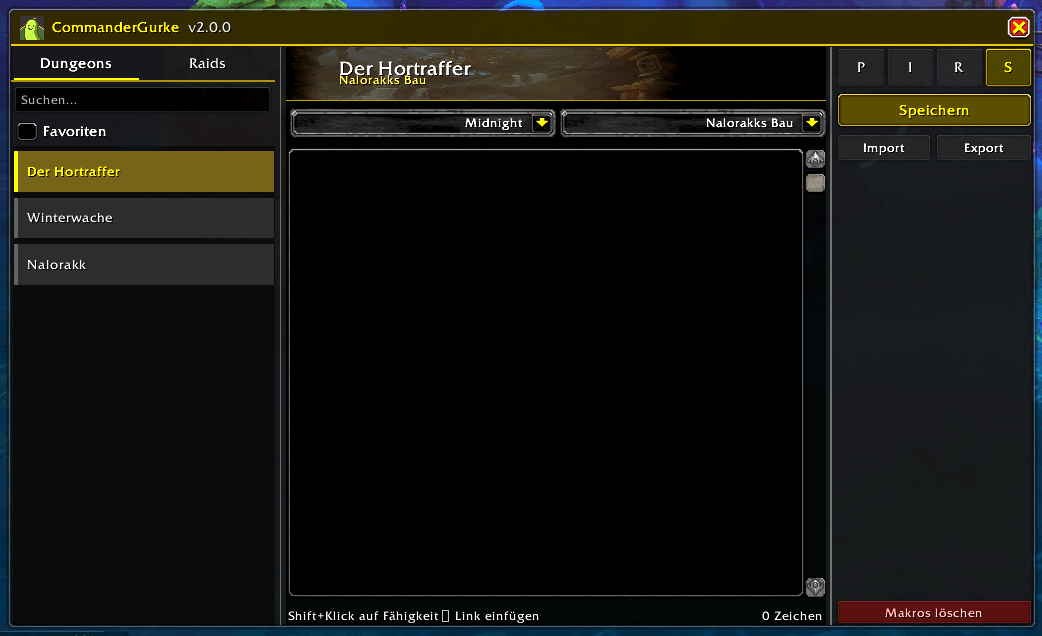
Main Window
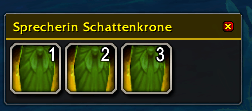
Macrobar
Description
CommanderGurke is a tool designed for no-voice guilds, raid leaders, or anyone who needs to post boss mechanics to the chat quickly without re-typing them every time.
Originally created for my own guild, this addon helps you manage and broadcast strategies efficiently.
⚠️ Important: How it works (The Macro System)
Due to changes in Blizzard's API, addons are no longer allowed to post text to the chat automatically without a hardware event (key press). CommanderGurke solves this limitation with a smart Macro System:
-
Text Splitting: Since WoW macros are limited to 255 characters, the addon automatically splits your long boss guides into smaller chunks.
-
Macro Bar: These chunks are converted into temporary macros and placed on the addon's specific Macro Bar.
-
Numbered Buttons: You will see numbered buttons (1, 2, 3...) on the bar. Simply click them in order to post the full explanation to the chat.
-
Cleanup: Since macro slots in WoW are limited, you can use the "Delete Macros" button to instantly clear the generated macros after the dungeon run.
Key Features
Custom Guides: Write your own explanations, tactics, and reminders for any boss.
Auto-Detection: Automatically switches to the correct instance when you enter a Dungeon or Raid.
Import & Export: Easily share your guides with guildmates.
Spell Linking: Supports linking spells and abilities in the text.
Macro Management: Create, use, and delete temporary macros with a strictly defined workflow.
How to use
-
Open the window via the Minimap Button or
/cg. -
Select the Dungeon/Raid (or let the auto-detection do it).
-
Write (or import) your text.
-
Click Save. The addon will now generate the necessary macros.
-
Click the numbered buttons (1, 2, 3...) on the Macro Bar in order to post the text.
-
Use Delete Macros when you are done to free up macro slots.
⚠️ Known Issues
Double Links from Adventure Journal: Currently, when you Shift-Click an ability from the Adventure Journal to insert it, the link is inserted twice.
Workaround: Simply delete one of the links manually. I am working on a fix for this.
Blizzard Action Blocks: Sometimes the WoW Client might block the addon or throw a generic error message.
How to help: If you encounter this, please report the exact error message in the comments. If you use addons like BugSack or BugGrabber, posting the specific error output helps me immensely to find and fix the cause.
Beschreibung (Deutsch)
CommanderGurke ist ein Tool für No-Voice Gilden, Raidleiter oder jeden, der Bosstaktiken schnell in den Chat posten möchte, ohne sie jedes Mal neu tippen zu müssen.
Ursprünglich habe ich das Addon für meine eigene Gilde geschrieben, teile es nun aber hier, falls es für andere Gruppen hilfreich ist.
⚠️ Wichtig: So funktioniert es (Das Makro-System)
Aufgrund von Änderungen an der Blizzard-API ist es Addons nicht mehr erlaubt, vollautomatisch Texte in den Chat zu schreiben. Es wird zwingend ein Tastendruck benötigt. CommanderGurke umgeht dieses Problem mit einem Makro-System:
-
Text-Aufteilung: Da WoW-Makros auf 255 Zeichen begrenzt sind, teilt das Addon lange Erklärungen automatisch in mehrere Abschnitte auf.
-
Makro-Leiste: Diese Abschnitte werden in temporäre Makros umgewandelt und auf der Makro-Leiste des Addons angezeigt.
-
Nummerierte Buttons: Auf der Leiste erscheinen durchnummerierte Buttons (1, 2, 3...). Klicke diese einfach nacheinander an, um den kompletten Guide Stück für Stück zu posten.
-
Aufräumen: Da der Platz für Makros in WoW begrenzt ist, gibt es einen "Makros löschen" Button, mit dem du die erstellten Makros nach dem Dungeon sofort wieder entfernen kannst.
Features
Eigene Guides: Erstelle Erklärungen und Taktiken für jeden Boss.
Automatische Erkennung: Wechselt automatisch zur richtigen Instanz, wenn du einen Dungeon oder Raid betrittst.
Import & Export: Teile deine Guides ganz einfach mit Gildenkollegen.
Zauber verlinken: Du kannst Fähigkeiten und Spells direkt im Text verlinken.
Makro-Management: Erstellt und löscht die nötigen Makros direkt über das Interface.
Benutzung
-
Öffne das Fenster über den Minimap-Button oder
/cg. -
Wähle den Dungeon/Raid (oder nutze die Auto-Erkennung).
-
Schreibe (oder importiere) deinen Text.
-
Klicke auf Speichern. Das Addon generiert nun die notwendigen Makros.
-
Klicke die nummerierten Buttons (1, 2, 3...) auf der Makro-Leiste nacheinander an.
-
Nutze "Makros löschen", wenn du fertig bist, um deine Makro-Plätze wieder freizugeben.
⚠️ Bekannte Fehler (Known Issues)
Doppelte Verlinkungen: Wenn du eine Fähigkeit mit Shift-Klick aus dem Abenteuerführer (Adventure Journal) einfügst, erscheint der Link aktuell doppelt im Textfeld.
Lösung: Einfach den doppelten Link manuell löschen. Ich arbeite bereits an einer Lösung.
Blizzard Fehlermeldungen (Blocks): Hin und wieder kann es vorkommen, dass der WoW-Client eine Aktion des Addons blockiert und eine Fehlermeldung ausgibt.
Hilfe benötigt: Falls das passiert, bitte postet die genaue Fehlermeldung in die Kommentare. Wenn ihr Addons wie BugSack oder BugGrabber nutzt, kopiert bitte den genauen Fehlerbericht hier rein. Das hilft mir enorm bei der Fehlersuche!
CommanderGurke Team