


ComboGlow
- By
Снимок ÑкÑана 2026-09-05 105818.png
Снимок ÑкÑана 2026-09-05 111209.png
Description
This addon is no longer maintained. I have officially left World of Warcraft, so there will be no future updates or compatibility fixes for upcoming patches.
# ComboGlow
Marks action bar buttons by class-resource count, proc, and your own aura —
for World of Warcraft 12.1 (Midnight), where the aura APIs are largely closed
to addons.
**[English](#english) · [Русский](#русский) · [简体中文](#简体中文)**
---
# English
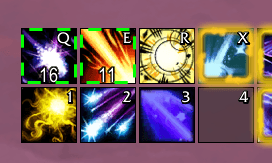
Highlights an action bar button on three states per spell:
| State | Lights up when | Default look |
|-------|----------------|--------------|
| **up** | your aura is on the unit | green marching dashes |
| **gone** | the aura is missing | red colour wash |
| **ready / proc** | the resource threshold is met **or** the spell procced | gold glow |
Works for combo points, holy power, chi, soul shards, arcane charges, essence
and the rest.
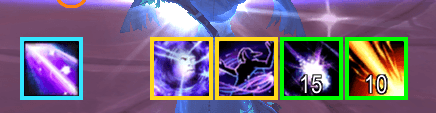
A **reminder strip** sits above your class resource bar: every "gone" state
puts its icon there while the aura is missing, so what needs pressing is next
to the resource you are already watching. A state redirected at another
spell's aura stays out of it — Primal Wrath's "Rip is not up" is the same fact
Rip's own icon already reports, and choosing to use it is a decision, not a
reminder. `/cg move` to drag the strip elsewhere, `/cg centeroff` to turn it
off, `/cg center <#>` to force something in.
> **Tested on one setup only.** Written and used with the EllesmereUI suite on
> a Feral druid and a Holy paladin, ruRU client, 12.1. Other action bar addons
> are supported in code (Blizzard's own, Dominos, anything on
> LibActionButton-1.0) but have not been tried. Bug reports welcome.
It is a standalone folder: EllesmereUI updates cannot overwrite it, but when
that suite is loaded ComboGlow borrows its glow engine (`EllesmereUI.Glows`)
so the animated markers match the rest of the interface.
## Getting started
Nothing to configure. The first time you log in on a specialization the addon
scans your bars and creates a rule for **every spell that spends the class
resource**, printing what it added.
A fixed cost becomes an "at least this much" threshold (Word of Glory — 3 holy
power); a variable one becomes "at maximum" (combo point finishers report a
minimum of 1, so the current cap is used: 5, or 6 with the talent). Spells the
Cooldown Manager tracks as auras get an aura rule as well. No hardcoded spell
ids and no per-class tables, so nothing rots across patches.
Open the options window with `/cg`. Pick a spell on the left, a state on top,
then click a marker — that click is also what creates the state, so setting one
up is a single click.
Re-scan after rearranging your bars with `/cg preset`; wipe the spec with
`/cg clear`.
## The options window
The list shows **one row per spell** with three pips on the right — green, red,
gold — lit for the states that are set up. The strip above the gallery switches
which state you are editing, and every gallery tile is a live preview: a real
overlay running the same code as the bar, drawn on that spell's own icon.
The **watching:** row handles spells that apply another spell's debuff. Primal
Wrath puts Rip on everything, so its button has no aura of its own. That is
detected automatically: for a spell the Cooldown Manager does not track as an
aura, its own description is searched for the name of one that is — the game
already says "applying Rip", so there is nothing to look up. One match is
taken and announced in chat; anything ambiguous is left for you to point by
hand through the same row.
## Markers
Six in the gallery, all visually distinct:
| Key | What it is |
|-----|------------|
| `solid` | crisp coloured frame around the icon |
| `fill` | colour wash over the icon |
| `active` | Blizzard's soft highlight border |
| `pixel` | marching dashes |
| `shine` | orbiting sparkles |
| `modern` | proc glow |
`pixel`, `shine` and `modern` are drawn by EllesmereUI's engine when it is
loaded, and fall back to built-in looks when it is not. A few more styles
(`button`, `gcd`, `classic`) remain available through `/cg style` but are kept
out of the gallery: once tinted they are indistinguishable from the ones above.
A few seconds before the aura runs out the frame turns red — `/cg warn <#>
<seconds>`, 4 by default, `0` disables. The threshold works even when the
duration is secret: it is baked into a step colour curve the engine evaluates.
## Count formats
| Written | Means |
|---------|-------|
| `5` | 5 or more |
| `5+` | the same |
| `=5` | exactly 5 |
| `3-4` | between 3 and 4 |
| `max` | at the current maximum (follows talents that raise the cap) |
## Commands
| Command | What it does |
|---------|--------------|
| `/cg` | open the options window |
| `/cg help` | command list |
| `/cg preset` | scan the bars and set up what it finds |
| `/cg clear` | remove every rule of this spec |
| `/cg list` | list the rules, with data source and button count |
| `/cg add <count> <spell>` | resource rule |
| `/cg dot [spell]` \| `/cg buff [spell]` | aura rule; with no argument, the spell you cast last |
| `/cg missing <#>` | flip a rule to "glow while gone" |
| `/cg unit <#> <unit>` | player, target, focus, mouseover, pet |
| `/cg aura <#> <name\|id>` | watch a different aura than the spell itself |
| `/cg warn <#> <seconds>` | turn red this long before it ends |
| `/cg style <#\|all> <key>` | marker |
| `/cg color <#> r g b` | colour, 0–255 |
| `/cg alpha <#\|all> <0-100>` \| `/cg thick <#\|all> <1-10>` | brightness, frame thickness |
| `/cg timer <#> on\|off` | time left on the icon |
| `/cg center <#>` | show this state in the reminder strip too |
| `/cg poll <ms>` | how often aura state is re-read (0 = events only) |
| `/cg mirror on\|off` | Cooldown Manager fallback |
| `/cg secret on\|off` | restricted-content mode |
| `/cg auracheck` \| `/cg cdtest` | diagnostics |
Rules are stored **per specialization, per character**.
## Why AdiButtonAuras stopped working, and what this does instead
AdiButtonAuras targets `## Interface: 110200` (11.2) and enumerates auras with
`GetAuraDataByIndex` / `GetAuraSlots` / `GetDebuffDataByIndex`. Under 12.1's
aura restrictions those **hard error** rather than returning nothing.
There is not a single enumeration here. Only direct per-spell queries:
* `C_UnitAuras.GetAuraDataBySpellName(unit, name, "HARMFUL|PLAYER")` — is your
own aura there;
* `C_UnitAuras.GetUnitAuraBySpellID` / `GetPlayerAuraBySpellID` for the ids
Blizzard kept readable;
* `C_UnitAuras.GetAuraDuration` → `Cooldown:SetCooldownFromDurationObject`,
which renders engine-side and so survives a secret number;
* `C_Secrets.ShouldAurasBeSecret` / `ShouldSpellAuraBeSecret` to know which
mode we are in.
In practice on 12.1 `ShouldAurasBeSecret` answers **true everywhere**, even on
a target dummy in a city, and `ShouldSpellAuraBeSecret` is true for ordinary
dots. So debuffs on a target cannot be read at all, and everything rests on the
Cooldown Manager mirror below: presence yes, remaining time no. Your own buffs
from Blizzard's readable set work fully, with a real timer.
`/cg auracheck` prints exactly what the API answers where you are standing.
## The Cooldown Manager mirror
When the aura cannot be read, the engine still knows: a Cooldown Manager item
frame tracks aura presence itself. Its answer is a **secret boolean**, which
must never be tested in Lua — it goes to `SetAlphaFromBoolean` and is resolved
engine-side. The remaining time rides the same trick: the engine has already
written it into its own FontString and `SetText` accepts secret strings, so the
text is passed through verbatim.
Only works for spells tracked in the Cooldown Manager, which is why it is a
fallback. `/cg mirror off` disables it.
## Display latency
The default UI redraws on `UNIT_AURA`, and when that event is late a debuff
appears a second after it landed, or only after re-targeting. Two extra paths:
* **instant on cast** — a successful cast of a tracked spell flips the display
without waiting for confirmation, running the previous known duration. Real
data overrides the guess; the window is 2 s, so an immunity or a miss clears
itself.
* **polling** — aura state is re-read every 200 ms, not only on the event.
`/cg poll 100`, `/cg poll 0` to rely on events alone.
`/cg auracheck` reports the measured gap between your cast and the first
successful read, so "is the data late or just the redraw" is answered with a
number.
## Bars
Buttons are found on:
* **EllesmereUIActionBars** (`EABButton<slot>`) — that module builds its own
buttons and deliberately removes them from Blizzard's registry, so they have
to be looked up by name or an EUI setup yields nothing at all;
* Blizzard's own bars (`ActionBarButtonEventsFrame.frames`);
* Dominos;
* anything built on `LibActionButton-1.0` (Bartender4, ElvUI, …);
* Cooldown Manager icons, optionally, with `/cg cdm on`.
Macros are resolved to the spell they cast, and base spells and overrides
(forms, talents that swap ids) are matched.
## Secret values
Under restrictions `UnitPower()` can return a *secret value*: a number that can
be handed to a C function but never compared in Lua. So visibility above a
threshold is produced geometrically rather than by a condition — the value goes
into `StatusBar:SetValue()` and the fill drives a clipping frame containing the
glow, so the whole comparison happens inside the engine.
If that path ever misbehaves, `/cg secret off` disables it: markers then simply
do not show in restricted instances and work normally everywhere else.
## Notes
* `/cg` is a short alias. If another addon claims it, ComboGlow falls back to
`/cgl`, then `/cglow`; `/comboglow` always works.
* The addon only reads `UnitPower` and draws frames. It casts nothing and
presses nothing — ordinary UI code.
## Licence
MIT, see [LICENSE](LICENSE).
## Support
If it saved you an evening of fighting Midnight's secret values, you can chip
in any amount you like:
**YooMoney:** https://yoomoney.ru/to/4100119613908309
---
# Русский
Подсветка кнопок панели по количеству классового ресурса, проку и твоей
собственной ауре — для World of Warcraft 12.1 (Midnight), где API аур почти
целиком закрыт для аддонов.
Три состояния на заклинание:
| Состояние | Когда горит | Вид по умолчанию |
|-----------|-------------|------------------|
| **висит** | твоя аура на цели | зелёный бегущий пунктир |
| **нет** | ауры нет | красная заливка |
| **готово / прок** | набран ресурс **или** заклинание прокнуло | золотое свечение |
Работает с комбо-очками, святой силой, ци, осколками души, чародейскими
зарядами, сущностью и остальными.
**Полоса напоминаний** висит над панелью классового ресурса: каждое состояние
«нет» выкладывает туда свою иконку, пока ауры не хватает — то, что надо нажать,
оказывается рядом с ресурсом, на который ты и так смотришь. Состояния,
перенаправленные на чужую ауру, туда не попадают: «Разорвать не висит» у
Первобытного гнева это тот же факт, о котором уже говорит иконка самого
Разорвать, а решение применить аое принимает игрок — это не напоминание.
`/cg move` — перетащить, `/cg centeroff` — выключить, `/cg center <№>` —
затащить что-то принудительно.
> **Проверено только на одной сборке.** Написано и обкатано с сюитой
> EllesmereUI на друиде-фераль и пала-хиле, клиент ruRU, 12.1. Остальные
> аддоны панелей в коде поддержаны (стандартные панели Blizzard, Dominos, всё
> на LibActionButton-1.0), но вживую не проверялись. Баг-репорты приветствуются.
Отдельная папка: обновления EllesmereUI её не затирают, но если сюита
загружена, ComboGlow берёт её движок подсветки (`EllesmereUI.Glows`), поэтому
анимированные отметки выглядят как в остальном интерфейсе.
## Быстрый старт
Настраивать ничего не нужно. При первом входе на специализацию аддон сам
сканирует панели и создаёт правило на **каждое заклинание, которое тратит
классовый ресурс**, и пишет в чат, что добавил.
Фиксированная стоимость становится порогом «столько и больше» (Слово Славы — 3
святой силы), переменная — «на максимуме» (финишеры на комбо-очках отдают
минимум 1, поэтому берётся текущий кап: 5, или 6 с талантом). Заклинания,
которые Cooldown Manager отслеживает как ауры, получают ещё и правило на ауру.
Никаких зашитых ID и списков по классам — ничего не протухает от патча к
патчу.
Окно настроек — `/cg`. Слева выбираешь заклинание, сверху состояние, потом
кликаешь отметку; этот же клик состояние и создаёт, так что настройка в один
клик.
Пересканировать после перестановки панелей — `/cg preset`, стереть всё на
спеке — `/cg clear`.
## Окно настроек
В списке **одна строка на заклинание**, справа три точки — зелёная, красная,
золотая, — горят те, чьи состояния настроены. Полоска над галереей переключает
редактируемое состояние, а каждая плитка галереи это живое превью: настоящий
оверлей тем же кодом, что рисует на панели, на иконке этого заклинания.
Строка **«следит за:»** нужна для заклинаний, вешающих чужой дебафф.
Первобытный гнев накладывает Разорвать, своей ауры у его кнопки нет. Это
определяется само: если Cooldown Manager не отслеживает ауру самого заклинания,
в его описании ищется имя того, которое отслеживается — игра и так пишет
«применяя Разорвать», искать нечего. Единственное совпадение подставляется и
объявляется в чат; неоднозначное оставляется тебе, задаётся той же строкой.
## Отметки
В галерее шесть, все визуально разные:
| Ключ | Что это |
|------|---------|
| `solid` | чёткая цветная рамка вокруг иконки |
| `fill` | заливка иконки цветом |
| `active` | мягкая рамка Blizzard |
| `pixel` | бегущий пунктир |
| `shine` | искры по кругу |
| `modern` | проковое свечение |
`pixel`, `shine` и `modern` рисует движок EllesmereUI, если он загружен; без
него заменяются собственными видами. Ещё несколько стилей (`button`, `gcd`,
`classic`) доступны через `/cg style`, но в галерею не выведены: после
тонировки они неотличимы от перечисленных.
За несколько секунд до конца ауры рамка краснеет — `/cg warn <№> <секунд>`, по
умолчанию 4, `0` выключает. Порог работает даже с секретной длительностью: он
запечён в ступенчатую цветовую кривую, которую вычисляет движок.
## Формат количества
| Запись | Значение |
|--------|----------|
| `5` | 5 и больше |
| `5+` | то же самое |
| `=5` | ровно 5 |
| `3-4` | от 3 до 4 |
| `max` | на текущем максимуме (учитывает таланты, поднимающие капу) |
## Команды
| Команда | Что делает |
|---------|-----------|
| `/cg` | открыть окно настроек |
| `/cg help` | список команд |
| `/cg preset` | просканировать панели и настроить найденное |
| `/cg clear` | удалить все правила этой спеки |
| `/cg list` | список правил, с источником данных и числом кнопок |
| `/cg add <кол-во> <заклинание>` | правило на ресурс |
| `/cg dot [закл]` \| `/cg buff [закл]` | правило на ауру; без аргумента — последний каст |
| `/cg missing <№>` | перевернуть: светиться когда ауры нет |
| `/cg unit <№> <юнит>` | player, target, focus, mouseover, pet |
| `/cg aura <№> <имя\|id>` | следить за другой аурой, а не за самим заклинанием |
| `/cg warn <№> <секунд>` | краснеть за столько до конца |
| `/cg style <№\|all> <ключ>` | отметка |
| `/cg color <№> r g b` | цвет, 0–255 |
| `/cg alpha <№\|all> <0-100>` \| `/cg thick <№\|all> <1-10>` | яркость, толщина рамки |
| `/cg timer <№> on\|off` | остаток времени на иконке |
| `/cg center <№>` | показывать это состояние ещё и в полосе напоминаний |
| `/cg poll <мс>` | как часто перечитывать ауры (0 = только события) |
| `/cg mirror on\|off` | запасной путь через Cooldown Manager |
| `/cg secret on\|off` | режим закрытых значений |
| `/cg auracheck` \| `/cg cdtest` | диагностика |
Правила хранятся **отдельно для каждой специализации и персонажа**.
## Почему AdiButtonAuras перестал работать, и что здесь вместо него
У AdiButtonAuras в `.toc` стоит `## Interface: 110200` (11.2), и ауры он
перебирает через `GetAuraDataByIndex` / `GetAuraSlots` / `GetDebuffDataByIndex`.
Под ограничениями 12.1 такие переборы **падают с ошибкой**, а не отдают пустоту.
Здесь нет ни одного перебора. Только точечные запросы:
* `C_UnitAuras.GetAuraDataBySpellName(unit, name, "HARMFUL|PLAYER")` — есть ли
конкретно твоя аура;
* `C_UnitAuras.GetUnitAuraBySpellID` / `GetPlayerAuraBySpellID` для ID, которые
Blizzard оставила читаемыми;
* `C_UnitAuras.GetAuraDuration` → `Cooldown:SetCooldownFromDurationObject` —
рисует на движке, поэтому переживает секретное число;
* `C_Secrets.ShouldAurasBeSecret` / `ShouldSpellAuraBeSecret` — в каком мы
режиме.
На практике в 12.1 `ShouldAurasBeSecret` возвращает **true везде**, даже на
манекене в городе, а `ShouldSpellAuraBeSecret` — true для обычных дотов. То
есть дебаффы на цели не читаются в принципе, и всё держится на зеркале
Cooldown Manager: наличие есть, времени нет. Собственные баффы из читаемого
набора Blizzard работают полностью, с настоящим таймером.
`/cg auracheck` печатает, что именно отвечает API там, где ты стоишь.
## Зеркало Cooldown Manager
Если ауру прочитать нельзя, движок всё равно её знает: иконка Cooldown Manager
сама отслеживает наличие. Её ответ — **секретный булев**, его нельзя проверять
в Lua, поэтому он уходит в `SetAlphaFromBoolean` и разрешается на стороне
движка. Остаток времени тем же приёмом: движок уже написал его в свою
FontString, а `SetText` принимает секретные строки, так что текст переносится
как есть.
Работает только для заклинаний, отслеживаемых в Cooldown Manager — потому это
и запасной путь. Выключается `/cg mirror off`.
## Задержка отображения
Стандартный интерфейс перерисовывается по `UNIT_AURA`, и когда событие
опаздывает, дебафф появляется через секунду или только после перевыбора цели.
Два дополнительных пути:
* **мгновенно по касту** — успешный каст отслеживаемого заклинания сразу
переключает отметку, не дожидаясь подтверждения, и берёт прошлую известную
длительность. Настоящие данные перебивают догадку; окно 2 секунды, так что
иммун или промах гаснут сами.
* **опрос** — состояние перечитывается каждые 200 мс, а не только по событию.
`/cg poll 100`, `/cg poll 0` — жить только на событиях.
`/cg auracheck` показывает замеренный разрыв между твоим кастом и первым
удачным чтением, так что «опаздывают данные или перерисовка» отвечается цифрой.
## Панели
Кнопки ищутся:
* **EllesmereUIActionBars** (`EABButton<слот>`) — этот модуль делает свои
кнопки и намеренно вычёркивает их из реестра Blizzard, поэтому искать их надо
по имени, иначе на EUI-сборке не находится вообще ничего;
* стандартные панели Blizzard (`ActionBarButtonEventsFrame.frames`);
* Dominos;
* всё на `LibActionButton-1.0` (Bartender4, ElvUI и др.);
* иконки Cooldown Manager — по желанию, `/cg cdm on`.
Макросы разбираются до заклинания, которое они кастуют; учитываются базовые
заклинания и оверрайды (формы, таланты, подменяющие ID).
## Секретные значения
Под ограничениями `UnitPower()` может вернуть *secret value* — число, которое
можно отдать C-функции, но нельзя сравнить в Lua. Поэтому видимость выше порога
строится геометрией, а не условием: значение уходит в `StatusBar:SetValue()`, а
полоса заполнения двигает обрезающий фрейм со свечением внутри, и всё сравнение
происходит внутри движка.
Если этот путь поведёт себя странно — `/cg secret off`: тогда в таких инстансах
отметки просто не показываются, а везде остальном всё работает как обычно.
## Мелочи
* `/cg` — короткий алиас. Если его занял другой аддон, ComboGlow берёт `/cgl`,
потом `/cglow`; `/comboglow` работает всегда.
* Аддон только читает `UnitPower` и рисует рамки. Ничего не кастует и не
нажимает — обычный UI-код.
## Лицензия
MIT, см. [LICENSE](LICENSE).
## Поблагодарить
Если аддон сэкономил тебе вечер возни с секретными значениями Midnight — можно
поддержать любой комфортной суммой:
**ЮMoney:** https://yoomoney.ru/to/4100119613908309
---
# 简体中文
按职业资源数量、触发(proc)和你自己的光环来标记动作条按钮 —— 面向
《魔兽世界》12.1(Midnight),在这个版本里光环 API 对插件基本关闭了。
每个法术有三种状态:
| 状态 | 何时点亮 | 默认样式 |
|------|----------|----------|
| **生效中** | 你的光环在目标身上 | 绿色流动虚线框 |
| **已消失** | 光环不在了 | 红色色块覆盖 |
| **就绪 / 触发** | 资源达到阈值**或**法术触发**或**爆发技冷却结束 | 金色光效 |
适用于连击点、神圣能量、真气、灵魂碎片、奥术充能、精华等等。
**提醒条**位于职业资源条上方:每个「已消失」状态会在光环缺失时把图标放到那里,
爆发技冷却好了也一样。需要按的东西就出现在你本来就在看的资源旁边。
被重定向到别的法术光环的状态不会进入提醒条 —— 「原始狂怪」的「割裂不在」和
割裂自己的图标说的是同一件事,而是否使用范围终结技是玩家的判断,不是提醒。
`/cg move` 拖动位置,`/cg centeroff` 关闭。
> **只在一套环境下测试过。** 使用 EllesmereUI 套件,野性德鲁伊和神圣圣骑士,
> ruRU 客户端,12.1。代码里支持其他动作条插件(暴雪原生、Dominos、任何基于
> LibActionButton-1.0 的),但没有实测。欢迎反馈问题。
>
> 插件内的界面目前只有英文和俄文。中文界面还没做 —— 如果有需要请提 issue。
## 开始使用
不需要配置。你第一次用某个专精登录时,插件会扫描你的动作条,为**每个消耗职业
资源的法术**建立规则,并把添加的内容打印到聊天框。
固定消耗变成「至少这么多」的阈值(圣光术语 —— 3 点神圣能量);可变消耗变成
「满值时」(连击点终结技上报的最小值是 1,所以取当前上限:5,有天赋则为 6)。
冷却管理器当作光环追踪的法术会同时得到光环规则,精华冷却列表里的法术会得到
爆发规则。没有硬编码的法术 ID,也没有按职业写死的表,所以不会随版本失效。
用 `/cg` 打开设置窗口。左边选法术,上面选状态,然后点一个标记 —— 这一次点击
同时也会创建该状态,所以设置一个状态只需要一次点击。
重新排列动作条后用 `/cg preset` 重新扫描;`/cg clear` 清空当前专精。
## 设置窗口
列表里**每个法术一行**,右侧三个小点(绿、红、金)表示哪些状态已经设置。
画廊上方的条切换正在编辑的状态,每块画廊图块都是实时预览:和动作条上跑的是
同一套代码,画在该法术自己的图标上。
**追踪:**这一行处理「用一个法术施放另一个法术的减益」的情况。原始狂怪会给所有
目标挂上割裂,所以它的按钮没有自己的光环。这一点会被自动识别:如果冷却管理器
没有把该法术当作光环追踪,插件会在它自己的法术描述里查找一个被追踪法术的名字 ——
游戏本来就写了「施加割裂」,无需查表。唯一匹配会被采用并在聊天框中说明;含糊不清
的情况则留给你用同一行手动指定。
## 标记
画廊里六种,彼此在视觉上都不相同:
| 键名 | 是什么 |
|------|--------|
| `solid` | 图标周围的实色边框 |
| `fill` | 覆盖图标的色块 |
| `active` | 暴雪的柔和高亮边框 |
| `pixel` | 流动虚线 |
| `shine` | 环绕的火花 |
| `modern` | 触发光效 |
光环结束前几秒边框会变红 —— `/cg warn <编号> <秒数>`,默认 4 秒,`0` 关闭。
即使剩余时间是保密值(secret)这个阈值也有效:它被写进一条阶梯色彩曲线,由引擎
自己求值。
## 为什么 AdiButtonAuras 失效了,这里换了什么做法
AdiButtonAuras 的 `.toc` 写的是 `## Interface: 110200`(11.2),内部用
`GetAuraDataByIndex` / `GetAuraSlots` / `GetDebuffDataByIndex` 遍历光环。在 12.1
的光环限制下,这些调用会**直接报错**,而不是返回空。
这里没有任何遍历,只有按法术的定点查询:
* `C_UnitAuras.GetAuraDataBySpellName(unit, name, "HARMFUL|PLAYER")` —— 你自己的
光环在不在;
* `C_UnitAuras.GetUnitAuraBySpellID` / `GetPlayerAuraBySpellID` —— 暴雪保留可读的
那些 ID;
* `C_UnitAuras.GetAuraDuration` → `Cooldown:SetCooldownFromDurationObject` ——
由引擎绘制,所以数值是保密值也能用;
* `C_Secrets.ShouldAurasBeSecret` / `ShouldSpellAuraBeSecret` —— 判断当前处于哪种
模式。
实测在 12.1 上 `ShouldAurasBeSecret` **到处都返回 true**,即使是在城里打训练假人,
而 `ShouldSpellAuraBeSecret` 对普通 DoT 也返回 true。也就是说目标身上的减益根本
读不到,一切都依赖下面的冷却管理器镜像:有无可知,剩余时间不可知。你自己身上、
在暴雪可读名单内的增益则完全正常,带真实计时。
`/cg auracheck` 会打印你当前所处环境下 API 的真实回答。
## 冷却管理器镜像
读不到光环时,引擎自己是知道的:冷却管理器的图标本身就在追踪光环是否存在。
它的答案是一个**保密布尔值**,绝不能在 Lua 里判断 —— 它被交给
`SetAlphaFromBoolean`,由引擎解析。剩余时间用同样的手法:引擎已经把它写进了自己的
FontString,而 `SetText` 接受保密字符串,所以文本被原样搬运。
只对冷却管理器追踪的法术有效,所以这是后备方案。`/cg mirror off` 可以关闭。
## 许可
MIT,见 [LICENSE](LICENSE)。
## 支持作者
如果它帮你省下了一晚上和 Midnight 保密值搏斗的时间,可以随意打赏:
**YooMoney:** https://yoomoney.ru/to/4100119613908309
ComboGlow Team
