Description
CombatLock is a lightweight utility addon that prevents game windows from popping up or UI elements from hiding when you accidentally press keys during combat.
No matter what custom keybindings you use, CombatLock automatically disables window hotkeys the moment combat starts and restores them instantly when combat ends.
Key Features
Standalone Minimap Button (CL): Easily toggle the addon ON/OFF, open settings, or drag the icon around the minimap without heavy external libraries.
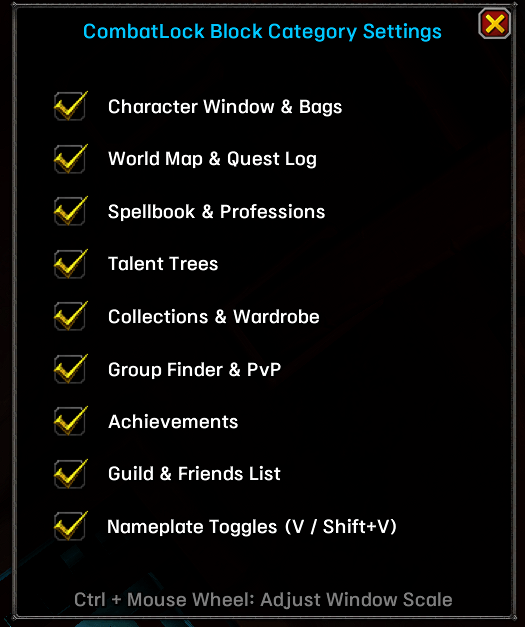
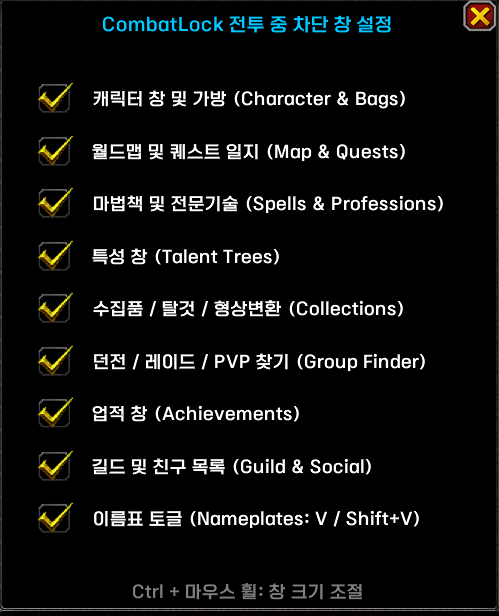
Custom Block Category Settings: Open the option frame to individually select which UI categories to block or allow during combat.
Resizable Option Frame: Easily scale the settings frame size by holding Ctrl + Mouse Wheel over the option window.
Auto Close Open Panels: Automatically closes any open bags or UI windows as soon as combat begins.
Auto-Enable Enemy Nameplates: Automatically enables enemy nameplates upon entering combat if they were turned off, ensuring nameplates are always visible in boss fights.
What It Blocks During Combat
Hide UI: ALT+Z (Toggle User Interface)
Character Window & Bags: Character info, equipment, reputation, and all inventory bags (Compatible with default bags & Baganator)
Spellbook & Professions: Spellbook, professions, and crafting windows
Talents: Specialization and talent trees
Quest Log & World Map: Quests, map, and objective tracking
Achievements: Achievement frame and Warband score
Social & Guild: Friends list, social panels, and guild window
Dungeon Finder & PvP: Group finder, raid finder, PvP frame, and encounter journal
Collections & Housing: Warband collections, mounts, pets, wardrobe, and housing dashboard
Nameplates: Enemy and friendly nameplate toggles (V / Shift+V) (Works automatically with your custom keybindings)
Minimap Controls & Commands
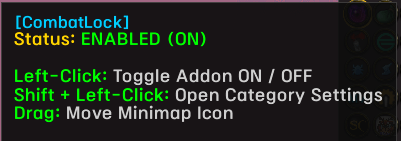
Minimap Left-Click: Toggle Addon ON / OFF (Out of combat only)
Minimap Shift + Left-Click: Open Custom Block Category Settings Frame
Minimap Drag: Move button position around the minimap
Ctrl + Mouse Wheel (on Config Window): Adjust Option Frame Scale (Size)
/cl or /combatlock : Check current addon status
/cl on : Turn ON combat key lock (Out of combat only)
/cl off : Turn OFF combat key lock (Out of combat only)
/cl opt or /cl config : Open Custom Block Category Settings Frame
CombatLock은 전투 중 실수로 키를 눌렀을 때 게임 창이 열리거나 UI가 사라지는 것을 막아주는 가벼운 유틸리티 애드온입니다.
단축키를 기본 설정으로 쓰시든 개인 커스텀 단축키로 바꿔 쓰시든 완벽하게 작동하며, 전투가 시작되면 해당 기능과 창이 열리는 단축키를 자동으로 잠그고 전투가 끝나면 원상복구해 줍니다.
주요 기능
미니맵 아이콘 (CL): 무거운 외장 라이브러리 없이 클릭 한 번으로 애드온 켜기/끄기, 설정창 열기 및 드래그 이동이 가능합니다.
개별 차단 선택 옵션창: 미니맵 아이콘을 Shift + 좌클릭하거나 /cl opt를 입력하여 원하는 UI 창만 골라서 전투 중 차단 여부를 설정할 수 있습니다.
설정창 크기 자유 조절: 설정창 위에서 Ctrl + 마우스 휠을 굴리면 원하는 크기로 창 비율을 자유롭게 축소/확대할 수 있습니다.
열려있는 창 자동 닫기: 전투 시작 순간 열려있던 가방이나 UI 창을 자동으로 닫아줍니다.
전투 시작 시 적 이름표 자동 활성화: 이름표가 꺼진 상태로 보스전 등에 진입하면 자동으로 적 이름표를 켜준 뒤 단축키를 차단합니다.
전투 중 차단되는 기능 및 창 목록
UI 숨기기: ALT+Z (사용자 인터페이스 보이기/숨기기)
캐릭터 창 및 가방: 캐릭터 정보, 장비, 평판 탭, 순정 가방 및 Baganator (전투 시작 시 열려있던 가방도 자동으로 닫힘)
마법책 및 전문기술: 마법책, 전문기술 및 제작창
특성: 특성 및 전문화창
퀘스트 및 지도: 퀘스트 일지, 월드맵
업적: 업적창 및 전투부대 업적 점수
소셜 및 길드: 친구 목록, 소셜창, 길드창
던전 및 PvP: 파티/던전/레이드 찾기, 플레이어 간 전투(PvP) 창, 모험 안내서
수집품 및 하우징: 전투부대 수집품(탈것/애완동물/형상변환) 및 하우징 대시보드
이름표 토글: 적 및 우호적 이름표 표시 토글 (V / Shift+V) (유저분이 지정한 개인 단축키에 맞게 자동으로 적용됩니다)
미니맵 조작법 및 명령어
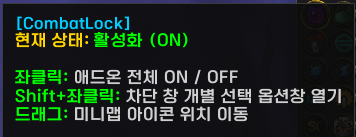
미니맵 좌클릭: 애드온 전체 ON / OFF (비전투 중에만 가능)
미니맵 Shift + 좌클릭: 차단 창 개별 선택 옵션창 열기
미니맵 드래그: 미니맵 아이콘 위치 이동
Ctrl + 마우스 휠 (설정창 위): 개별 차단 설정창 크기 조절
/cl 또는 /combatlock : 현재 애드온 상태 확인
/cl on : 전투 중 단축키 차단 기능 켜기 (비전투 중에만 가능)
/cl off : 전투 중 단축키 차단 기능 끄기 (비전투 중에만 가능)
/cl opt 또는 /cl config : 차단 창 개별 선택 옵션창 열기
애드온 피드백 & 버그 문의 - https://open.kakao.com/o/g88bp7Mi
☕ Buy the Developer a Coffee / 개발자에게 커피 한 잔 사주기
💖 [투네이션 (Toonation) 국내 후원하기]**(https://toon.at/donate/seolppe)
☕ [Ko-fi (Global Support) 후원하기]**(https://ko-fi.com/seolppep)
🔴 [Patreon (Global Support) 정기 후원하기]**(https://www.patreon.com/SeolPPe)
Your support keeps addon development going! 제작자를 응원해 주시면 애드온 개발에 큰 힘이 됩니다!
CombatLock Team

Owner