


CombatCrosshair
- By
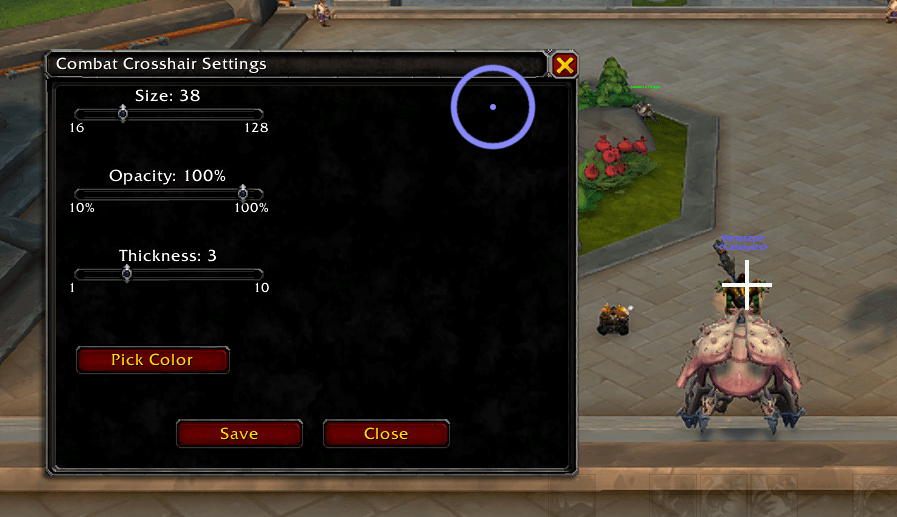
cc.png
Description
# Combat Crosshair
A customizable crosshair addon for World of Warcraft that displays character position via crosshair during combat.
## Features
- ✅ **Automatic Combat Detection** - Crosshair appears when entering combat and disappears when leaving
- ✅ **Class Color Default** - Automatically uses your class color on first load
- ✅ **Fully Customizable** - Adjust size, color, opacity, and thickness
- ✅ **Live Preview** - See changes in real-time while configuring
- ✅ **Lightweight** - Minimal performance impact
- ✅ **Persistent Settings** - Your preferences are saved between sessions
## Installation
1. Download the latest release
2. Extract the `CombatCrosshair` folder into your WoW addons directory:
- Windows: `World of Warcraft\_retail_\Interface\AddOns\`
- Mac: `World of Warcraft/_retail_/Interface/AddOns/`
3. Restart World of Warcraft or type `/reload` in-game
4. The addon will load automatically and display a confirmation message
## Usage
### Commands
- `/crosshair` or `/cc` - Open the configuration panel
- `/crosshair toggle` - Manually show/hide the crosshair
- `/crosshair reset` - Reset all settings to defaults
### Customization Options
Open the configuration panel with `/crosshair` to adjust:
- **Size** - Control the overall size of the crosshair (16-128 pixels)
- **Opacity** - Adjust transparency (10-100%)
- **Thickness** - Change line thickness (1-10 pixels)
- **Color** - Pick any color using the color picker
### Default Settings
- Size: 38 pixels
- Thickness: 3 pixels
- Color: Your class color
- Opacity: 100%
## Requirements
- World of Warcraft Retail (The War Within and later)
- Interface Version: 120000+
## Support
If you encounter any issues or have suggestions, please open an issue on the GitHub repository.
## License
This addon is open source. Feel free to modify and distribute as needed.
## Author
Created by Venaseph
## Changelog
Version 1.0.0
- Initial release
- Combat-triggered crosshair display
- Customizable size, color, opacity, and thickness
- Class color defaults
- Live preview in configuration panel
For more information:
https://github.com/Venaseph/CombatCrosshair
The CombatCrosshair Team
