


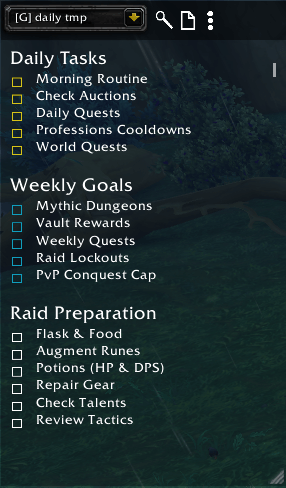
Coffeenotes1.png
Description
This Addon is currently still under construction. So there might be some features behaving unexpectedly. Please let me know in the comments.
CoffeeNotes
A lightweight, always-visible notes addon for World of Warcraft. Keep track of tasks, checklists, and reminders directly on your screen — with automatic daily and weekly resets.
Features
- **Multiple Notes** — Create as many notes as you need, organized by character or shared globally across all characters.
- **Read & Edit Modes** — Double-click the note to toggle edit mode. Click anywhere outside to return to read-only view.
- **Interactive Checklists** — Check off items by clicking. Supports three checkbox types with distinct visual styles:
- `-` / `+` — Standard checkbox
- `-d` / `+d` — Daily reset checkbox (resets automatically each day)
- `-w` / `+w` — Weekly reset checkbox (resets automatically each week)
- **Headings** — Lines starting with `#` are rendered as bold headings.
- **Indentation** — Use `~` at the start of a line to indent it.
- **Pin Notes** — Pin important notes so they appear first in the dropdown.
- **Templates** — Quickly create new notes from built-in or custom templates. Save any note as a reusable template.
- **Search** — Search across all notes by name or content.
- **Import / Export** — Transfer notes between players or back them up.
- **Copy / Move** — Copy or move notes between character and global scope.
- **Auto-Hide** — Automatically hides during combat, Mythic+, or raids (configurable).
- **Resizable & Movable** — Drag to reposition, resize from the bottom-right corner.
- **Custom Textures** — Distinct checkbox icons for normal, daily, and weekly tasks.
Slash Commands
| Command | Description |
|---|---|
| `/cn` | Toggle the notes frame |
| `/cn add <text>` | Append text to the current note |
| `/cno` | Open the options panel |
Text Syntax
Write notes in plain text using these markers:
# Heading
Regular text line
- Unchecked item
+ Checked item
-d Unchecked daily task
+d Checked daily task
-w Unchecked weekly task
+w Checked weekly task
~ Indented line
~- Indented checkbox
~~- Double indented checkbox
Example
# Weekly To-Do
-w Clear Vault
-w Mythic+ 8 runs
-d World Quests
-d Check Auction House
# Shopping List
- Enchants
- Gems
- Flask
Note Scopes
- **Character Notes** — Only visible on the character that created them.
- **Global Notes** — Shared across all characters on the account.
Notes are labeled `[C]` (character) or `[G]` (global) in the dropdown.
Header Bar
Hover over the top edge of the note frame to reveal the header bar:
- **Dropdown** — Switch between notes
- **Search** — Search all notes
- **New** — Create a new note (optionally from a template)
- **More Actions** — Pin/unpin, rename, delete, templates, save as template
Options (`/cno`)
- **Background Opacity** — Adjust note transparency
- **Font Size** — Base text and heading font sizes
- **Daily Reset Hour** — When daily checkboxes reset (0–23)
- **Weekly Reset Day** — Which day weekly checkboxes reset
- **Auto-Hide** — Toggle auto-hide for combat, Mythic+, and raid zones
- **Templates** — Toggle visibility of individual templates, delete custom templates
- **Import / Export** — Select a note to export, export all notes, or import
- **Copy / Move** — Copy or move a selected note between character and global scope
Auto-Hide Behavior
When the note is automatically hidden (combat, M+, raid), using `/cn` will override the auto-hide and show the note until:
- You manually hide it again with `/cn`
- You change zones or enter a new instance
The CoffeeNotes Team
