


ClutchFPS - Addon Manager
- By
Automatically strip non-essential world addons when entering Dungeons, Raids, and Delves to maximize FPS and eliminate combat micro-stutters, then restore your full addon list with one click when returning to the open world.
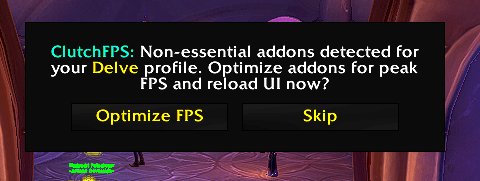
Activate_pop_up.png
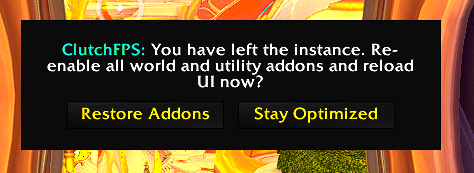
DeActivate_pop_up.png
Description
⚡ ClutchFPS - Addon Manager
Stop letting heavy open-world, collection, and auction house addons tank your frame rate during high keys, raid progression, and rated PvP.
ClutchFPS is a lightweight, context-aware addon manager built for performance-minded players. When you zone into a Dungeon, Raid, Delve, Battleground, or Arena, ClutchFPS detects if non-essential addons are running and prompts you to switch to your custom character loadout with a single click. When you zone back out into the open world, it prompts you to restore your full UI layout just as easily.
🎯 Key Features
- Per-Character Loadouts with Shared Account Templates: New characters automatically inherit your shared account-wide starting loadouts (Open World and Rated & Instance), while any new loadouts or tweaks you make save specifically to your current character without messing up your alts' setups. Use the Save as Account Template button anytime to push your favorite character setup as the new default for future alts.
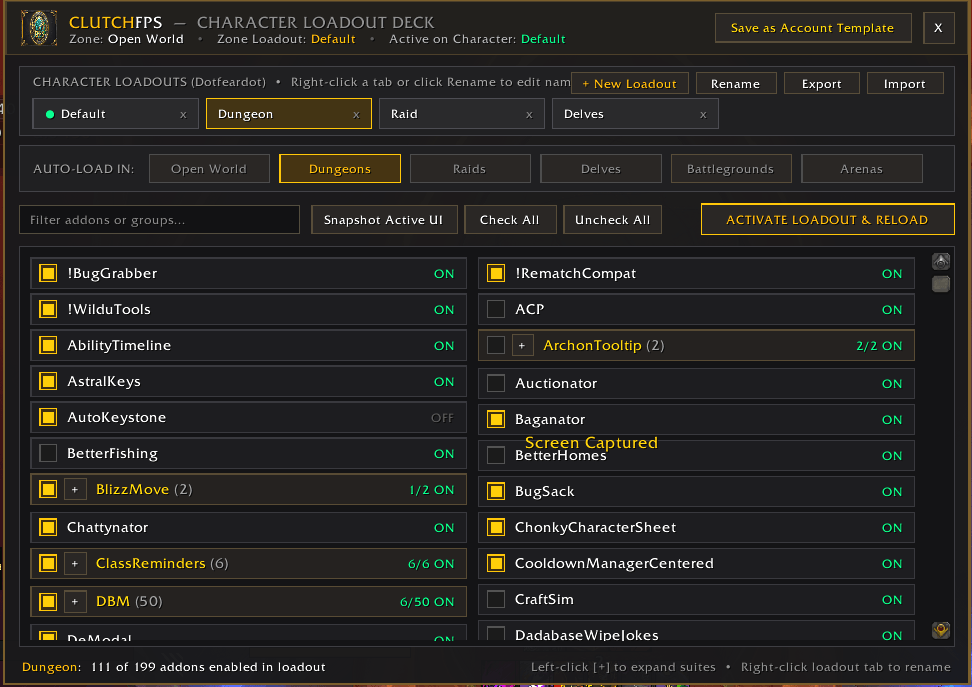
- Custom Command Deck UI: Features a clean dark-and-gold two-column card grid, live search bar, and a horizontal loadout ribbon with + New Loadout, Rename (or Right-Click any tab), Snapshot Active UI, Check All, and Uncheck All controls.
- Export & Import Loadout Strings: Easily share loadouts with friends or back them up.
- 6 Auto-Load Zone Triggers: Assign any custom loadout to automatically trigger when entering Open World, Dungeons, Raids, Delves, Battlegrounds, or Arenas.
- Smart Collapsible Addon Groups: Automatically detects and bundles multi-module addons (such as Details!, DBM, BigWigs, ElvUI, RaiderIO, HandyNotes, and EnhanceQoL) into collapsible dropdown cards with a tri-state master toggle.
- Combat Lockdown Safe: Never interrupts you mid-pull; zone switch prompts only trigger when out of combat.
- Standard LibDBIcon Minimap Button: Native compatibility with minimap button collectors (Leatrix Plus, EnhanceQoL, MBB). Left-click to toggle the Command Deck, or right-click to immediately re-enable all addons for your current character.
🛠️ Slash Commands & Controls
/clutchfps— Toggles the ClutchFPS Command Deck window (also accessible via Options -> AddOns -> ClutchFPS)./clutchoff(or/cleanoff) — Immediately re-enables all installed addons for your current character and reloads your UI.- Minimap Left-Click: Toggle the ClutchFPS Command Deck window.
- Minimap Right-Click: Re-enable all addons for this character and reload UI.
💡 Quick Start Guide
- Type
/clutchfpsor Left-Click the ClutchFPS minimap button to open the Command Deck. - Select a loadout tab in the top ribbon (or click + New Loadout to create a custom one, and Right-Click any tab to rename it).
- Click the Auto-Load In zone buttons (Open World, Dungeons, Raids, Delves, Battlegrounds, Arenas) to assign where that loadout should trigger.
- Check the addons you want enabled for that loadout (or click Snapshot Active UI to capture what you currently have loaded), then click Activate Loadout & Reload!
💬 Feedback & Bug Reports
Have a feature request or found an issue? Please leave a comment on the CurseForge project page!
Author: Lfdmakesgold
ClutchFPS - Addon Manager Team
