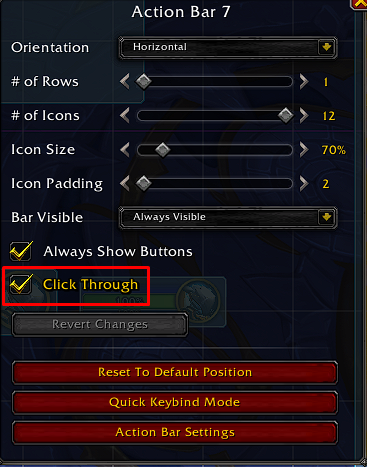
You don't need to click "Save" (on the main menu) after editing the option.
Description
New Dragonflight's UI doesn't have the common option to enable or disable "Click-through" on action bars, so I decided to make my own AddOn. Personally, I use Bars 7 and 8 to show my important CDs to not use WeakAuras, in this way, with this AddOn, I can click-through those Action Bars.
Open the "Edit Mode" option in Game Menu and then select an Action Bar. You'll be able to see a CheckBox, click it if you want to click through, otherwise, don't.
Also, you have some slash commands:
To disable click-through on all action bars: /ctab unset all -- Shortcut: /ctab u*
To disable click-through on a specific bar: /ctab unset N -- Shortcut: /ctab u N, where N corresponds to the action bar number between 1 and 8.
To enable click-through on all action bars: /ctab set all -- Shortcut: /ctab s*
To enable click-through on a specific bar: /ctab set N -- Shortcut: /ctab s N, where N corresponds to the action bar number between 1 and 8.
If you have any questions, send me a DM on Discord: Ghanvert#4728
NOTE: It seems to be working ONLY IN ENGLISH CLIENTS. I am working in a fix for this, so it works on every single language.
ClickThroughActionBars Team