Click Legend
- By
Click casting and hover casting in one addon. Cast on unit frames, or on any unit under your cursor without targeting it. One key, several rules: resurrect, heal, damage. Guided setup, no macros. Shows your bindings on screen.
Description
ClickLegend
Better click casting, and hover casting, on the default raid frames or the ones you already use. For WoW Forever.
Click a unit frame, cast a spell. Or point at anyone, anywhere, and press a key. ClickLegend does both, is quick to set up, and is impossible to forget, because it shows every binding on screen.
Hover casting: cast on whatever is under your cursor
Point at a character in the world, a nameplate or a unit frame and press your key. The spell goes to that unit. You never change target.
No mouseover macros to write, one per spell. You choose how far it goes, once, in the guided setup:
- Unit frames only. Classic click casting. Your keys do what they always did everywhere else.
- Any unit under the cursor. Your keys also cast on characters in the world and on nameplates.
- Under the cursor, else my target. The same, and when nothing fitting is under the cursor the spell goes to your target. One key that always does something: what most people who cast by mouseover want.
What makes it pleasant to use:
- The mouse wheel keeps its zoom. Bind heals to wheel up and down: over a unit the wheel casts, anywhere else it zooms the camera as it always did.
- It works with your rules. The same key can resurrect a dead ally, heal a living one and damage an enemy, whichever is under the cursor.
- Keyboard keys, the wheel and extra mouse buttons. Plain left, right and middle click stay on unit frames, so clicking in the world still selects, turns the camera and interacts.
- Per key, if you want. Any single key can be set to any of the three ways in the editor.
- No surprises. Before you switch it on, ClickLegend names the game key bindings those keys will take over.
Set up in about a minute
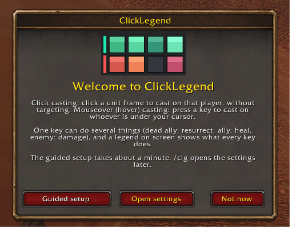
The guided setup is offered the first time you log in. Press Next and it asks, one page each:
- Where to start: a ready-made set for your class, your bindings copied from another addon, or nothing. And which mouse you have.
- Your buttons: switch on the ones you want (left, right, middle, wheel, extra mouse buttons, keyboard keys), each plain or with Shift, Ctrl or Alt.
- What they do: one line per key, with what it does on an ally, a dead ally and an enemy, and what it casts on you when none of those fits. Click a box, pick a spell.
- Hover casting: one of the three ways above. Only asked if you have a key it applies to.
The last page switches click casting on and tells you what changed. In a hurry? Pick your class's set on the first page and press Skip the setup: use it and turn on.
- Starter sets for every class: healer and damage or tank versions for priest, paladin, druid and shaman, with the most used spells on the plain clicks.
- Not sure which mouse buttons you have? Click them. ClickLegend recognises each one and adds it.
- Quickbind: a list of your spells. Point at one, press the key you want it on. Done.
- Drag and drop: drag a spell from your spellbook onto a key, or onto the legend.
One key, several rules
Most click casting gives you one spell per key. ClickLegend gives each key a short list of rules, and casts the first one that fits. On a single key:
- Dead ally: Rebirth
- Ally: Rejuvenation
- Enemy: Moonfire
No macros to write. You pick everything from lists, and each key reads itself back in plain words: "Dead ally: Rebirth. Ally: Rejuvenation. Enemy: Moonfire. Otherwise on you: Rejuvenation."
- Add a rule by what you want: heal an ally, damage an enemy, resurrect, else cast on myself. ClickLegend puts it in the right place, and fixes the order for you when a rule could never fire.
- Conditions: ally or enemy, alive or dead, in or out of combat, your stance or form, with or without a pet, an extra modifier. A rule shows only the conditions it uses.
- Cast on someone else: a rule can go to yourself, your target, your focus, your target's target or your pet instead of the unit under the cursor. "Ally under the cursor: heal. Else: heal myself", on one key.
- Automatic fallback: a rule whose spell you do not know is skipped, so the next one takes over. The same setup works while you level and whatever your talents are.
- Dispel and Resurrect: two ready-made actions that cast whichever spell of that kind your class has. Put Resurrect first on any key and that key also brings back the dead.
- Any input: every mouse button, the mouse wheel and keyboard keys, plain or with Shift, Ctrl or Alt.
- What a rule can do: cast a spell (your highest rank, or one exact rank), use an item or trinket, run one of your macros or macro text you write on the spot, target, focus, assist, or open the unit menu.
- Extras per key: stop your current cast or use a trinket just before the spell; cast as the button goes down instead of when you let go.
- It tells you when a rule can never fire because one above it always wins.
Coming from Clique, VuhDo or HealBot?
New… offers Copy from for whatever ClickLegend can read right now: Clique, VuhDo, HealBot, EllesmereUI HoverCast or the game's own Click Casting. Your bindings there become a ClickLegend set, a spell for allies and another for enemies on one key as two rules. From Clique, hovercast and out-of-combat bindings and macro text come along too. An addon's own actions are left out, and you are told how many. Switch the other click casting off before you turn ClickLegend's on.
Easy to change
- Two halves: your keys on the left, the rules of the key you click on the right. Icons show what each key casts on an ally and on an enemy.
- Undo takes back your last changes, up to eight.
- Pick, don't type: spells, macros and items come from searchable lists with icons.
- Sets: shared across your characters. Each character picks its set, and a spec can have one of its own. Export a set as text, or import one a friend sent you.
- Click the legend: unlock it, click an icon, and that key opens in the editor.
Works with your frames
- The default frames: party, raid, player, target, focus, pet and boss frames. No other addon needed.
- Other unit frames: frame addons that offer their frames for click casting. That includes EllesmereUI, ElvUI and Grid2, and VuhDo once you tick "Clique Support" in VuhDo's options.
HealBot is the exception: it always does its own click casting on its own frames. ClickLegend can still show HealBot's bindings in its legend.
The legend: never forget a binding
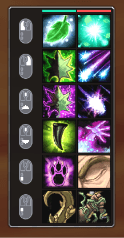
A small display on screen shows what every bound key and button does.
- A small picture of your mouse beside each spell, with the button you bound lit up. Four mice to choose from, one with twelve side buttons: the guided setup asks you to press them, so it learns what your mouse sends. Or have the legend as one large picture of your mouse with each button's spells around it.
- It follows your rules: it shows what each key would do right now, such as the resurrection while your cursor is on a dead ally.
- It shows what will not work: a cooldown sweeps over its icon, a spell you lack the mana for turns blue, one that cannot reach the unit under your cursor turns orange.
- It can stay out of the way: the Minimal preset keeps it beside your cursor, only while that is on a unit frame, showing only what works on that unit.
- Hold Shift, Ctrl or Alt to see that modifier's bindings, or show every layer at once.
- An icon flashes when its spell is cast. Bindings that cannot fire (spell not learned, macro deleted) are greyed out.
- Unit tooltips list the bindings for the frame under your cursor.
- Layouts, sorting, colors, presets, and it can attach to your party frames.
Already click casting with something else? The legend works on its own too. It reads EllesmereUI HoverCast, Clique, VuhDo, HealBot and the game's own Click Casting, and never changes any of them.
Getting started
- Install and log in. The welcome window offers the guided setup.
- Drag the legend where you want it, then type
/clg lock. /clgor the minimap button opens the settings at any time./clg setupopens the guided setup.
Works with no other addon installed. ClickLegend is an independent addon and is not affiliated with EllesmereUI, Clique, VuhDo or HealBot.
Free and open source (MIT).
Click Legend Team