
CLIAlts
Skjermbilde 2026-10-12 233337.png
Skjermbilde 2026-10-12 233330.png
Skjermbilde 2026-10-12 233326.png
Skjermbilde 2026-10-12 233320.png
Skjermbilde 2026-10-12 233314.png
Description
A retro-styled Text User Interface (TUI) character and alt tracking addon for World of Warcraft (compatible with World of Warcraft: Forever, Classic Era, and modern Classic).
Track your characters' Faction, Race, Level, Professions, Gold, Hearthstone Bindings, and Saved Rested Experience — including real-time offline accumulation, exact countdowns and dates for when rested XP will reach 150% (capped), and wasted XP calculations.
- Authentically styled like a classic CRT terminal or BBS dashboard, complete with monospace ASCII borders, box headers, tabular rows, and progress bars.
- 7 Phosphor CRT Color Themes: Phosphor Green (
GRN), VT220 Amber (AMB), Cyberdeck Cyan (CYN), VT100 Monochrome (MON), Phosphor Safe / Colorblind (SAFE), Synthwave (SYN), and Dracula (DRA). - One-Key Compact Mode (
[ COMPACT ]): Shrinks the window from 780px to 630px and hides wide progress bars for narrow displays, high UI scales, or 1080p setups. - Customizable Scale & Typography: UI scaling from 70% to 180% (
/clialts scale) and terminal monospace font sizing from 12px to 22px (/clialts font). - Draggable & Centered Window: Drag from title bar, automatic position saving across sessions, and instant reset via
/clialts reset.
- Integrated monospace command line prompt at the bottom of the dashboard.
- Command History: Cycle through the last 50 executed commands using the Up/Down arrow keys.
- Tab Auto-Completion: Context-aware auto-completion with the Tab key for commands, column sort keys, character names, raid instance names, watchlist items, and themes.
- Item Link Insertion: Shift-click any item in your bags or chat into the prompt to automatically paste its name or link.
- Smart Focus Routing: Pressing
Enteror/focuses the prompt when hovering over the CLIAlts window, but seamlessly passes through to standard WoW chat when your mouse is outside the window. PressingEscapeclears the prompt or closes the window.
[ 1: ALTS OVERVIEW ]:- Faction badge (
[A],[H],[-]), class-colored name, level, race/class codes, level progress bar ([=====.....]), current gold, rested XP percentage, and ETA countdown to cap. - Stale character indicator (
[S]) for alts not logged into for ≥30 days.
- Faction badge (
[ 2: RESTED XP MONITOR ]:- Exact rested XP pool vs cap (
current / max XP), ASCII progress bar (#for capped,=for accumulating,~for disconnect estimations), accumulation rate (XP/hr), resting status (RESTin inns/cities vsWILDin wilderness), and ETA or Rested Waste duration (!4d 2h).
- Exact rested XP pool vs cap (
[ 3: PROFESSIONS ]:- Primary professions with current ranks and caps (e.g.
Alchemy 300 / 300), secondary skills (Cooking, First Aid, Fishing), and profession search filters.
- Primary professions with current ranks and caps (e.g.
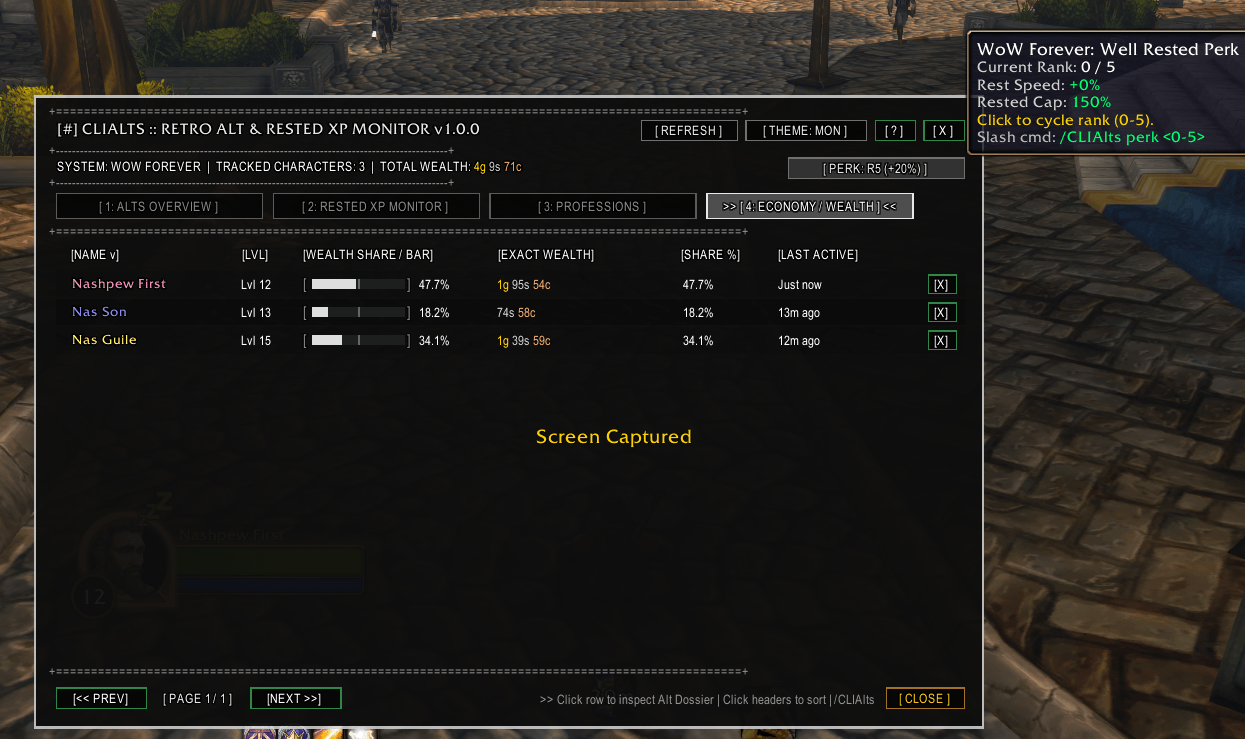
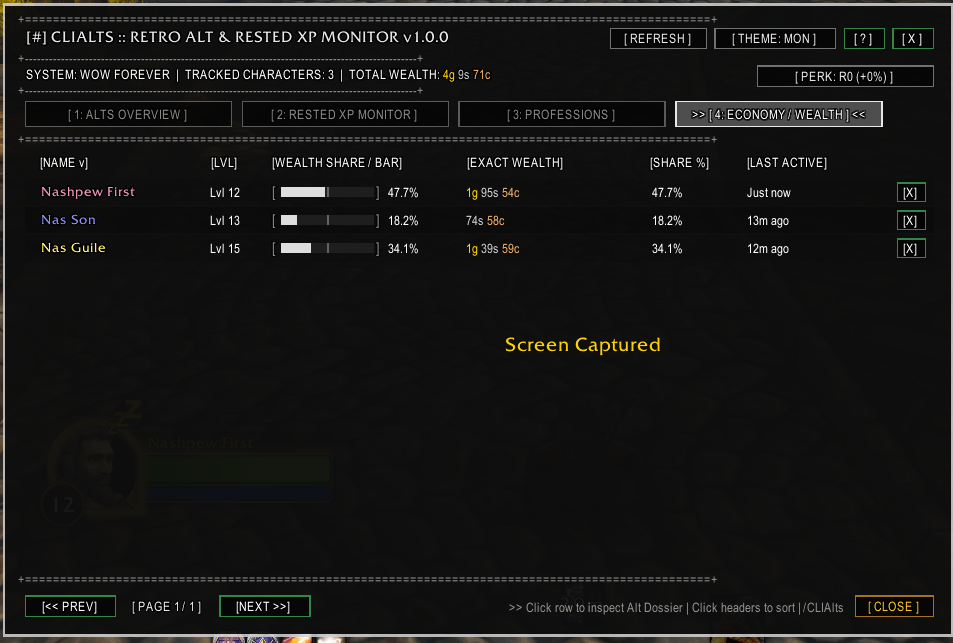
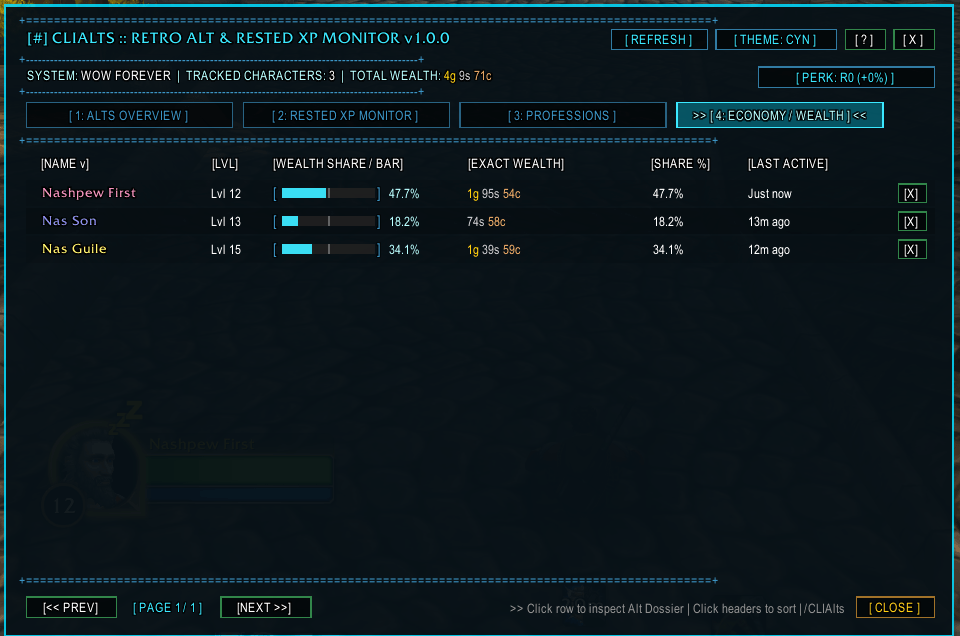
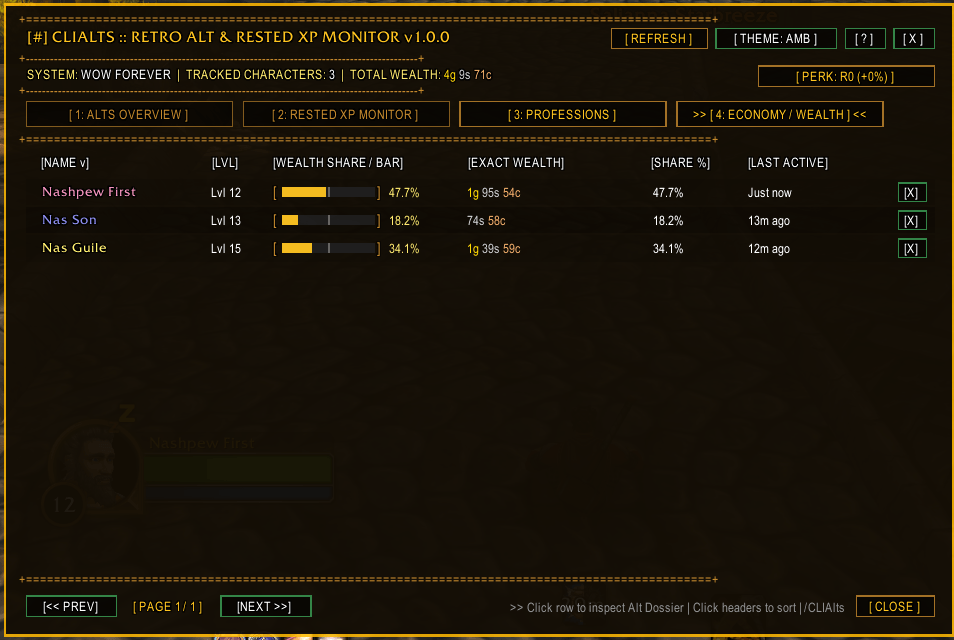
[ 4: ECONOMY / WEALTH ]:- Total wealth per character, account wealth percentage share, last logged out zone location, and Hearthstone binding location (
GetBindLocation()). - Status bar includes an ASCII trend sparkline (
_.-=*#) and 24h, 7d, and 30d account wealth deltas.
- Total wealth per character, account wealth percentage share, last logged out zone location, and Hearthstone binding location (
[ 5: COOLDOWNS & SAVED LOCKS ]:- Trade skill cooldown timers (Mooncloth, Transmutes, Salt Shaker, Refined Deeprock Salt, etc.) with real-time countdowns.
- Saved dungeon and raid instance lockouts with reset countdowns and instance IDs.
- Real-Time Offline Accrual Model: Accurately computes rested accumulation across all alts (5.0% per 8h in sanctuaries/cities; 1.25% per 8h in wilderness).
- WoW Forever Well Rested Perk Support: Fully supports legacy perk ranks 0–5 (+4% accumulation rate and +6% cap increase per rank, up to 180% maximum rested).
- Drift Self-Calibration: Compares live client exhaustion on login with projected values; if drift >2, automatically calibrates observed accrual rates and perk ranks.
- Rested Waste Tracking: Calculates the exact time an alt has spent sitting capped at maximum rested XP, plus total potential XP lost (e.g.
capped for 3d 4h, ~52k XP wasted). - Next Alt Recommender (
> next//clialts next): Instantly recommends the top 3 alts you should log into right now to stop wasting rested XP. - Leveling Session Planner (
> plan <hours>//clialts plan [hours]):- Automatically measures session XP/hr rates for sessions lasting ≥10 minutes upon logout.
- Generates an optimal sequential playtime allocation schedule for your play session (e.g.
Thor 90m, then Åse 45m) based on available rested pools and rested burn ratios. - Automatically falls back to level-scaled estimates (
~level * 650 + 4000 XP/hr, marked with~) when session data is not yet recorded.
- Lightweight targeted inventory tracking: track items across all your alts' bags and bank without scanning full inventories or running heavy background loops.
- Add items via
/clialts watch <Item Name, ID, or Link>(or> watch <item>). - View aggregated counts across all characters with
/clialts watchlist(or> watchlist). - Remove items with
/clialts unwatch <item>.
- Instantly searches your roster for characters eligible for a raid or dungeon who have no active lockout.
- Supports shorthand aliases:
mc,ony,bwl,zg,aq20,aq40,naxx,ubrs,strat,scholo,dm. - Displays eligible unlocked characters with level, race/class, professions, and notes, alongside currently locked alts with remaining reset countdowns.
- Custom per-character notes:
> note <name> <text>(e.g.> note thor Transmute Arcanite). Notes appear in tooltips, search filters, and exports. - Alt Dossier Modal: Left-click any character row to open an in-depth character sheet displaying full name, faction, race, level progress, rested status, hearth location, last active timestamp, and professions.
- Safe Character Deletion: Right-click any character row to prompt an in-game confirmation dialog to prune or delete a character record.
- Automatically flags alts inactive for ≥30 days with a red
[S]tag in tables and[STALE]warning in tooltips and dossier. - Bulk prune inactive alts with
> prune <days>or/clialts prune <days>. Prompts an interactive confirmation modal displaying the count and names before removing records.
- Pre-Migration Safety: Automatically creates a deep-copy snapshot (
CLIAltsDB.backup) before any database schema migration. - Manual Backup & Restore: Create on-demand backups with
/clialts backupand restore them at any time with/clialts restore.
- Customizable Login Alerts (
/clialts alerts [category]): Toggle individual alert notifications for:cooldowns: Ready trade skill cooldowns.rested: Characters reaching 150% rested cap.mail: Characters with mail expiring in ≤3 days.lockouts: Raid/dungeon lockouts that have reset.
- Login Digest (
/clialts digest): Renders a clean ASCII summary box on login (or on demand) summarizing all actionable alt statuses.
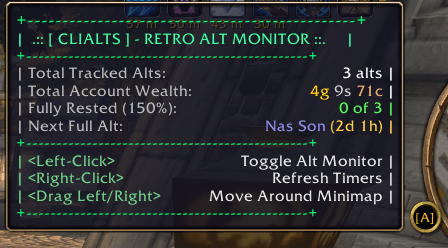
- Minimap Button: Circular minimap button with 360-degree orbital dragging and position persistence across sessions. Left-click toggles the main window; Right-click opens the Quick Guide.
- Optional LibDataBroker: Displays live summary text (e.g.
Alts: 3 capped | 12k waste) in compatible display bars (Titan Panel, ChocolateBar, Bazooka). Built with conditional loading—zero runtime cost if LDB is not installed.
- Spreadsheet Export (
/clialts export/> export): Opens an in-game copyable dialog formatted in standard CSV format for easy import into Excel or Google Sheets. - Performance Profiling (
/clialts perf): Displays exponential moving average execution times (in ms) for data collection and window rendering, alongside current addon memory usage. - Unit Assertion Suite (
/clialts selftest): Executes a comprehensive in-game test suite validating rested mathematics, waste accumulation, alert formatting, search filtering, and backup/restore mechanisms.
| Command | Description |
|---|---|
/clialts, /cli, /ca |
Toggle the main TUI monitor window |
/clialts [1-5] |
Switch directly to a specific tab (1: Alts, 2: Rested, 3: Profs, 4: Econ, 5: Locks) |
/clialts next |
Recommend top 3 alts to log into (highest wasted rested XP) |
/clialts plan [hours] |
Generate an optimal leveling session schedule (default: 2h) |
/clialts watch <item> |
Add an item to the bag & bank watchlist tracker |
/clialts unwatch <item> |
Remove an item from the watchlist tracker |
/clialts watchlist |
Print watchlist item totals across all characters |
/clialts export |
Open copyable CSV export modal dialog |
/clialts filter <query> |
Filter characters by faction, level range, class, or profession |
/clialts clear |
Clear the active character filter |
/clialts sort <col> |
Sort table by column key (name, level, gold, rested, waste, xp, location, hearth, seen, note) |
/clialts compact |
Toggle one-key compact mode (hides XP bars, slim 630px window) |
/clialts theme [name] |
Cycle or set phosphor theme (green, amber, cyan, mono, safe, synthwave, dracula) |
/clialts scale <0.7-1.8> |
Set UI scale (e.g. 1.2 or 120%) |
/clialts font <12-22> |
Set monospace terminal font size (default 15) |
/clialts note <name> [text] |
Set or view custom notes for an alt (clear to remove) |
/clialts unlocked <instance> |
Gap finder: list alts eligible for an instance without a lockout |
/clialts prune <days> |
Scan and prompt to prune alts inactive for N days |
/clialts backup |
Create a snapshot backup of your character database |
/clialts restore |
Restore character database from the last saved backup |
/clialts alerts [category] |
Toggle login alerts (cooldowns, rested, mail, lockouts, on, off) |
/clialts digest |
Display boxed login summary digest on demand |
/clialts rested |
Print an ASCII summary of all alts' rested XP to chat |
/clialts perk <0-5> |
Set or cycle your Well Rested legacy perk rank (0–5) |
/clialts gold |
Print total account wealth summary across all alts |
/clialts minimap |
Toggle the minimap icon on or off |
/clialts reset |
Reset main window position to screen center |
/clialts perf |
Print execution latency (Collect & Render) and memory usage |
/clialts selftest |
Run complete unit test assertions suite |
/clialts help, /clialts ? |
Open the in-game Quick Guide manual |
Inside the CLIAlts window, type directly into the > prompt:
| Prompt Input | Action |
|---|---|
1 .. 5 |
Switch to Tab 1 through 5 |
sort <col> |
Sort by column (name, level, gold, rested, waste, xp, location, hearth, seen, note) |
filter <query> |
Filter rows (e.g. filter horde <60, filter mining) |
find <query> |
Find character rows matching text |
clear |
Clear active filter |
page <n>, goto <n> |
Navigate to page number |
next |
Print top 3 alts losing rested XP |
plan [hours] |
Generate leveling session schedule |
watch <item> |
Add item to watchlist (supports Shift-clicking item links) |
unwatch <item> |
Remove item from watchlist |
watchlist |
Display inventory counts for watched items |
note <name> <text> |
Set per-alt note (note <name> clear to remove) |
unlocked <instance> |
Search for alts eligible for raid/dungeon without lockout |
prune <days> |
Bulk prune characters unseen for N days |
compact, c |
Toggle compact mode |
theme <name> |
Set phosphor theme (green, amber, cyan, mono, safe, synthwave, dracula) |
scale <val> |
Adjust UI scale (e.g. scale 1.2) |
perk [0-5] |
Set or cycle Well Rested perk rank |
backup / restore |
Backup or restore character database |
export |
Open CSV export dialog |
help |
Open Quick Guide manual |
exit, quit, close |
Close main window |
Cycle through authentic retro CRT color themes using the [ THEME ] button in the title bar or typing > theme <name>:
- Phosphor Green (
GRN): Classic P1 green monochrome CRT display. - VT220 Amber (
AMB): Warm P4 amber phosphor terminal display. - Cyberdeck Cyan (
CYN): BBS / retro cyberdeck neon cyan. - VT100 Monochrome (
MON): Classic white phosphor on pure black. - Phosphor Safe (
SAFE): High-contrast, colorblind-safe cerulean/slate/amber palette. - Synthwave (
SYN): Retro-wave magenta and purple phosphor glow. - Dracula (
DRA): Gothic purple and mint modern terminal palette.
CLIAlts Team
