CleanChat Sentinel
- By
01.png
02.png
03.png
04.png
Description
CleanChat Sentinel
Keep useful Trade and Services messages. Hide the repetitive boost spam.
Turning off Trade and Services is the simplest choice if you never want to read those channels. CleanChat Sentinel is for players who still want legitimate crafting offers, trade messages and group-related posts, but do not want to see the same boosting, carry, gold-selling and Discord advertisements over and over.
The addon starts with conservative English and German filters. If it misses something, right-click the sender and mark the relevant message as Spam. That exact message pattern is then blocked locally. Only after several similar examples can the addon suggest a broader rule, which you can inspect before it blocks anything. If a message was classified incorrectly, mark it as Not Spam to protect similar legitimate messages.
Nothing is uploaded, no player is reported automatically, and every filtering decision includes a readable reason.
Why CleanChat Sentinel?
- Local and private — no chat messages, player names, examples or statistics leave the WoW client
- Explainable decisions — see why a message was allowed, sent to Review or blocked
- Direct chat feedback — mark a missed message as Spam or correct a mistake with Not Spam
- Useful channels stay useful — filter selected advertisements instead of hiding an entire channel
- False-positive protection — trusted senders, explicit Allow rules and negative examples take priority
- Conservative by design — generated rules begin as candidates or in Shadow mode
- Fail-open safety — if a message cannot be evaluated safely, it remains visible
Main features
Smart spam filtering
- Detects common boosting, carry, leveling, gold-selling and service advertisements
- Recognizes repeated templates, common obfuscation and narrowly similar confirmed messages
- Includes conservative English and German starter rules
- Supports public channels, Say, Yell, Whispers and Community chat where supported and enabled
- Never treats a generic word such as
boost,run,gold,raidorsellingas sufficient evidence on its own
Feedback directly from chat
Right-click a supported player name to:
- Mark the latest message as Spam
- Choose a specific recent message when several messages are possible
- Mark the latest message as Not Spam
- Mark spam and explicitly ignore the sender
- Ignore the sender without changing the learning data
- Open the rule tester
The addon never silently chooses an ambiguous message. Ignore is separate from filtering and only happens after your direct click.
Review Inbox
Messages detected for review or by Shadow mode are collected in a limited Review Inbox. Every entry shows the decision and its reason. From there you can:
- confirm Spam and activate immediate narrow protection;
- correct a detection with Not Spam;
- explicitly ignore the sender;
- delete the entry without changing the classification.
Entries that no longer have a safe Blizzard chat-line ID are removed instead of leaving unusable actions in the interface.
What happens when you mark a message as Spam?
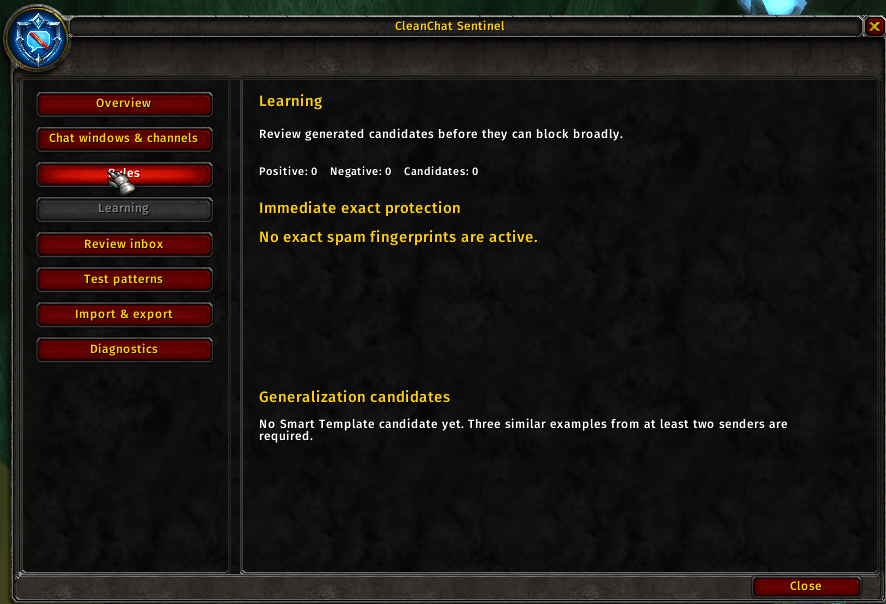
One confirmed spam message immediately creates narrow protection for that message and close formatting variations. It does not turn individual words such as boost, gold or raid into global block rules.
When several similar advertisements are confirmed, the addon can propose a Smart Template based on their shared wording. A proposed template must have multiple examples, preferably from different senders, and must not conflict with messages marked Not Spam. It starts as a visible suggestion or in Shadow mode, where matches appear in Review but remain visible in chat.
Generated rules use four visible states:
- Candidate — proposed but not active
- Shadow — evaluated and shown in Review without broadly blocking
- Active — enabled after sufficient evidence or your decision
- Disabled — retained but inactive
All generated rules show what they match and remain inspectable, reversible and under your control.
Rules and testing
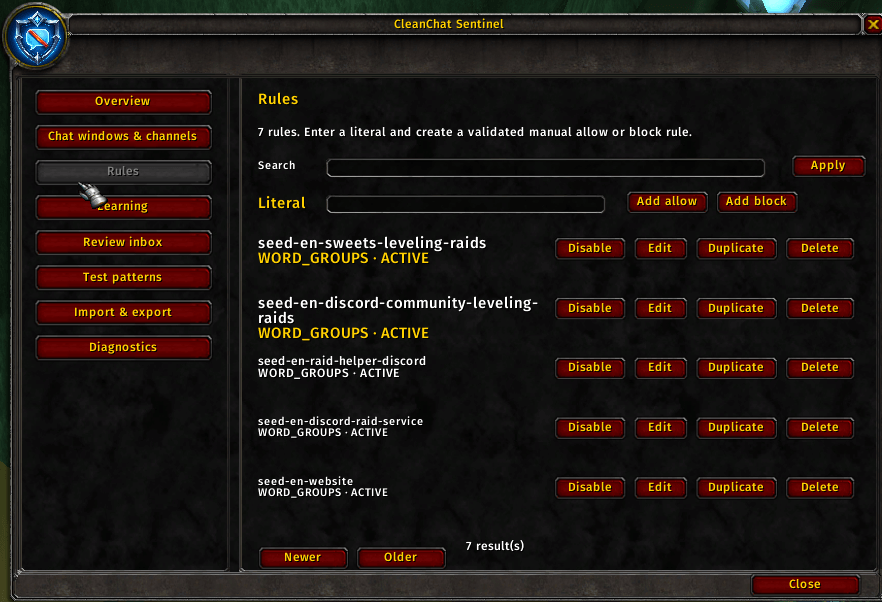
- Explicit Allow and Block rules
- Literal phrases and structured word groups
- Smart Templates
- Advanced Lua patterns with validation
- Pattern tester showing normalized text, action, score and reasons
- Declarative rule import and export with validation and checksums
Lua patterns are described accurately as Lua patterns; the addon does not claim full regular-expression or PCRE compatibility.
Profiles and trusted senders
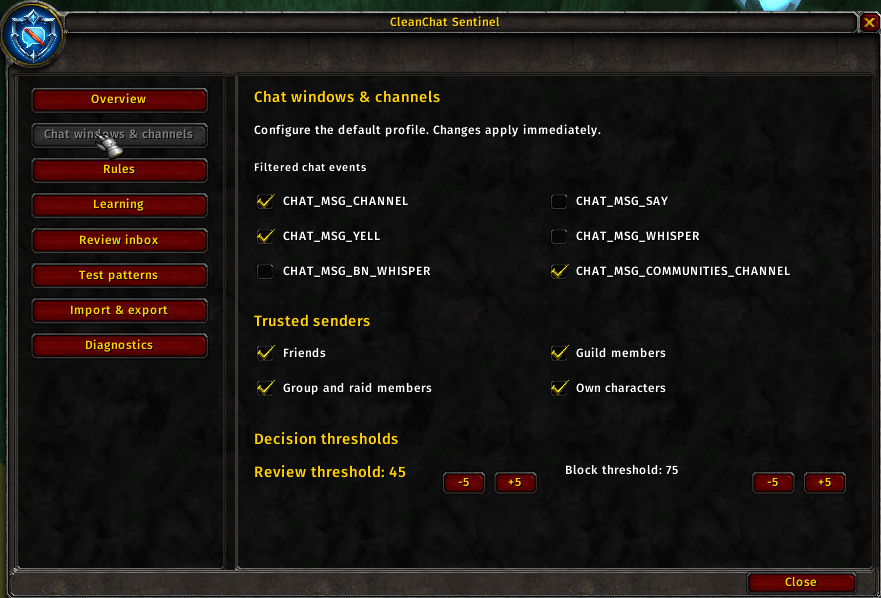
- Select the supported chat events you want to filter
- Protect friends, guild members, group and raid members, and your own characters
- Configure Review and Block thresholds
- Use Shadow mode to observe generated detections safely
- Keep filtering disabled for sensitive or trusted chat areas
Quick start
- Open CleanChat Sentinel with
/ccsor left-click the minimap button. - Enable filtering on Overview.
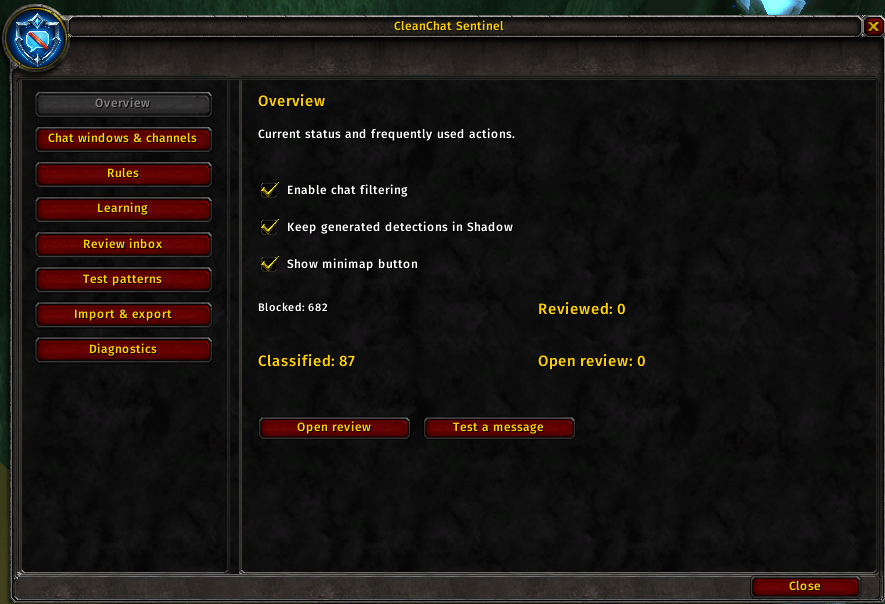
- Choose the desired events and trusted senders under Chat windows & channels.
- Leave generated detections in Shadow mode while the addon adapts to your chat.
- Right-click sender names to mark Spam or Not Spam.
- Check the Review Inbox and Learning pages occasionally.
The FAQ & guide page inside the addon explains every major feature in English and German.
Slash commands
/ccs
/ccs on
/ccs off
/ccs status
/ccs review
/ccs test
/ccs stats
/ccs debug
/ccs undo
/ccs export
/ccs import
/ccs reset
Destructive reset actions require confirmation.
Privacy and safety
CleanChat Sentinel works entirely inside World of Warcraft.
- No network communication
- No external analytics or telemetry
- No cloud classification or external language model
- No automatic player reports
- No automatic Ignore actions
- No execution of imported rules or data
- No complete chat-history persistence by default
- No forced processing of inaccessible or protected values
- Filter errors show the message instead of breaking or hiding the chat
The addon uses deterministic local rules, fingerprints, bounded similarity checks and explicit user feedback. It does not use artificial intelligence, a neural network or a cloud service.
Supported clients
Separate packages are provided for:
- World of Warcraft Retail 12.1.0 — Interface 120100
- World of Warcraft Mists of Pandaria Classic 5.5.4 — Interface 50504
- World of Warcraft Classic Era 1.15.9 — Interface 11509
- World of Warcraft TBC Classic Anniversary 2.5.6 — Interface 20506
Every package uses the same shared filtering engine with client-specific metadata and runtime capability checks. PTR, Beta and unsupported legacy versions are not currently included.
Installation
Install CleanChat Sentinel with the CurseForge or Wago app, or extract the CleanChatSentinel folder from the package matching your client into:
World of Warcraft/<client>/Interface/AddOns/Restart World of Warcraft or use /reload, then enable CleanChat Sentinel in the AddOns menu.
CleanChat Sentinel Team