Clean Cooldown Manager

Just some tweaks to clean up the Blizzard Cooldown Manager look and feel until they do them.
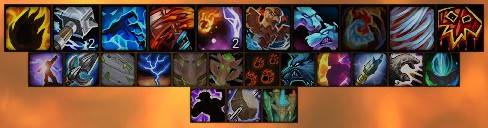
Now that's better!
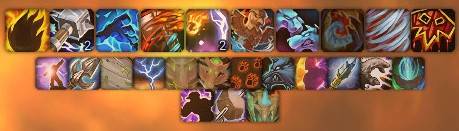
Now that's better!

An incremental improvement

An incremental improvement

Description

CleanCooldownManager

A simple & minimalist add-on for World of Warcraft that tweaks the look of Blizzard’s built-in Cooldown Manager until Blizzard implements these changes themselves.

  • Zero padding
  • No borders/Black borders
  • Minimalist, no overhead

About

CleanCooldownManager focusses purely on aesthetics and cleanliness of the built-in cooldown UI. It does not add new features, change gameplay, or alter configuration options.
It simply refines the look of the existing cooldown manager.

Installation

  1. Download or clone the repository.
  2. Copy the CleanCooldownManager folder into your WoW Interface/AddOns/ directory.
  3. Enable the add-on in the Add-Ons list (in-game).
  4. Reload UI (e.g., /reload) or restart the game client.

Usage

No configuration is required for the visual cleanup. Once the addon is enabled the cooldown visuals will be adjusted automatically. You may need to scooch your bars closer to each other if you want them touching.

Slash Commands

/ccm
Displays brief usage help for the addon in chat.

/ccm rant
Get my thoughts on the necessity for this addon.

/ccm borders
Toggle the black borders ON or OFF.

/ccm buffs
Toggle buff centering ON or OFF.

/ccm reload
Reapply the clean modofications.

Files

  • CleanCooldownManager.toc — AddOn manifest for WoW.
  • CleanCooldownManager.lua — The core Lua script implementing the tweaks.
  • LICENSE — This project is licensed under the GNU General Public License v3.0.
  • README.md — This documentation file.

License

This project is open source under the GNU General Public License v3.0 (GPL-3.0). You are free to use, modify, and redistribute this code under the terms of that license.

The Clean Cooldown Manager Team

profile avatar
  • 5
    Projects
  • 192.5K
    Downloads

More from RedAntisocialView all

  • CursorRing project image

    CursorRing

    • 180.7K
    • Addons

    CursorRing is a World of Warcraft addon that adds a customizable, class-colored ring around your cursor. It dynamically tracks spell casts, channels, and combat states, providing visual feedback through smooth radial animations.

    • 180.7K
    • May 31, 2026
    • Addons
  • Instance Enemy Nameplates On project image

    Instance Enemy Nameplates On

    • 219
    • Addons

    A simple addon that turns all enemy nameplates on in instances, and back to combat-only outside.

    • 219
    • May 31, 2026
    • Addons
  • Hunter Pet Tooltip project image

    Hunter Pet Tooltip

    • 367
    • Addons

    Adds family and taming requirement info to hunter pet tooltips

    • 367
    • May 31, 2026
    • Addons
    • +1
  • Midnight Mount Tooltip project image

    Midnight Mount Tooltip

    • 2.0K
    • Addons

    Adds information about the mount a player is currently riding to Blizzard's tooltip.

    • 2.0K
    • May 31, 2026
    • Addons
    • +1
  • CursorRing project image

    CursorRing

    • 180.7K
    • Addons

    CursorRing is a World of Warcraft addon that adds a customizable, class-colored ring around your cursor. It dynamically tracks spell casts, channels, and combat states, providing visual feedback through smooth radial animations.

    • 180.7K
    • May 31, 2026
    • Addons
  • Instance Enemy Nameplates On project image

    Instance Enemy Nameplates On

    • 219
    • Addons

    A simple addon that turns all enemy nameplates on in instances, and back to combat-only outside.

    • 219
    • May 31, 2026
    • Addons
  • Hunter Pet Tooltip project image

    Hunter Pet Tooltip

    • 367
    • Addons

    Adds family and taming requirement info to hunter pet tooltips

    • 367
    • May 31, 2026
    • Addons
    • +1
  • Midnight Mount Tooltip project image

    Midnight Mount Tooltip

    • 2.0K
    • Addons

    Adds information about the mount a player is currently riding to Blizzard's tooltip.

    • 2.0K
    • May 31, 2026
    • Addons
    • +1