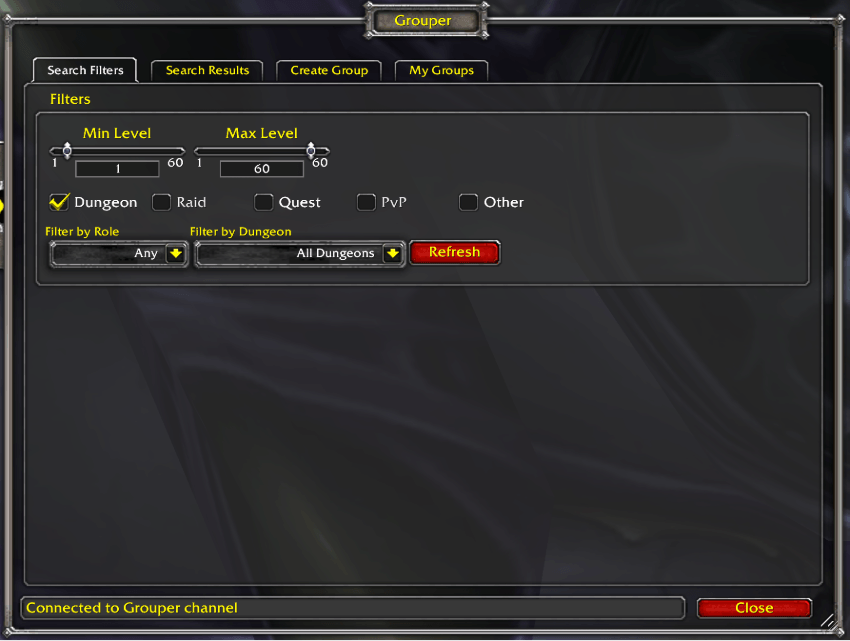
GrouperSearchFilters.png
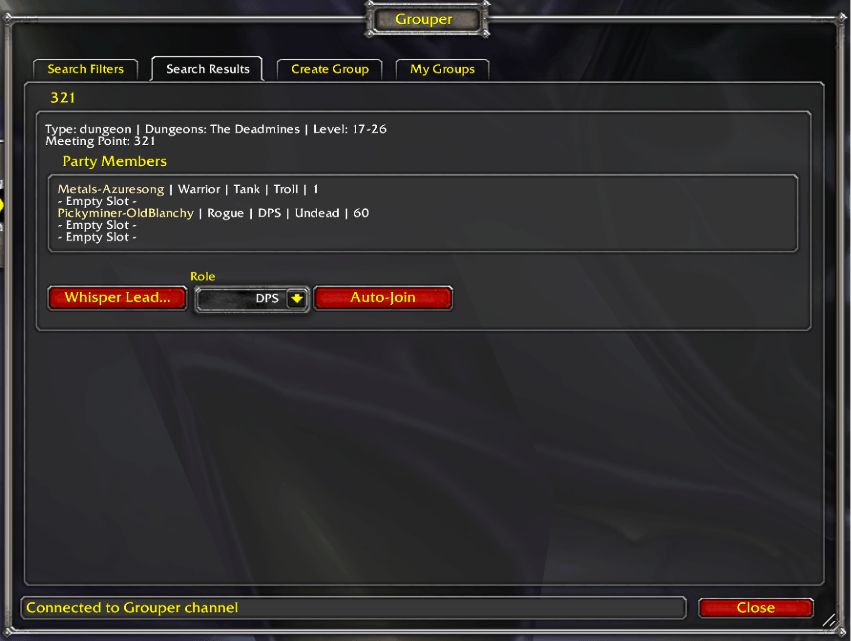
GrouperSearchResults.png
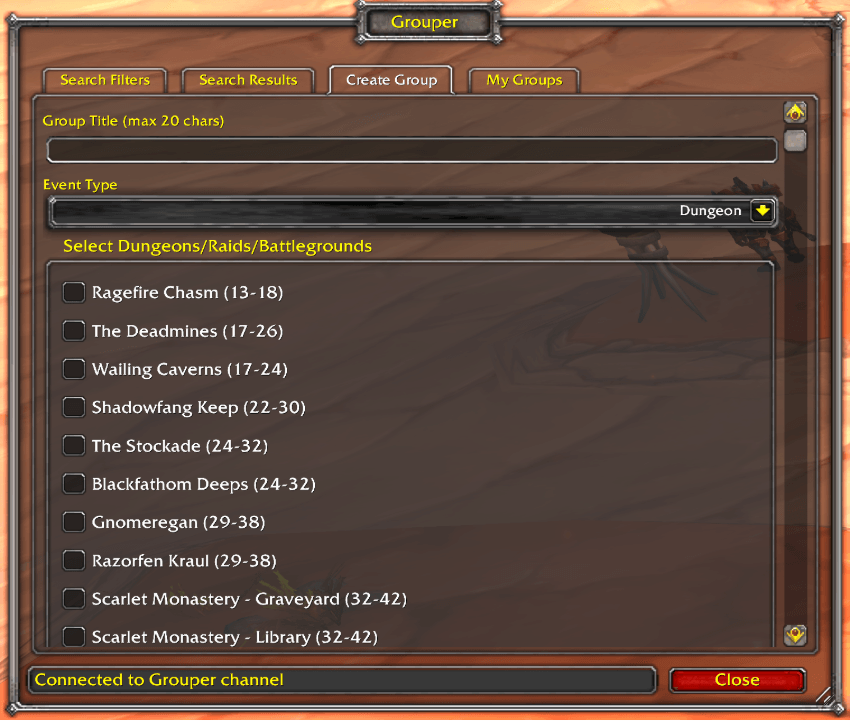
GrouperCreateGroup.png
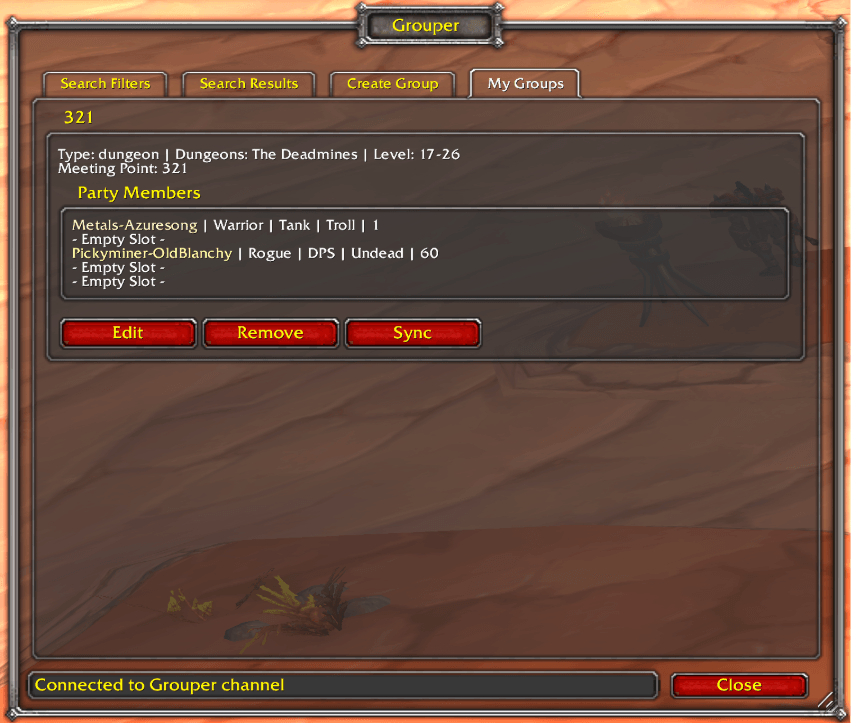
GrouperMyGroups.png
Description
Ultimate Grouper - Server-Wide Group Finder for WoW Classic Era
Tired of spamming trade chat looking for a group? Ultimate Grouper (formerly Grouper) is a server-wide group finder addon for World of Warcraft Classic Era and every other Classic version, Retail and WoW Forever. Browse, create and join groups for dungeons, raids, quests, PvP and more, all from one clean window, with no chat spam required.
New in 1.0: A Brand-New Main Window
Version 1.0 brought a completely redesigned window, in the same style as Ultimate Guild Invite and Ultimate Profession Master. It has just two tabs:
- Search Groups: your filters across the top and every matching group right below, one row per group in a striped list. Click + on a group to see its meeting point, raid recruitment, loot rules, quests and every member with their class, level and roles. Whisper the leader or Auto-Join straight from the row
- Manage Groups: not in a group yet? It's where you create one: pick the kind of group with one click, then tick your dungeons, raids, battlegrounds or quests in a list that shows each one's levels and location. Once you're in a group, the same tab shows it, with the leader's actions in a bar across the top
Prefer the old tabbed window? Click Classic Window in the top-right corner, or type /grouper ui. The classic window has a New Window button to come back, and Ultimate Grouper remembers your choice.
The Problem
WoW Classic's built-in LFG tools are limited: the LookingForGroup channel is text-only chaos, trade chat clogs quickly, and there's no structured way to advertise roles, level ranges, or specific dungeons you're running. When you finally find a group the information is already stale.
Meanwhile raid leaders have it worse: tracking 20-40 recruits across whispers, manually counting class slots, and reposting announcements every few minutes is tedious busywork that takes focus away from actually playing.
The Solution
Ultimate Grouper uses a dedicated addon channel shared by every Ultimate Grouper user on your realm. Group listings are shared automatically and shown in a structured list with rich filtering, so players see only the groups relevant to them, and leaders spend less time managing chat.
Core Features
Server-Wide Group Discovery
- Browse all active Ultimate Grouper groups across your realm in one place, regardless of what zone you're in
- Sort the list by any column
- Stale groups expire on their own, so dead listings don't clutter the view
- When a leader presses Sync, everyone sees the updated group
Smart Filtering
- Group types: one-click Dungeon, Raid, Quest, PvP and Other buttons; each one lit is shown
- Instance filter: pick one dungeon, raid or battleground to see only the groups heading there
- Open slot: show only groups that still need a Tank, Healer or DPS
- Level range: set a min/max level; groups outside it are hidden
- Search box: type part of a group's title, leader, instance or any member's name
- Each game version only shows the dungeons, raids and battlegrounds it actually has
Dungeon Groups
- List several dungeons in a single group posting
- Tank, Healer and DPS slots, with each member's role and 2nd role shown
- Auto-Join: pick your role and 2nd role, click Auto-Join, and the leader gets an "Invite them?" popup with Yes and No. If your first role is already taken, you fill your 2nd role instead
- A second tank or second healer can't Auto-Join into a slot that's already full; they get a whisper explaining why
- Leaders can switch Auto-Join off; players who try it are told to whisper instead
- Guild restriction: make a group guild-only, and only members of the guilds you list will see it
Raid Recruitment
- The raid size comes from the raid you pick
- Role targets: set how many Tanks, Healers and DPS you need
- Class needs: add how many of each class you want (e.g. "3 Mage")
- Loot system: /roll, DKP, EPGP, Free for All, Loot Council, Master Looter or Soft Reserve
- Clear status: Fresh, Partially Cleared, Farm Mode or Specific Bosses
- Reserved items, and a voice field for your Discord details
Quest Groups
- Pick up to five quests from a drop-down of the quests in your quest log
- If you have Questbook installed, clicking a picked quest opens it there
- Your announcement lists the quests, and players running Ultimate Grouper or Questie can click them as quest links
Announcements
- The Announce button posts your group, with its level range, size and the roles or classes you still need, to the LFG channels you're in
- Choose which channels get your announcements, plus Guild chat and your GreenWall confederation
- Not in the LFG channel yet? Announce joins it for you, and your next announcement includes it
- Leading a group? Shift-Left-click the minimap button, or the Ultimate Grouper icon on Titan Panel, to announce it without opening the window
- Each group can be announced once a minute, so a stray double-click can't spam chat
Running Your Group
- Sync: share your group's current state with every Ultimate Grouper user. Do this after roles change or someone joins
- Announce: post your group to chat (see above)
- Assign Roles: set each member's role and 2nd role. Dungeon groups are held to 1 tank, 1 healer and 3 DPS; raids have no such limit
- Transfer Leadership: hand the listing to another member
- Edit: change your group's type, dungeons, title or meeting point
- Remove: take your listing down (it asks first)
- Right-click any group for the same actions
Window & Customization
- Minimap button: left-click opens Ultimate Grouper, Shift-Left-click announces your group, right-click opens its settings
- Titan Panel and other LibDataBroker displays can show Ultimate Grouper too
- Background, border and font choices in the settings
- The window remembers its size and position, and Escape closes it
Group Types
- Dungeon: 5-man groups with Tank / Healer / DPS slots, several dungeons per posting, and Auto-Join
- Raid: recruitment with role targets, class needs, loot system and clear status
- Quest: questing groups built from the quests in your log
- PvP: battleground groups, with the level bracket you choose
- Other: anything else, from world events to role-play
How It Works
- When you log in, Ultimate Grouper joins its addon channel and asks the other players for the groups they know about
- When a leader creates or syncs a group, it's shared with everyone on the channel
- When a group is removed, it disappears from everyone's list
- Ultimate Grouper keeps checking for groups from players who log in after you
- Groups never cross factions: Horde players see Horde groups and Alliance players see Alliance groups
- Announcements and invites only happen when you click a button, which keeps Ultimate Grouper inside the game's rules for addons
Slash Commands
- /grouper or /grouper show: open the main window
- /grouper ui: switch between the new window and the classic tabbed one
- /grouper config: open the settings
- /grouper join: join the Grouper channel (usually automatic)
- /grouper status: show channel and sync status
- /grouper cleanup: clear stale groups from the list
- /grouper savepos: save the window's position as your default
- /grouper autojoin status: show whether you're accepting Auto-Join requests
- /grouper autojoin toggle: start or stop accepting Auto-Join requests
- /grouper debug on|off: turn detailed logging on or off (for bug reports)
- /grouper debug tab: open the Grouper Debug chat tab
Requirements
- Ace3
- VersionCheck-1.0
- LibDBIcon-1.0 (installed automatically by the CurseForge app; WoW Forever uses the copy bundled with Ultimate Grouper)
- LibAceGUIWidgets (installed automatically by the CurseForge app)
- LibGuildRoster (installed automatically by the CurseForge app)
- Optional: Questbook, to open picked quests in it
- WoW Classic Era (Interface 11509)
- TBC Classic (Interface 20506)
- WotLK Classic (Interface 30405) and Titan Reforged (Interface 38000)
- Cataclysm Classic (Interface 40402)
- Mists of Pandaria Classic (Interface 50504)
- Retail (Interface 120007)
- WoW Forever (Interface 16001)
Recent Updates
v1.3.3 (Latest Release — 2026-11-15)
Fixed
- WoW Forever: no more error when people join or leave your group during a dungeon fight. The game hides those messages from addons during a fight, and Grouper now leaves them alone instead of erroring
- WoW Forever: Grouper still notices people joining and leaving your group during those fights, by checking your group list instead
v1.3.2 (2026-11-15)
Fixed
- WoW Forever: removing your group no longer shows a blocked-action error. The group is removed and other players see it go
- WoW Forever: your group's updates and the request for other players' groups when you log in now go through the same way, so they are no longer blocked by the game either
v1.3.1 (2026-11-13)
Fixed
- WoW Forever: Grouper now recognises you by your full first-and-last name. It could treat your surname as a realm, so you, your group and your guildmates did not always match up, and your own group could come back to you as if someone else had posted it
- WoW Forever: the "Successfully joined Grouper channel" message and the automatic reconnect now work when your name includes a surname
v1.3.0 (2026-10-21)
Changed
- Grouper is now Ultimate Grouper. The new name, in orange, shows in your addon list, on the window title, in the minimap button and Titan Panel tooltips and label, in the settings menu, on the window's version line and at the start of the addon's chat messages. Your settings, minimap button position and Titan Panel setup are kept, and
/grouperstill works - Group announcements now end with "Ultimate Grouper addon group!"
v1.2.0 (2026-10-14)
New
- Announce your group from the minimap button. If you lead a group, Shift-Left-click the Grouper minimap button, or the Grouper icon on Titan Panel, to post it to your chat channels without opening the window. If you're not the leader, or have no group yet, Grouper tells you why nothing was posted
Older updates are in the addon's full changelog.
Bug Reports & Feature Requests
Found a bug or have a suggestion?
If you have any questions, comments, or anything else, please feel free to reach out on Discord!
Credits
Developed by:
- Pimptasty - Author
Special Thanks:
- The Old Gods guild community for real-world testing and feedback
- Ace3 library maintainers for the excellent addon framework
- WoW Classic community for bug reports, suggestions, and support
License
Ultimate Grouper is open-source software. See the LICENSE file for details.
Ultimate Grouper Team

Owner