Classic Weapon Enchants
- By
A small addon for managing temporary weapon enchants in classic world of warcraft. Parses bags for valid item and centralizes them in a flyout menu where they can be easily applied to a weapon depending on the click type. Supports poisons, sharpening stone
Classic Weapon Enchants
Usage:
Hover to open the flyout menu.
Click weapon enchant.
- Left-click: Apply the selected enchant to the main hand weapon
- Right-click: Apply the selected enchant to the off-hand weapon
Supports Season of Discovery ✔️
Usage
- Hover to open the flyout menu.
- Click weapon enchant.
- Left-click: Apply the selected enchant to the main hand weapon
- Right-click: Apply the selected enchant to the off-hand weapon
Supports Season of Discovery ✔️.
Slash Commands
usage: /cwe {command} {arg}
show- Shows the flyout togglehide- Hides the flyout togglereset- Resets the flyout menu to its default positiondebug- Toggles debug print statementsdirectionordir- Sets the direction of the flyout menuup- Flyout will appear above the toggle button (default)down- Flyout will appear below the toggle buttonleft- Flyout will appear to the left of the toggle buttonright- Flyout will appear to the right of the toggle button
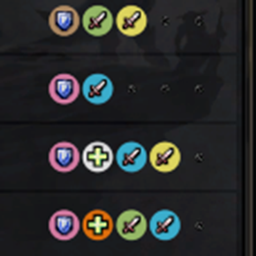
lines- Sets the number of lines in the flyout menu1- Flyout menu will have 1 line (default)2- Flyout menu will have 2 lines3- Flyout menu will have 3 lines (pictured)- Inputs beyond
3not encouraged; maybe not behave as expected
delay- Sets the delay duration in seconds for the flyout menu to hide after the mouse leaves the flyout[0.2, 5]- number between0.2and5, inclusive- default is
0.5, recommended is0.25 - Inputs clamped
icon- Sets the flyout toggle button's icon- arg is a either a number, which can be a
iconFileIDor a preset[0-4]0- This fallback icon is dynamic based on the players class.1- Poison icon2- Weapon oil icon3- Sharpening stone icon4- Shaman enhancement icon
- or a
iconFilePathstring such as"Interface\Icons\INV_Misc_QuestionMark"
- arg is a either a number, which can be a
Todo
<input disabled="disabled" type="checkbox" /> Add Dropdown settings on right clicking the toggle button to allow for some customization
- Would include options such as:
- Flyout direction
- Flyout Toggle Mode (Click/Hover)
- Hide delay duration on hover mode
- add a "Hide" option to completely hide the flyout toggle
- Would include options such as:
<input disabled="disabled" type="checkbox" checked="checked" /> Add support or additional flyout directions.
roughly implemented. The buttons are not organized in a way that makes sense for the new directions, but the flyout does appear in the correct location.
- <input disabled="disabled" type="checkbox" /> Fix the button organization for the new directions
<input disabled="disabled" type="checkbox" /> Add a "click" mode for the flyout toggle by implement it as checkbox widget.
<input disabled="disabled" type="checkbox" checked="checked" /> fix bug with
debugvalue being reset tofalseon reload occasionally.
Limitations
Because these actions are all "protected" (casting a spell/using an item in), during combat the addon's functionality may be limited.
For now im not handling the edge case of getting new weapon enchant items while in combat, so if you get a new item/enchant while in combat you will have to wait until you are out of combat to see it in the flyout. (extremely rare edge case)
Classic Weapon Enchants Team