Classic GmbH Quartermaster
- By
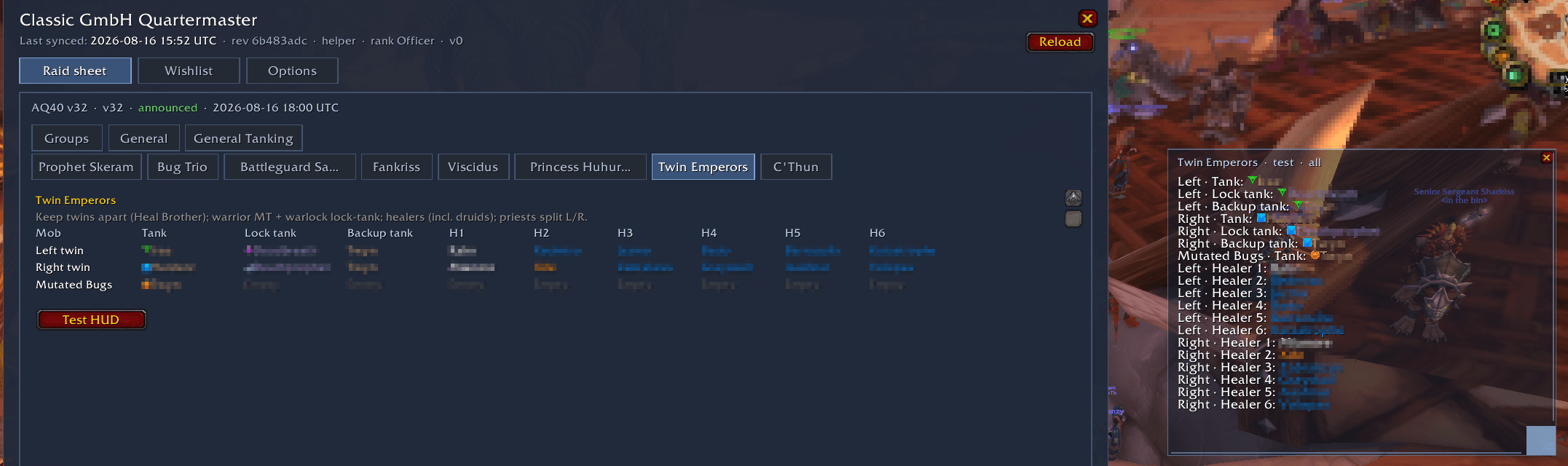
2026-08-16 19_00_46-World of Warcraft.png
Description
Classic GmbH Quartermaster shows your guild raid sheet inside World of Warcraft Classic Era: raid groups, boss assignments, and a floating assignment HUD while you play.
- Raid sheet UI (
/gmbhor minimap button): Groups (G1–G8), general/tanking boards, and per-boss assignment tabs - Assignment HUD: personal or full assignments for the current boss; draggable and resizable
- Guild peer sync: raid sheet data shares automatically with nearby raid/guild members who have the addon
- Minimap / SlideBar: circular button with the addon logo (LibDataBroker launcher)
- Install into
Interface\AddOns\ClassicGmbHQuartermaster - Enable the addon, then
/reload - Open with
/gmbhor the minimap button - After officers announce a sheet, sync from peers in raid/guild if your local sheet is empty
You can generate HelperData.lua (raid groups + boss assignments) with the included Python script. Requires Python 3.
Print a sample JSON file:
python write_helperdata.py --example-json
Or edit example_helperdata.json from the project, then write the Lua file into your AddOns folder:
python write_helperdata.py --from-json example_helperdata.json --out "D:\Games\World of Warcraft\_classic_era_\Interface\AddOns\ClassicGmbHQuartermaster\HelperData.lua"
Interactive mode (raid slug, title, announced, groups, assignments), then choose the output path:
python write_helperdata.py
Optional: set WOW_PATH to your _classic_era_ folder so the default output path is filled in. After writing, /reload in WoW.
Assignment lines in interactive mode look like:
section | slot | player [| class [| role]]
Example: C'Thun | MT | Hardzor | Warrior | Tank
write_helperdata.py and example_helperdata.json ship with the addon package / GitHub project.
- Raid sheet content is visible after the guild announces the sheet
- Keep the addon updated so sync stays compatible
- Slash help:
/gmbh help
Classic GmbH Quartermaster Team