Classic Bags
- By
A bag addon that looks like it belongs in Classic WoW, but works like a modern inventory manager.
Skærmbillede 2026-09-24 211509.png
Skærmbillede 2026-09-24 211515.png
Skærmbillede 2026-09-24 211525.png
Skærmbillede 2026-09-24 211536.png
Description
ClassicBags
Individual Bags. Classic Feel. Modern Features.
ClassicBags keeps what made Classic bags feel right: every bag is its own window, stacked in the corner like the original. It then adds the tools you'd expect from a modern bag addon: search, one-click sorting, and a way to decide what goes where.
No giant grid unless you want one. No clutter.
Features
Your bags, the Classic way
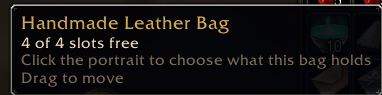
- The backpack and every equipped bag get their own window, with a round bag portrait and a bronze frame.
- The keyring and your bank bags open in the same style.
- Windows stack bottom-right like Blizzard's. Drag any window somewhere else and it stays there, saved per character. Right-click its title to put it back.
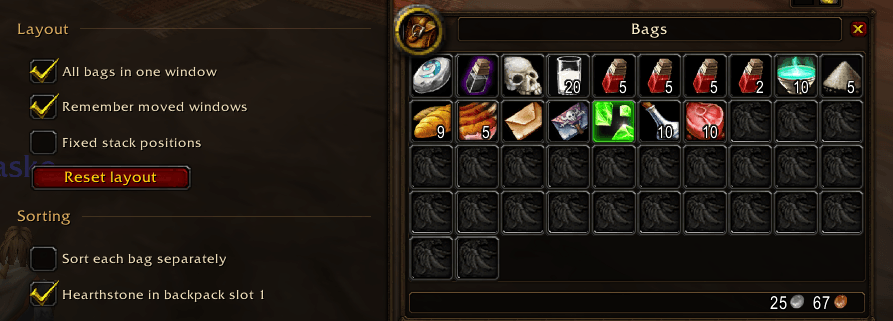
- Your gold is shown at the bottom of the backpack.
Search
- Click the magnifier above your backpack and type. Matching items stay bright in every open bag; everything else dims.
- Nothing moves or disappears while you search.
Sorting
- One click merges your stacks and tidies all your bags: Hearthstone first, junk last.
- It moves items one at a time, exactly like clicking them yourself, and stops the moment you enter combat or pick something up.
- It never sells, deletes or drops anything.
Decide what goes where
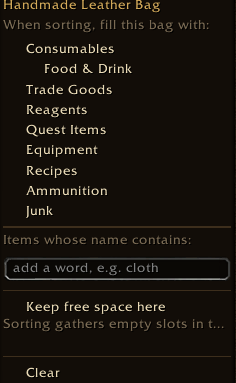
- Click a bag's portrait to choose what it should hold when you sort: Consumables, Food & Drink, Trade Goods, Quest Items, Equipment, Junk and more.
- Or add words: type "cloth" and every cloth goes into that bag.
- Mark one bag to keep your free space, so new loot lands there.
- A small badge on the portrait shows which bags have rules.
Looks
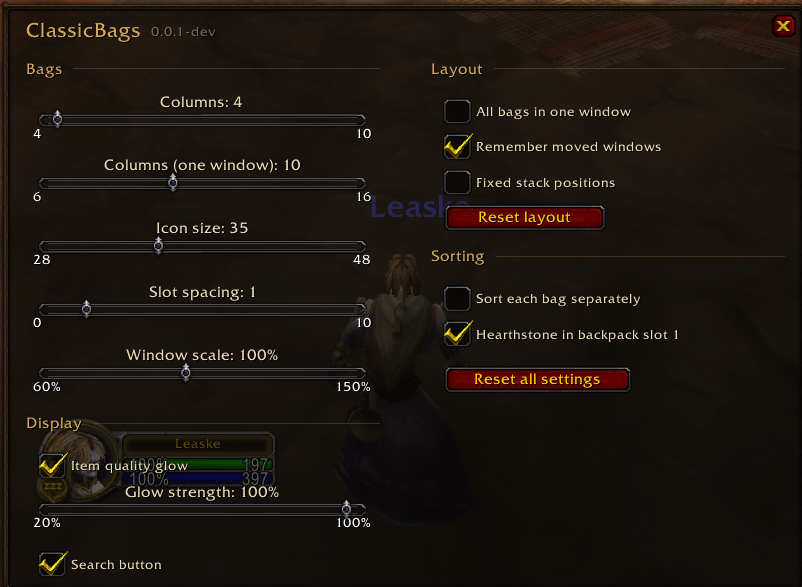
- A soft glow in the item's quality colour for green items and better, with adjustable strength.
- Adjustable columns, icon size, spacing and window scale.
Prefer one big bag?
- Tick "All bags in one window" in the settings. It's off by default, because individual bags are the point.
Getting started
Install, log in and press B. That's it.
Type /cb to open the settings, also found under Options → AddOns → ClassicBags.
| Command | What it does |
|---|---|
/cb |
Open settings |
/cb sort |
Sort your bags (again to stop) |
/cb reset |
Put every bag window back in the stack |
/cb help |
List all commands |
Good to know
- Classic Era only (1.15.9). Hardcore and Season of Discovery realms use the same client and should work too, but so far it has been tested on a normal Era realm.
- This is a beta. The main 24-slot bank still uses Blizzard's window for now; bank bags already open as ClassicBags windows.
- Classic Era doesn't split trade goods into cloth, herbs and so on, so use a word rule ("cloth") for those.
Found a bug or have an idea? Leave a comment. Screenshots of what went wrong help a lot.
The Classic Bags Team