Class Pilot - Forever
- By
01-hunter-pet.png
02-three-designs.png
03-paladin-leveling.png
04-gear.png
05-quest-guide.png
Description
Class Pilot
Your class guide for WoW Forever, in one window. Leveling talents, trainer spells, rotations, raid and PvP builds, and best-in-slot gear for all nine classes. Log in on any character: Class Pilot detects your class and shows only that class's planner. Switch characters and it switches with you.
New: it can spend your talent points for you. Tick one box and every point goes into the build as you level.
Beta. Class Pilot is in active development for the WoW Forever beta. Builds and gear are for the beta's level-30 cap and will be updated for launch. Anything that can't be detected yet says "coming soon" instead of guessing.
Testers wanted! Every class needs players to check its builds in game. If something looks wrong, tell us in the comments.
What's in it
Leveling
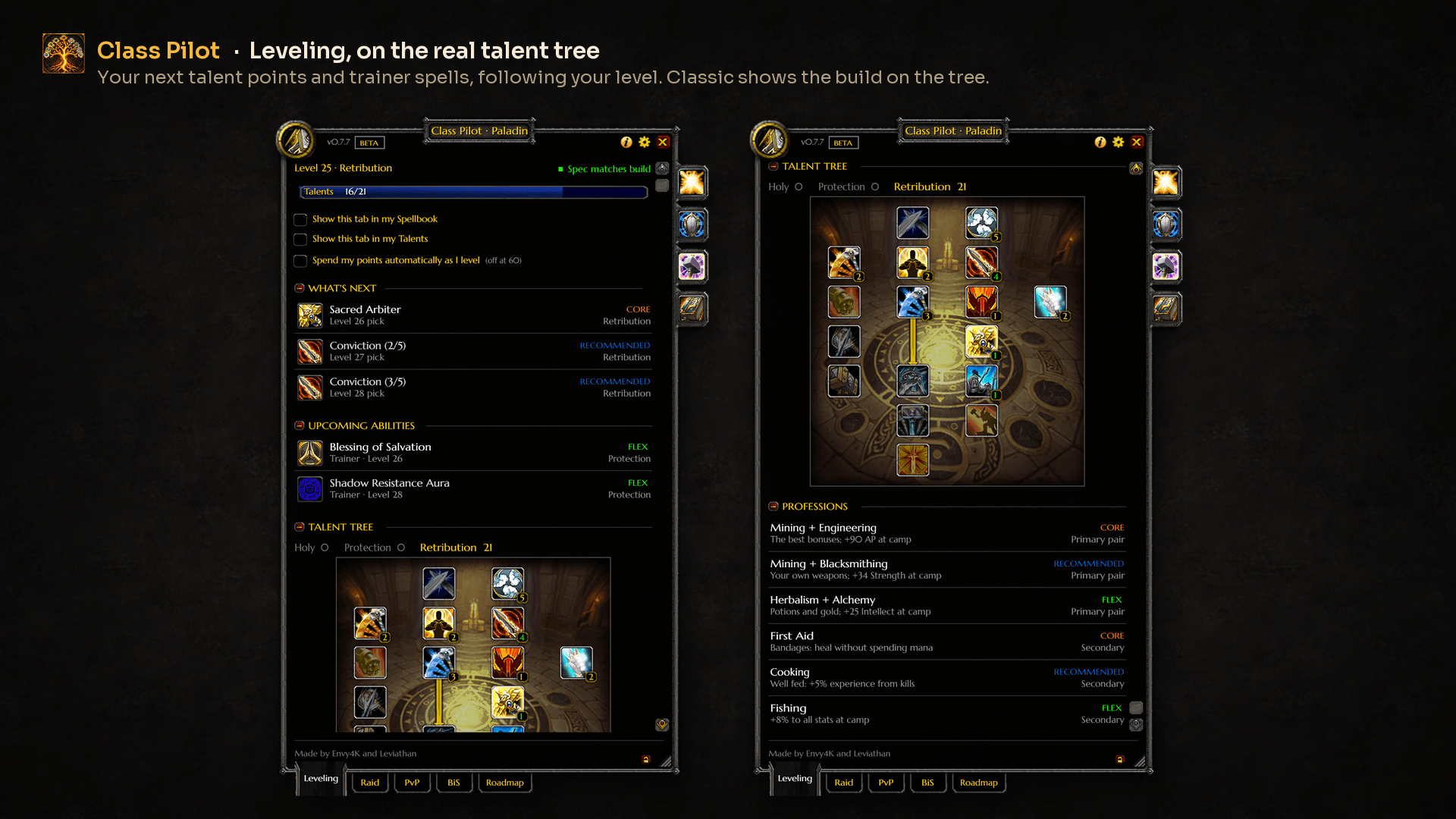
- What to spend each talent point on, following your level live (1-30), and which trainer spells to buy next.
- Auto-spend talent points: tick Spend my points automatically as I level and each new point goes into the build the moment you ding. Points already waiting go in as soon as you tick it.
- It only adds points, never takes them back, and never in combat (it waits until the fight ends).
- If your talents don't match the build, it tells you why in chat and leaves them alone.
- It works with your own imported builds too, and turns itself off at 60. New players can switch it on from the welcome screen; it starts off.
- "Spend now": it reads the points you've actually spent and highlights the ones waiting.
- Professions that suit your class.
- Optional side tab on Blizzard's Spellbook and Talents window, and an optional next-pick tracker (a small HUD card in Modern and Compact).
Raid and PvP
- A build and rotation for each talent tree, with a build picker (one chip per tree) and the consumables to bring.
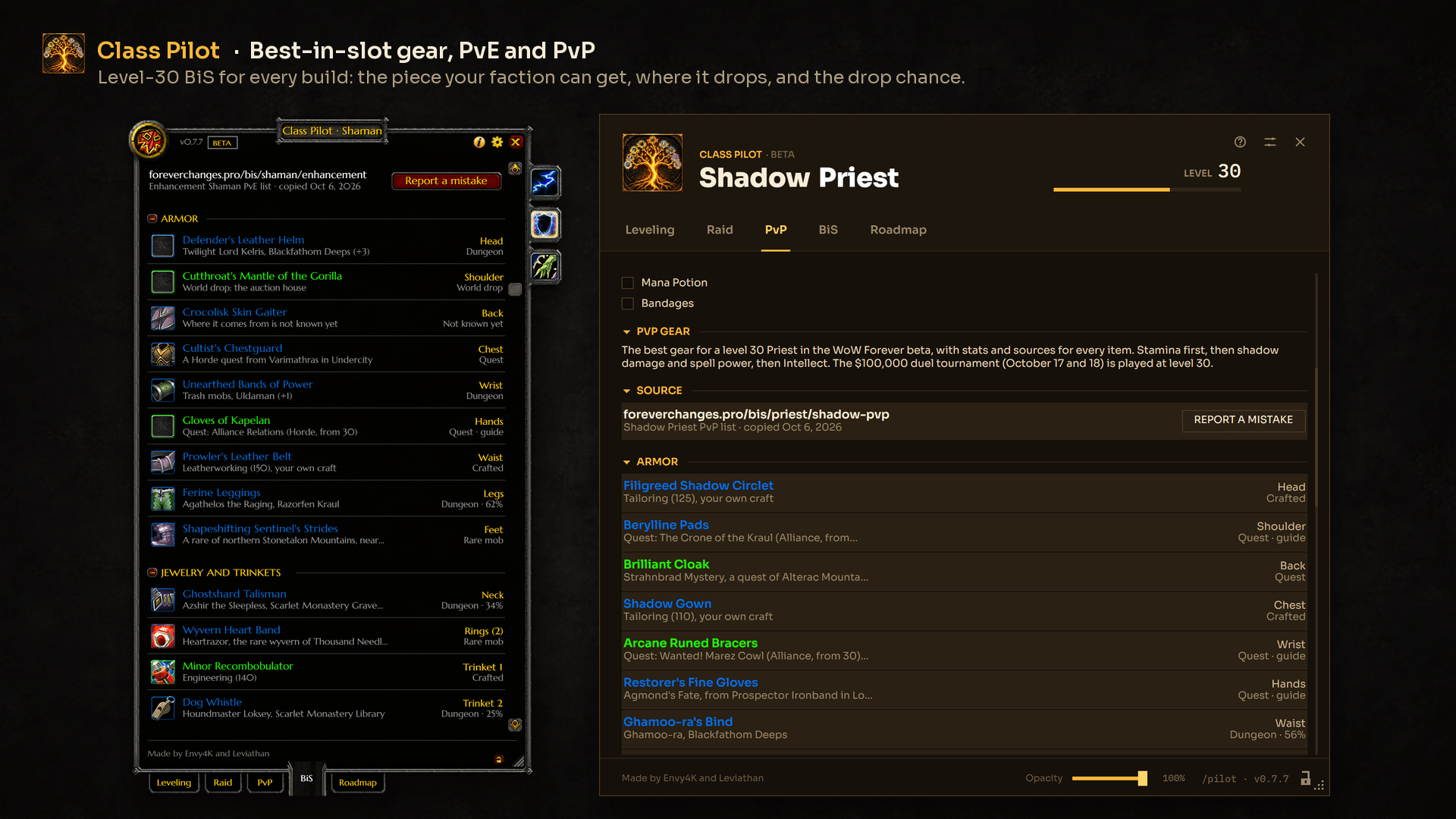
- PvP gear on the PvP tab: each PvP build's best level-30 gear, slot by slot, with where to get it.
- A spec check compares the talent points you've spent with the build you're looking at.
BiS gear
- The best level-30 gear for each build, slot by slot, with where your faction gets it: dungeon boss, quest, profession, vendor, world drop or rare.
- Drop chances on boss drops (Classic's rates; Forever hasn't published its own).
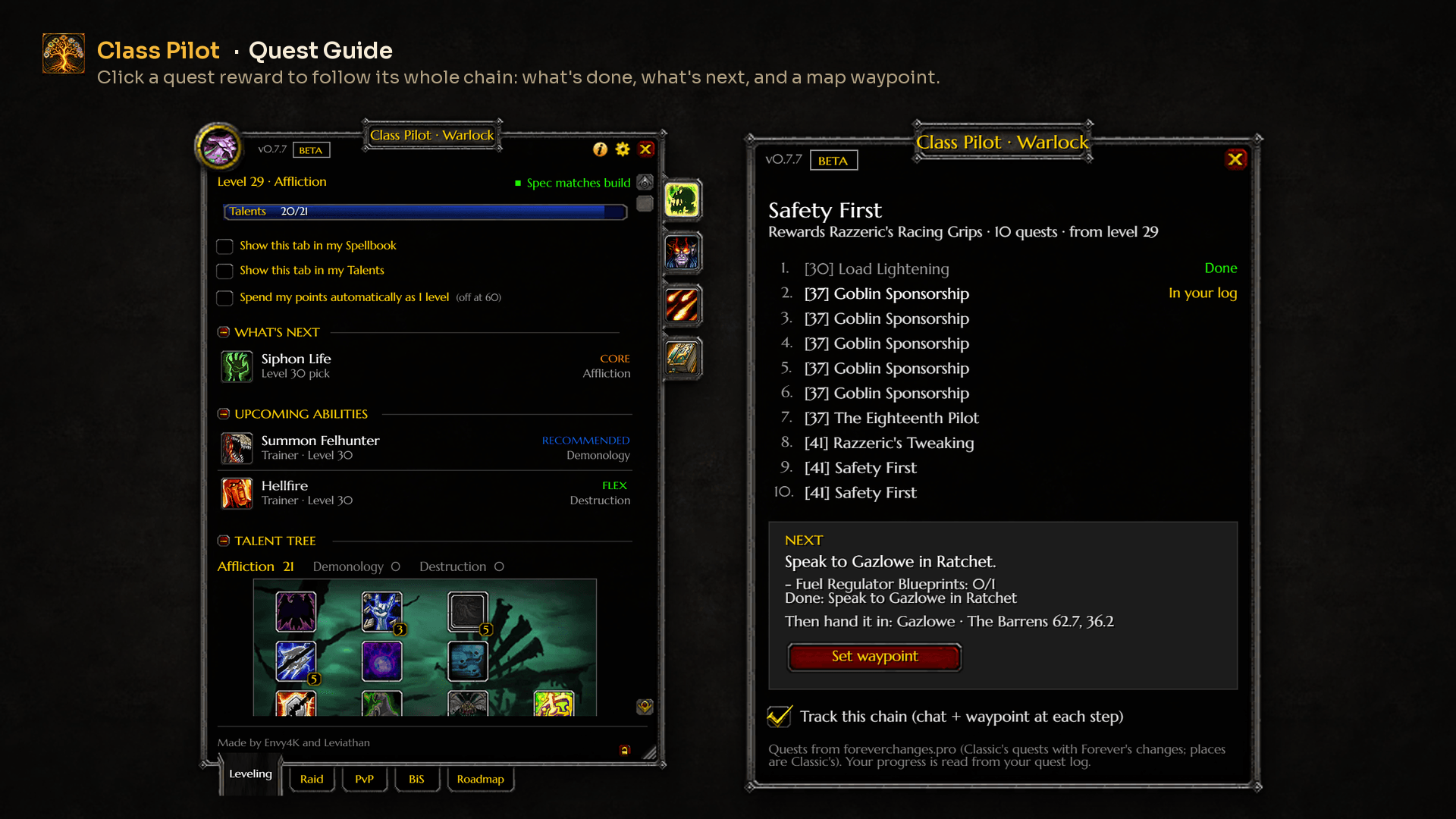
- Quest Guide: click a quest reward to see its whole quest chain, step by step from your own quest log (done, in your log, ready to hand in), with a map waypoint to the next NPC. Track a chain to get a chat line and a new waypoint at every step.
- Hover any piece for the game's item tooltip and every way to get it.
My builds
- Paste a talent calculator link (talentsforever, Icy Veins, wowforeverbuilds, Warcraft Tavern), save it with a name, and the Leveling tab follows your build point by point.
- Builds are remembered by talent name, so they survive talent tree changes. An Update build button saves them on the new trees.
- Export any build back out as a talentsforever link to share.
Class extras
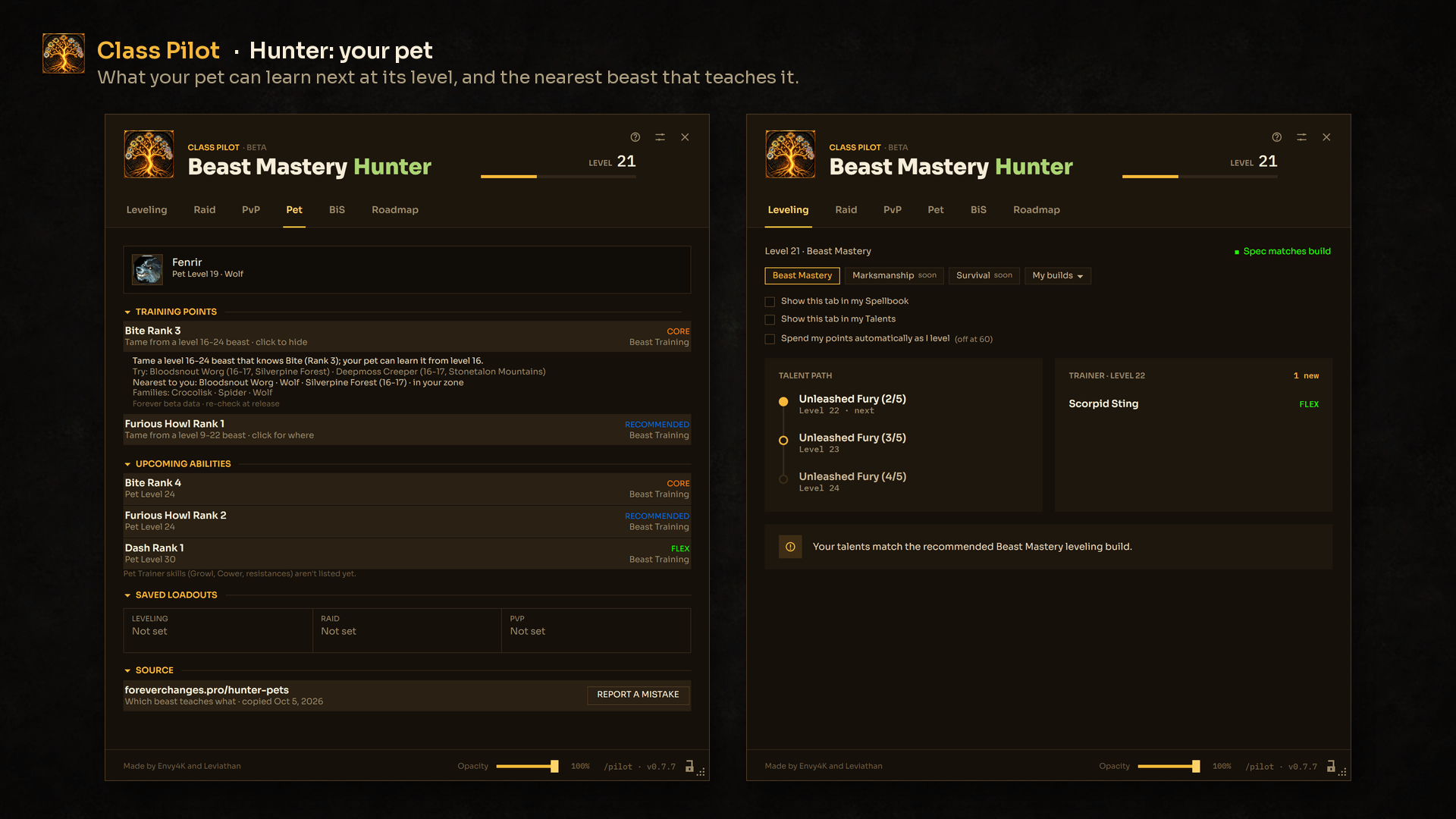
- Hunter: a Pet tab (your pet live, what it can learn next and where to tame each Beast Training rank, with the nearest teacher to you) and the Tame Suggestor: hover a beast to see what it teaches and whether your pet needs it.
- Rogue: a Poisons tab: which poison goes where, every poison to 30 and its reagents.
Three looks
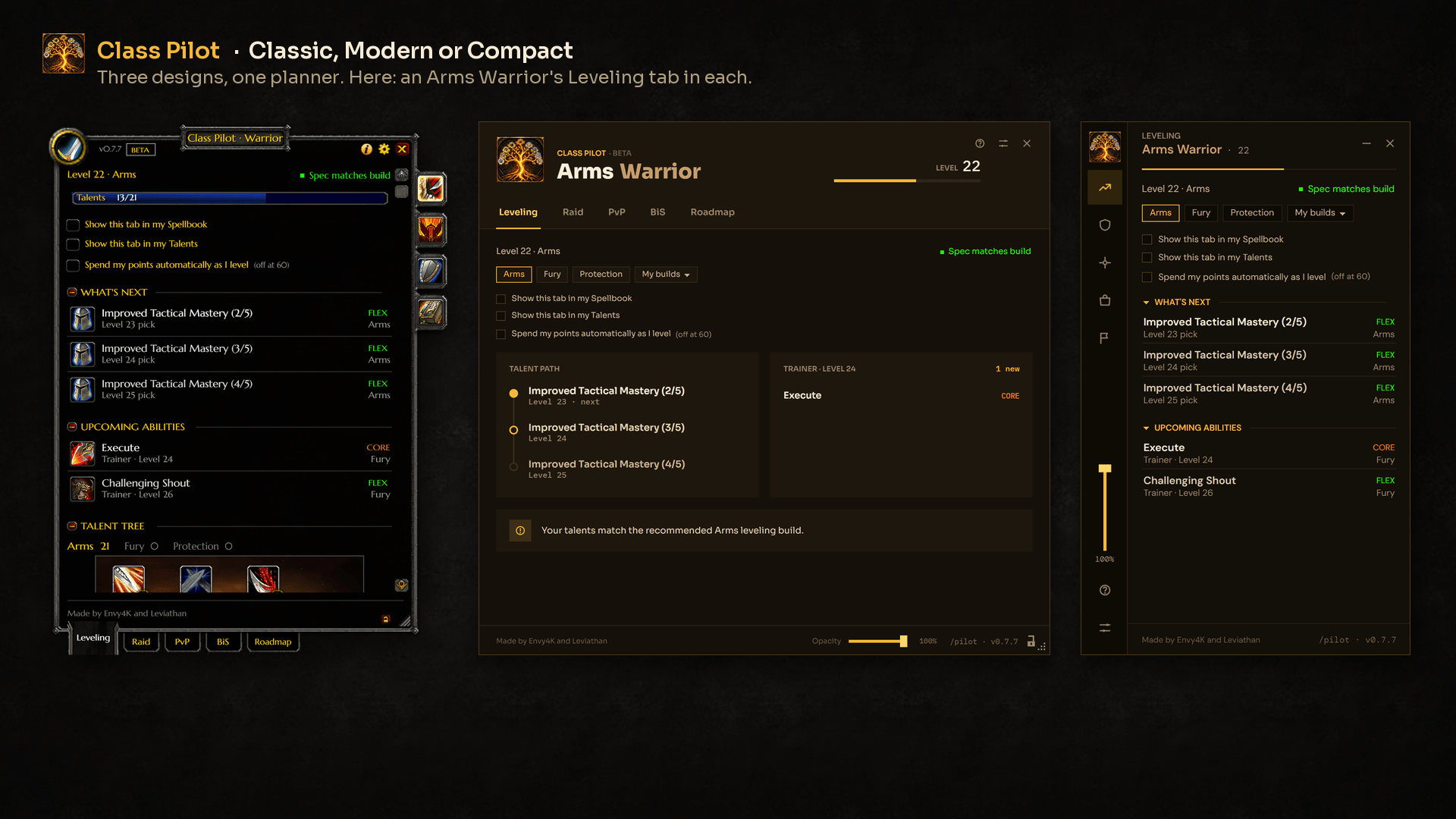
- Modern (default): gold on dark stone. A header with your spec in your class color, your level and an XP bar; on Leveling, your talent path beside what's new at your next trainer visit.
- Compact: a slim side panel with an icon bar for the tabs. Drag it anywhere, or collapse it to a single line showing your next pick.
- Classic: the WoW Classic interface, with the game's own art: stone frames, gold title plate, red buttons, talent icons, your build drawn on its talent tree.
Pick one on first launch and switch any time from Options. In Modern and Compact, an opacity slider on the window lets you see the game through the background (the text stays solid). The window is resizable, every section folds away, and there's a minimap button.
Install
- CurseForge app: install Class Pilot – Forever and it keeps itself up to date.
- By hand: download the zip, delete any old
ClassPilotfolder fromWorld of Warcraft\_classic_beta_\Interface\AddOns\, and unzip this one there. Restart WoW after an update that adds files.
Commands
/pilotopens or closes the planner (/classpilotworks too)./pilot bis,/pilot raidand/pilot pvpopen that tab;/pilot pet(Hunter) and/pilot poisons(Rogue) open the class tab./pilot optionsopens settings and the design picker./pilot welcomeshows the welcome screen again (design and auto-spend)./pilot helplists the commands, the data sources and when they were copied./pilot trackerturns the next-pick tracker on or off./pilot locklocks or unlocks the window size.- Minimap button: left-click opens the planner, right-click opens Options, drag to move it.
Coming next
- Every spec finished at launch: the specs marked "soon" get their Leveling, Raid and PvP builds once WoW Forever's release details are known.
- Builds and auto-spend to 60 when the level cap goes up.
- Missing features, added over time as we learn more about Forever at release. The in-game Roadmap tab keeps the list.
Good to know
- Beta settings bug: the WoW Forever beta client sometimes forgets addon settings after a reload or restart. That's a known Blizzard bug, not Class Pilot's. If your design or window size resets, that's why.
- Spotted a wrong BiS item or pet ability? That data comes from foreverchanges.pro: press Report a mistake on the BiS tab, the Pet tab or in Help. It gives you the page to report it on. Anything else (a build, a button, a typo of ours): leave a comment here.
Credits
Class Pilot is built on other people's work. Thank you to all of them. Class Pilot is not an official addon of any of these sources; their data is collected with permission.
- foreverchanges.pro: BiS lists, drop chances, quest chains, Hunter pet trainers, trainer spells and Forever's class changes.
- talentsforever.com: talent trees, talent and spell text and icons, used under CC BY 4.0.
- Guides from Icy Veins, wowforeverbuilds.com and Warcraft Tavern (and, for the Rogue, Method, foreverwisp.com and wow4evernews.com): builds and rotations.
- Fonts (Modern and Compact): Sora, DM Sans, IBM Plex Mono and DM Mono, under the SIL Open Font License.
In game, the Help window lists every source with the date it was copied.
Made by Envy4K and Leviathan.
Copyright (c) 2026 Envy4K and Leviathan. All rights reserved. World of Warcraft and Blizzard Entertainment are trademarks of Blizzard Entertainment, Inc. Class Pilot is not affiliated with or endorsed by Blizzard.
Class Pilot - Forever Team