CHUD Forever
- By
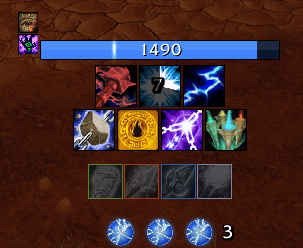
Shaman HUD.png
Description
A lightweight, display-only combat HUD for WoW Forever: cooldowns, procs, buffs and debuffs, totems, power, health, cast bar and swing timer, arranged around your character. It's built to replace ForeverAuras/WeakAuras-style setups without the setup work: every class gets a ready-made layout, and you change it by dragging spells onto bars.
Beta. CHUDForever is in public beta. Things will break; please report them.
Features
- Cooldown bars: your spells and items with clock or left-to-right cooldowns, countdown numbers, a GCD swipe, mana cost, and tints for out of range, not enough mana or unusable.
- Highlights: a glow when the game highlights a proc, a glow while reactive abilities (Overpower, Execute, Riposte…) are usable, and a glow when a cooldown resets early (Stormstrike).
- Your debuffs on the target: on a spell's own button, its debuff's time left, and gray until it's on the target if you like.
- Related spells on one button: the shocks, a hunter's fire and frost traps and stings, a warlock's curses, Fire and Frost Ward, potions. The button shows the one you used last, or the debuff ending first. Heroic Strike and Cleave share one that lights up while one is queued; a paladin's shows the seal that's up.
- Smart buttons: rogue openers only while stealthed, druid abilities only in the right form, Power Word: Shield gray while Weakened Soul is on your target, your warlock pet's main ability, and a mage's filler picked by spec.
- Bars for each job: rotation, cooldowns, utility, taunts, traps and items, set up for every class.
- Aura bars: your buffs while up (with a list of every buff you've had, to hide the ones you don't want), your debuffs on the target, and alerts when a buff is missing (no seal, no armor, Battle Shout, Thorns…).
- Charges as segments, orbs or gems, and shield absorbs as a bar: yours, and a priest's shield on their target.
- Totem bar (shaman): time left, the totem spell's cooldown, a pulse timer for Tremor, Grounding and the cleansing totems, and yards of reach left from where it landed.
- Weapon enchants: imbues and poisons, when missing or running low.
- Power, health and cast bars, a swing timer for main hand, off hand and ranged, and the 5-second rule spark on the mana bar.
- Alerts: a sound, a spoken phrase or a flash when something is applied, removed, ready or used.
- Visibility: show bars always or only in combat; fade or hide them otherwise, or while mounted.
- Profiles: one per character, shared between characters if you like. Import and export whole profiles or single bars.
- Easy to set up: a quick setup for each new character, a gear on every bar to resize it, and a minimap button.
Everything is click-through, so your keybinds stay on your normal (or hidden) action bars.
Built for the WoW Forever client
The client runs on a modern engine where many combat values are hidden from addons: cooldown times, auras, power, sometimes even your own spell IDs. CHUDForever never reads those values. It hands them to the game's own widgets to draw, so everything keeps working in combat. A few things the game hides completely are estimated instead, and the settings say where.
Getting started
Log in and the HUD appears with a layout for your class: rotation spells on top, cooldowns and utility below, items on the right. A new character gets a short quick setup first (size, position, and which extra bars to show).
/chud(or left-click the minimap button) opens the settings: every bar, its buttons and their behaviors, and your profiles./chud edit(or right-click the minimap button) unlocks the HUD. Drag bars to move them, use the gear on a bar's name to resize it, drop spells or items from your spellbook or bags onto a bar, drag buttons to reorder them, and click a button or right-click a bar for its options. Escape or Done locks it again.
Spells you haven't learned stay hidden and appear once you learn them, so one profile works for any mix of talents.
Commands
| Command | What it does |
|---|---|
/chud |
Open the settings |
/chud edit |
Move bars and add spells (/chud lock, /chud unlock) |
/chud reset |
Reset this character's profile to the defaults (asks first) |
/chud report |
Everything a bug report needs, ready to copy |
/chud version |
Which version you have |
/chud debug |
Troubleshooting commands (what each part of the HUD sees from the game) |
Reporting bugs
- Type
/chud report, press Ctrl+C to copy what it shows. - Open a bug report and paste it in. It has your version, settings and what the HUD sees from the game, and nothing is sent anywhere by the addon.
- If you got a Lua error, include it. BugSack with BugGrabber catches errors with the details needed to fix them.
Ideas and feature requests are welcome in the issues too.
Credits
- Sounds: see Media/Sounds/CREDITS.txt (Creative Commons).
- Spoken alerts were recorded with the Windows text-to-speech voices.
- Johnny Rivers
License
CHUD Forever Team